Sends per reach: the Instagram number tied to reaching people who don't follow you
Instagram's head named sends as one of the three signals that matter most, and slightly more so for reaching non-followers. What Instagram has said, what its Shares count includes, and how to calculate and compare sends per reach.
10 min read



On this page
Sends per reach is the share of people who saw your Instagram post and then sent it to someone. Instagram's head, Adam Mosseri, named sends as one of the three signals that matter most for ranking in January 2025, and said they count slightly more when Instagram decides whether to show a post to people who do not follow you yet.
Instagram Insights does not show sends per reach as a ready-made number. You work it out from two figures it does show: shares and viewers. This guide covers what Instagram has said about sends, what its Shares count includes, how to calculate the rate, and how to compare it across your posts, as of October 24, 2026.
The short answer
- Sends per reach = shares divided by the number of unique accounts that saw the post (Viewers in the Instagram app, reach in Meta's API).
- Mosseri named watch time, likes, and sends as the three most important ranking signals. Sends are "slightly more important" for reaching non-followers, and likes for reaching followers.
- Instagram has not published a target value, and it has not published how much more a send weighs than a like.
- Instagram labels the number Shares, not Sends, and its public definitions do not say whether story shares are counted with DM sends. Treat your result as a close stand-in, not an exact copy of Instagram's internal signal.
- Compare posts against your own median, by format, after a few days. One post with 12 shares tells you little; 30 posts tell you which topics people pass on.
What Instagram has said about sends
The clearest statement is the opening post of Mosseri's ranking video series, reported by Social Media Today on January 22, 2025. He divided reach into connected reach (people who follow you) and unconnected reach (people who do not), and wrote:
For both, the top three signals that matter most for ranking are watch time, likes and sends. So when looking at your insights, pay close attention to average watch time, likes per reach, and sends per reach.
He followed it with the nuance that gives this metric its reputation: likes are "slightly more important for connected content, and sends are slightly more important for unconnected content."
Instagram's longer explanation, "Instagram Ranking Explained" (May 31, 2023), shows where sharing sits in each part of the app. Sharing is one of the five actions Instagram predicts most closely in Feed. In Explore, the most important predicted actions are likes, saves, and shares. In Reels, the first prediction on the list is how likely you are to reshare a reel. Explore and Reels mostly show accounts people do not follow, which fits Mosseri's point that sends matter more for reaching new people.
What none of these sources says: how many sends a post needs, how much a send outweighs a like, or that sends matter more than watch time. Claims like "a send is worth five likes" are not from Instagram.
Send, share, or repost: what the number counts
Mosseri says "sends". Instagram's own screens say "Shares". Meta's help page "About Instagram insights" lists shares among the actions counted in Interactions, next to likes, comments, and saves. Meta's developer reference for media insights (updated September 11, 2026) describes the shares metric only as the "number of shares", available for feed posts, reels, and stories, and lists reposts as a separate metric.
So the Shares number you see is not mixed up with reposts, but the public definitions we read do not split it into DM sends and other kinds of sharing, such as adding a post to your story. Until Instagram publishes that split, sends per reach calculated from Shares is the closest number you can get, and the useful part is comparing it from post to post, which works the same either way.
How to calculate sends per reach
The formula is short:
Sends per reach = Shares / Viewers x 100
To find the two numbers in the app, open the post or reel, tap View insights, and note Shares and Viewers. Meta's help page defines Viewers as the number of unique accounts that saw your content on screen at least once, which is the "reach" in Mosseri's wording. Do not use Views: it counts repeat plays and displays, so it makes the rate look smaller than it is for posts people watch more than once.
Here is a made-up example for a bakery, to show the arithmetic:
| Post | Format | Viewers | Shares | Sends per reach |
|---|---|---|---|---|
| Weekend opening hours | Photo | 1,800 | 9 | 0.5% |
| How we laminate croissant dough | Reel | 6,400 | 192 | 3.0% |
| Five breads that freeze well, with reheating times | Carousel | 2,500 | 110 | 4.4% |
| New staff member introduction | Photo | 1,200 | 6 | 0.5% |
The reel reached the most people, but the carousel had the highest rate. The hours post and the staff post were useful to followers and gave few people a reason to forward them. That pattern, practical reference content being sent more often than announcements, is the kind of thing the rate surfaces and a plain share count hides.
A few rules keep the comparison fair:
- Wait before you judge. Meta's developer reference says the data behind insights can be delayed up to 48 hours. Compare posts at a similar age, such as seven days after posting.
- Compare like with like. Reels, carousels, and single photos reach different audiences. Rank reels against reels first.
- Mind small numbers. Meta labels reach for reels as estimated. Below a few hundred viewers, one or two shares swing the percentage a lot.
- Use your median as the baseline. Instagram has not published a good or bad value, so the useful benchmark is your own typical post.
Where to find the numbers in Instagram
Insights are available for public accounts, personal or professional, according to Meta's help page. There are two places to look:
- On a single post or reel: tap View insights under it. Tap the (i) icon on any insight screen to read Instagram's definition of each metric.
- Across your account: the insights overview in the app shows Views, Interactions, New followers, and Content you shared, for a period within the past 90 days. From Content you shared you can open the content library and filter your posts by type, reach, and interactions.
Instagram's help page on reel insights says reel insights are available for reels posted on or after May 14, 2021, and stay viewable for up to two years after the reel was published.
What tends to get sent
Instagram does not publish a list of content that earns sends, so the following are our suggestions, built on the idea behind the metric: a send means someone thought of a specific person while looking at your post.
- Reference posts. Price lists, size guides, opening hours for a holiday week, care instructions. People forward these to the person they are planning with.
- Answers to a question people argue about. "Which flour for which bread" or "do you need a permit for this" gets sent to settle a conversation.
- Things that are useful to someone else. A post about gifts for a new parent is sent to the person shopping for one, not by them.
- Posts with a clear "this is you" moment. A relatable situation from your trade, told specifically, is sent to the coworker or friend it describes.
- Something visual worth showing. A process clip, a before and after, or a finished piece that is hard to describe in words.
The caption can help by saying who the post is for, for example "For anyone opening their first cafe." Asking outright for sends is a judgment call: a plain line such as "send this to whoever orders the cake" fits a post where it is true, and reads as bait on a post where it is not.
What not to do
Sends from real people are the point. Instagram's Recommendations Guidelines, on its help page "Recommendations on Instagram", list content and behavior it avoids recommending to non-followers. Two items are relevant to anyone trying to push numbers up:
- "Coordinated comment networks intended to artificially drive engagement and distribution" make content ineligible for recommendations.
- Accounts that have "repeatedly engaged in misleading practices to build followings, such as purchasing 'likes'" are not recommended.
Engagement groups that swap shares, and services that sell them, fall into the same territory. They also fill your numbers with sends from people who were never your audience, which makes the rate useless for deciding what to post next.
Track sends per reach in eksis
eksis collects reach and shares for each Instagram post through Meta's API, which saves you opening every post's insights one by one.
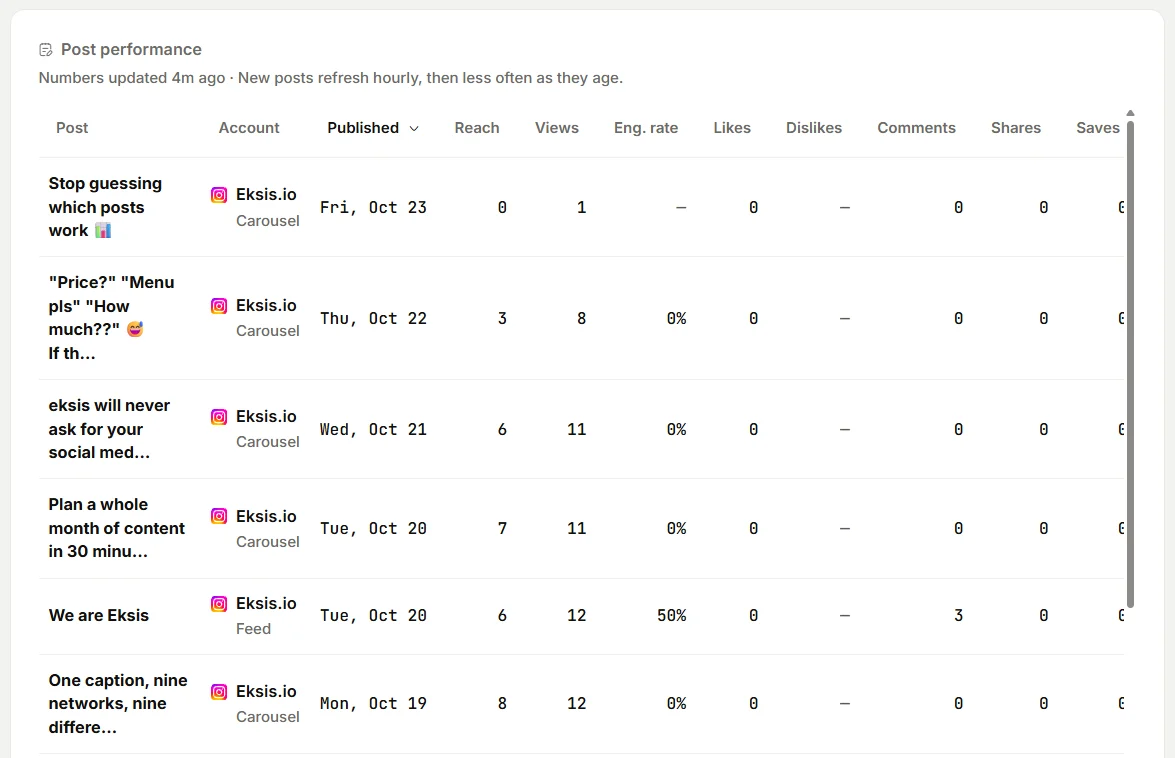
- Open Analytics and pick a period of 30 or 90 days. To see Instagram alone, select Insights under your Instagram account in the sidebar.
- Choose Export, then Posts. The CSV has one row per post with columns for reach, likes, comments, saves, and shares, plus the publish time in your workspace time zone. Excel workbook puts the same table in a sheet next to the summary, channel, follower, and hour tables. The post list holds the 200 most recent posts of the period.
- In your spreadsheet, add a column that divides shares by reach and multiply by 100. Sort by it, and filter by type to compare reels with reels.
- On screen, Post performance also shows engagement rate for each post. In eksis that rate counts likes, comments, saves, and shares together, divided by reach, so it is broader than sends per reach.
Reach in eksis comes from Meta's API, where it means unique accounts, so it matches Viewers in the app in meaning, though small differences are normal for an estimated metric. Numbers usually arrive within an hour of publishing, refresh often while a post is new, and stop updating 30 days after it went out. Posts you published from the Instagram app are included too.
Analytics is part of every paid plan, starting with Starter; the Free plan has no Analytics. See plans and the Instagram integration. For the wider ranking picture, read how the Instagram algorithm ranks posts, and for the other numbers worth a regular look, the social media metrics worth tracking.
Sources
- Adam Mosseri on Instagram: ranking series, first video (January 2025)
- Social Media Today: Instagram Shares Algorithm Insights To Inform Strategy (January 22, 2025)
- About Instagram: Instagram Ranking Explained, by Adam Mosseri (May 31, 2023)
- Meta Business Help Center: About Instagram insights (undated help page)
- Instagram Help Center: View insights on your Instagram reels (undated help page)
- Meta for Developers: Instagram Media Insights (updated September 11, 2026)
- Instagram Help Center: Recommendations on Instagram (undated help page)
All were read on October 24, 2026.
Frequently Asked Questions
What is sends per reach on Instagram?
It is the number of times people sent your post to someone, divided by the number of unique accounts that saw it. Adam Mosseri told creators in January 2025 to watch it alongside average watch time and likes per reach. Instagram Insights does not calculate it for you; divide Shares by Viewers.
Are shares and sends the same thing on Instagram?
Close, but Instagram has not said they are identical. Mosseri talks about sends, Insights shows Shares, and Meta's public definitions do not say whether sharing a post to a story is counted with DM sends. Reposts are counted separately.
What is a good sends per reach?
Instagram has not published one. Use the median of your own recent posts as the baseline and look for posts well above it, comparing reels with reels and carousels with carousels.
Why do sends matter more for non-followers?
Mosseri said sends are slightly more important for unconnected reach, meaning people who do not follow you. Instagram has not explained the reason or the size of the difference. It has said that in Explore and Reels, which mostly show accounts people do not follow, sharing is one of the main actions it predicts.
Can eksis show sends per reach?
Not as a ready-made column. On paid plans, Analytics collects reach and shares for every Instagram post, and Export, then Posts, gives you both in one file so you can divide them in a spreadsheet.