How to build an AEO workflow that turns AI answer gaps into LinkedIn posts
Answer engines like ChatGPT and Perplexity cite LinkedIn more than almost any other site. Here is a weekly loop for finding the questions where they leave your brand out and turning them into LinkedIn post briefs, by hand or with an AI assistant.
8 min read




On this page
Ask ChatGPT, Perplexity, or Google's AI Overviews which tool, supplier, or approach to use, and the answer names a handful of brands and cites a handful of pages. Answer engine optimization, or AEO, is the work of becoming one of them for the questions your customers actually ask.
Most small teams have no system for this yet. This guide sets one up as a weekly loop: find the questions where AI answers leave your brand out, check what you can credibly say about each one, and turn the best gaps into LinkedIn post briefs on your idea board, ready for whoever writes. You can run all of it by hand, or let an AI assistant do the legwork through the eksis MCP server.
Why LinkedIn is the place to start
AI answers draw heavily on LinkedIn, and two studies published in March 2026 show how much.
Semrush analyzed 325,000 prompts in ChatGPT Search, Google AI Mode, and Perplexity during January and February 2026, and the 89,000 LinkedIn URLs those answers cited. LinkedIn was the second most cited domain, appearing in 11% of AI responses on average: 14.3% on ChatGPT Search, 13.5% on Google AI Mode, and 5.3% on Perplexity.
Profound looked at professional queries between November 15, 2025 and February 15, 2026 and found LinkedIn was the most cited domain across all six AI search platforms it tracked: Gemini, Google AI Overviews, Google AI Mode, ChatGPT, Microsoft Copilot, and Perplexity.
LinkedIn posts are also cheap to make compared with articles. In the Semrush data, mid-length feed posts of 50 to 299 words took the largest share of citations among posts, so a small team can start without a content budget.
What gets a LinkedIn post cited
Two studies looked at which posts AI engines pick. Scrunch measured how post features change the odds of a ChatGPT citation, and Semrush looked at what the cited posts had in common.
| What the post does | Effect on citations | Source |
|---|---|---|
| Includes specific technical details | 77% more likely to be cited by ChatGPT | Scrunch |
| Names companies, people, or products in plain text | 33% more likely to be cited | Scrunch |
| Uses Unicode bold or italic letters | 58% less likely to be cited, though 12% more likely to get reactions | Scrunch |
| Puts the link in the comments | 31% less likely to be cited, though 11% more likely to get reactions | Scrunch |
| Is an original post rather than a reshare | About 95% of cited posts were original | Semrush |
| Shares knowledge or practical advice | Well over half of cited LinkedIn content | Semrush |
Two findings cut against common LinkedIn habits. Unicode styling and links in the first comment both earn a few more reactions and fewer citations, so a post meant to answer a question should stay in plain text with its link in the body. The bold and italic buttons in the eksis composer produce exactly those Unicode letters, so leave them off these posts.
Popularity matters less than you might expect. Semrush found that most cited posts had modest engagement, 15 to 25 reactions, and that about 75% of cited authors posted at least five times in four weeks. Posting useful things regularly looks closer to what gets cited than chasing one viral post.
The workflow, step by step
The loop runs once a week and takes five steps. The first three are research. The last two turn that research into posts.
1. Collect the questions your buyers ask
Write down 10 to 20 questions your customers ask before they buy, in their words: "Which accounting software works for a three-person agency?", "How do I schedule posts to Instagram and LinkedIn at once?" Sales calls, support tickets, and comment threads are the best sources.
Run each question in ChatGPT, Perplexity, and Google's AI Overviews, and note two things for every answer:
- Is your brand mentioned, named in the answer itself?
- Is your content cited, linked as a source?
A mention is usually worth more, because it puts your name in front of the person asking. A spreadsheet with one row per question and one column per engine is enough. If you want this done daily without manual checks, AI visibility tools such as Peec AI, Profound, and Scrunch run tracked prompts on a schedule. Check that a tool covers your language and market before paying for it.
2. Score the gaps
Every question where your brand is missing is a gap, but not every gap is worth a post. Score each one with four questions:
- Are we missing from the answer on most engines?
- Do people ask this often?
- Do we have real material to back up an answer?
- Is a competitor already named for it?
Keep the three to five gaps that score best. A short list you can actually write beats a long one that sits untouched.
3. Gather what you can credibly say
AI engines reward technical detail and named entities, and neither can be invented. Collect what your company already knows in one place: product pages, help articles, older posts that did well, webinar transcripts, case notes. A folder of documents is enough.
For each gap you kept, find the material that supports an answer. If there is none, drop the gap. A post with nothing specific in it will not be cited, and it will not convince the person reading it either.
4. Turn each gap into a brief on your idea board
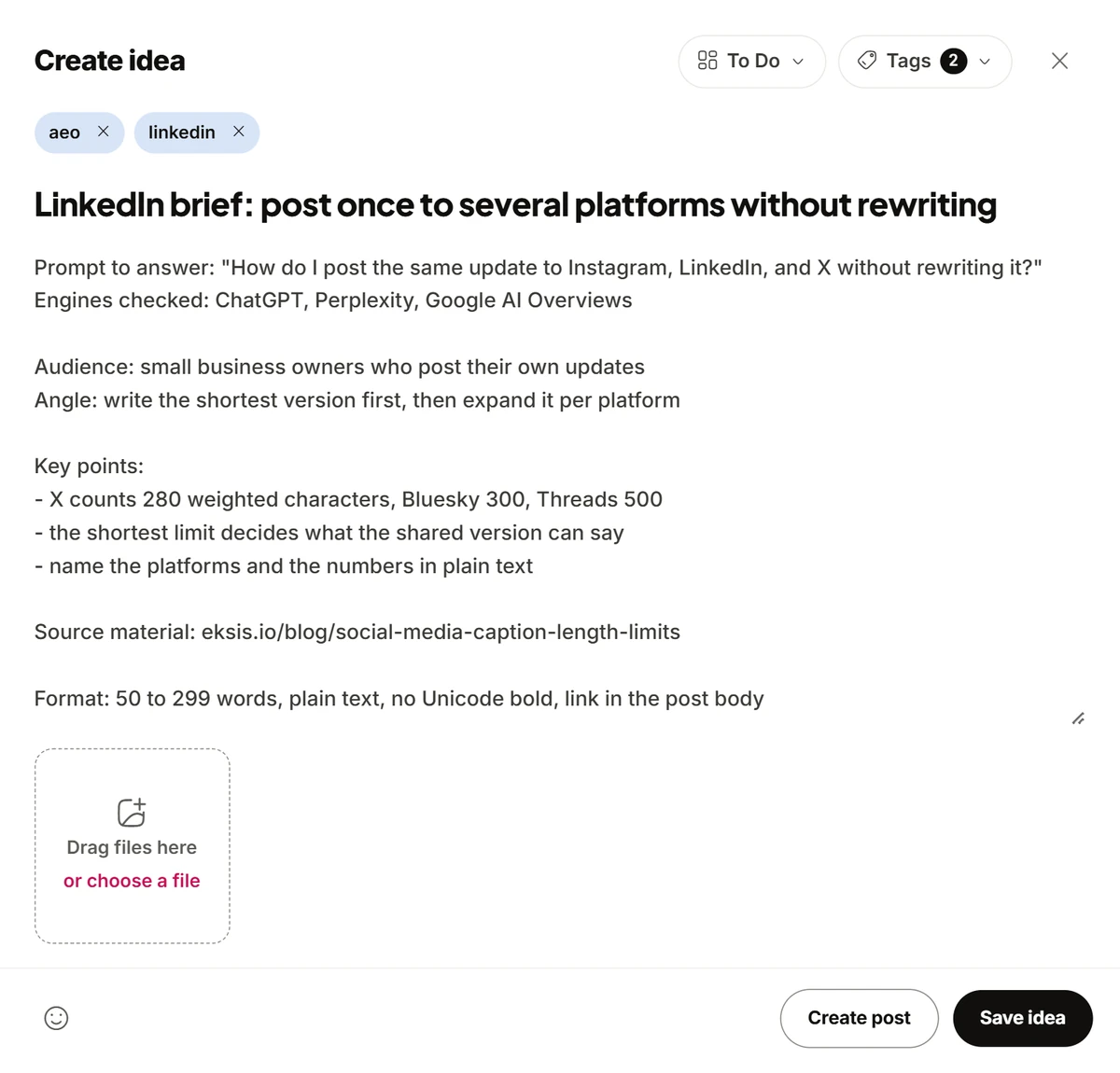
A brief is the handoff between research and writing. It should be complete enough that the writer never needs to open your spreadsheet:
Prompt to answer: the exact question, in the customer's words
Engines checked: which engines left you out
Audience: who is asking
Angle: the one point the post makes
Key points: specifics, numbers, and names to include
Source material: links or excerpts the writer can quote
Format: 50 to 299 words, plain text, no Unicode bold, link in the post body
In eksis, briefs live on the idea board under Create Idea. Give them their own column, such as "AEO briefs", and tag them so they are easy to filter.
You can type briefs in by hand. You can also connect an AI assistant to eksis and let it write them. The eksis MCP server works with Claude, ChatGPT, Cursor, and other MCP clients, at https://api.eksis.io/mcp. Apps that sign in with OAuth work on every plan, including Free. Once connected, the assistant can list your idea columns and save ideas with the list_idea_columns and create_idea tools. Saving an idea never posts or schedules anything.
With your spreadsheet and notes in front of the assistant, a weekly prompt can look like this:
Here are this week's prompts and whether each engine named us: [paste the table].

For every prompt where we were not named, look for supporting material in the
notes I shared. Drop prompts with no support. Rank the rest by how often the
question is asked and how strong our material is.

For the top three, call list_idea_columns, then create_idea in the "AEO briefs"
column with the tags aeo and linkedin. Use this format for the notes:
[paste the brief template]. Do not create or schedule any posts.
Read the briefs before anyone writes from them. The assistant can only use the material you gave it, and a weak source makes a weak brief.
5. Write, schedule, and check again
Open a brief and choose Create post to start a post from it in the composer, then schedule it to your LinkedIn profile. When a post goes out, move its idea to Done so next week's run does not suggest the same gap again.
Close the loop one to two weeks later. Run the same prompt in the same engines and record whether your brand is now named. LinkedIn only shares post statistics with apps approved for its Community Management API, so eksis cannot show them yet. Read reactions and impressions in LinkedIn's own analytics.
What to expect
AI answers change from day to day, and the same question can get a different answer an hour later. Track each prompt over several weeks rather than reading one result as a verdict.
Be careful with credit, too. A brand can start appearing in an answer for reasons that have nothing to do with a new post: a review site updates, a competitor's page goes stale, the engine changes how it picks sources. Treat a new mention as a good sign, not proof that one post caused it.
If you are still building a posting rhythm to feed this loop, start with how to plan a week of posts in one sitting, and see how to use AI for social media posts without sounding like a bot before you let an assistant draft the posts themselves.
Sources
- Semrush: We analyzed 89K LinkedIn URLs cited in AI search (March 10, 2026)
- Profound: LinkedIn is the most-cited domain for professional queries in AI search (March 9, 2026)
- Scrunch: LinkedIn posts that robots can't resist (2026)
- eksis MCP server and MCP tools
Frequently Asked Questions
What is AEO?
Answer engine optimization is the work of getting your brand named, or your content cited, when people ask AI tools such as ChatGPT, Perplexity, and Google's AI Overviews questions you can answer. It focuses on the answer itself rather than on a ranked list of links.
How is AEO different from SEO?
SEO aims for a high position in a list of search results that people click through. AEO aims to be part of the answer an AI engine writes, which the person may read without clicking anything. The two overlap: clear, specific, original content helps both.
What is the difference between a mention and a citation?
A mention is when the AI answer names your brand in its text. A citation is when it links to your page or post as a source. You can get one without the other, so track them separately.
Do I need a paid AI visibility tool?
No. Running your questions in each engine by hand and recording the results in a spreadsheet is enough to start. A tool saves time once you track more prompts than you can check each week.
Can eksis read my LinkedIn post statistics?
Not yet. LinkedIn only reports post statistics to apps approved for its Community Management API. eksis can publish to your LinkedIn profile, and you read the numbers in LinkedIn's own analytics.