The best time to post on Facebook in 2026, according to three studies
Buffer says weekday mornings, Sprout Social says noon to 8 p.m., and Hootsuite says 5 a.m. Here is what three large studies of Facebook posting times found, why they disagree, and how to find the hours that work for your own Page.
8 min read




On this page
Ask when to post on Facebook and you get confident answers that do not match. Buffer's study puts the best slot on Thursday at 9 a.m. Sprout Social's puts it between noon and 8 p.m. on Tuesdays and Wednesdays. Hootsuite's puts it on Tuesday at 5 a.m.
All three studies are large, all three report times in each account's local time, and all three come from companies that sell scheduling software, as eksis does. So instead of adding a fourth chart, this article puts the three side by side as they read on October 21, 2026, shows where they agree and why they differ, and ends with a way to find the hours that work for your own Page.
The short answer
If you need a schedule today, start here:
- Post on weekdays, Tuesday to Thursday first. Buffer's top days are Wednesday, Thursday, and Tuesday, and Sprout Social ranks Monday to Thursday highest.
- Test one morning slot between 8 and 10 a.m. and one midday slot between noon and 2 p.m. Buffer's best hours fall in the first window, and Sprout Social's start in the second.
- Give the weekend less weight. Buffer and Sprout Social both rank it last.
- After a few weeks, keep whichever slot your own posts do better in.
What each study found
| Buffer | Sprout Social | Hootsuite | |
|---|---|---|---|
| Sample | More than 14 million Facebook posts sent through Buffer | Nearly 2 billion engagements on about 307,000 profiles across six networks | More than 1 million social posts |
| Data period | Not stated | November 27, 2025 to February 27, 2026 | Not stated, labelled 2025 data |
| Best single time | Thursday, 9 a.m. | Tuesday and Wednesday, noon to 8 p.m. | Tuesday, 5 a.m. |
| Best days | Wednesday, then Thursday and Tuesday | Monday to Thursday | Not stated |
| Weakest | Saturday, and afternoons from noon to 5 p.m. | Weekends, with Sunday lowest | Late night, after 10 p.m. |
Each study also names a best time for every day of the week. The highlighted cells mark each study's single best time of the week.
| Day | Buffer | Sprout Social | Hootsuite |
|---|---|---|---|
| Monday | 9 p.m. | Noon to 1 p.m. | 5 p.m. |
| Tuesday | 8 a.m. | Noon to 8 p.m. | 5 a.m. |
| Wednesday | 8 a.m. | Noon to 8 p.m. | 6 a.m. |
| Thursday | 9 a.m. | Noon to 2 p.m., and 8 p.m. | 6 a.m. |
| Friday | 8 a.m. | Midday | 6 a.m. |
| Saturday | 10 p.m. | No clear peak | 6 a.m. |
| Sunday | 10 a.m. | Low all day | 8 a.m. |
Read across any row and the answers are hours apart. On Tuesday, Hootsuite's best hour comes before Buffer's, and Sprout Social's window opens at noon, inside the stretch Buffer reports as its weakest of the day.
Where the studies agree
The overlap is smaller than the headlines suggest, but it is there.
- Weekdays beat weekends. Buffer names Saturday the worst day to post. Sprout Social finds no peak on Saturday and its lowest engagement on Sunday.
- Midweek holds the top slot. Buffer's best time falls on a Thursday, Sprout Social's on Tuesday and Wednesday, and Hootsuite's on a Tuesday.
- The times are local. Each study converts posting times to the account's own time zone (Hootsuite localized data from 118 countries), so 9 a.m. means 9 a.m. where your followers are. If most of them live in another time zone, schedule for theirs.
Why the answers differ
They study different accounts
Each study looks at its own customers. Buffer describes its sample as businesses, creators, and influencers posting through Buffer. Sprout Social drew on more than 30,000 of its customers, and Hootsuite on businesses of all sizes. The followers of those accounts keep different hours, and a study can only report the hours its own sample keeps.
They measure different things
Buffer's charts rank hours by the median engagement of a post. Sprout Social describes its analysis as nearly 2 billion engagements, and its best windows as the times with the most active users scrolling. A count of engagements rises whenever more people are online. A median asks how a typical post did at that hour. The two questions can point to different hours without either study being wrong.
They cover different months
Sprout Social's data runs from late November to late February, a stretch that includes the end-of-year holidays. Buffer and Hootsuite do not give a data period in their articles. Online habits can change around holidays and school terms, so a winter sample may not describe your July.
Industry moves the answer
Sprout Social's own breakdown shows how wide the spread gets. For software and technology brands it lists weekday mornings, roughly 7 to 11 a.m. For food and beverage brands it lists late morning into the afternoon, roughly 10 a.m. to 3 p.m. A bakery's followers and a software company's followers are not on Facebook at the same moments.
Find your own best time to post on Facebook
The studies give you somewhere to start. Your own posts tell you where to stay. A simple test:
- Pick two or three candidate slots from the tables above, for example 9 a.m., 12:30 p.m., and 8 p.m.
- Post in each slot for three to four weeks. Spread your formats evenly, so one slot does not get all the videos and look better for that reason alone.
- Compare engagement per post, not totals, and check how many posts each number rests on. One post that takes off can make a slot look better than it is.
- Keep the best slot, swap the weakest for a new candidate, and run the test again next quarter.
Facebook gives you a free clue to start from. When you schedule a post in Meta Business Suite, the Active times option suggests hours when your audience is most active. That tells you when people are around, not when your posts did well, so use it to choose which slots to test.
Find and schedule your best hours in eksis
eksis does the sorting from that test for you and keeps the schedule, so the hours you find turn into posts that go out on time. It takes two screens.
1. Read your best hours
Click your Facebook Page in the sidebar and open Insights. The Best hours to post chart groups your posts by the hour they went out, in your workspace's time zone, and ranks those hours by average engagement, which for Facebook means likes, comments, and shares.
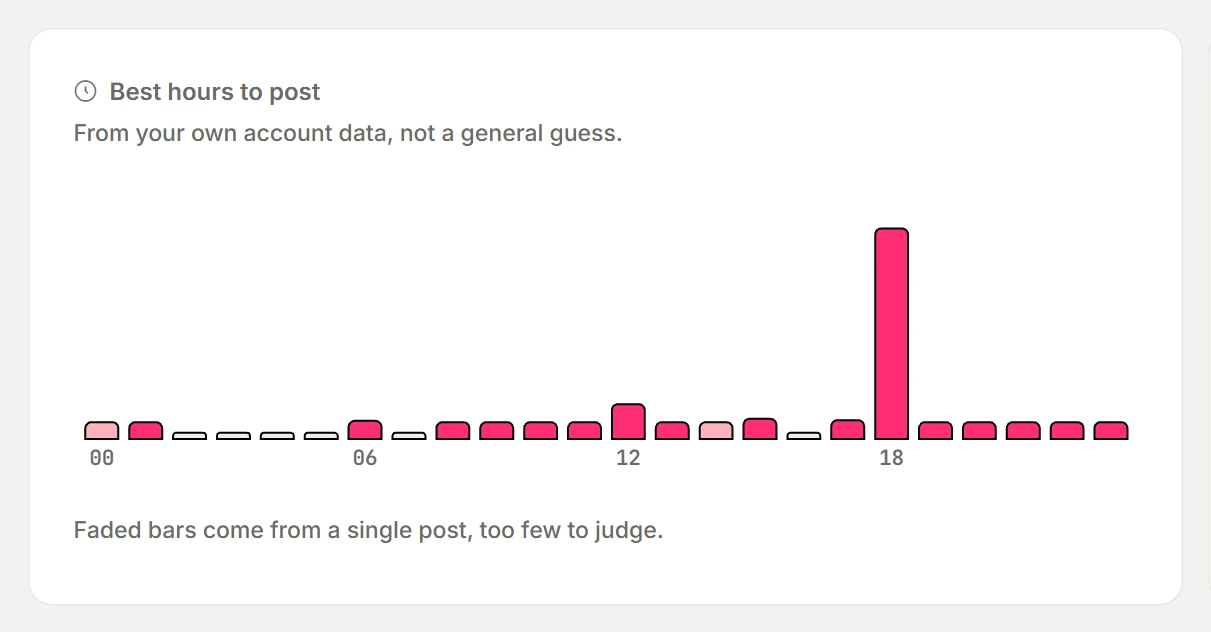
An hour needs at least two posts with numbers before it can rank ahead of the others, and an hour that rests on a single post is drawn faded. The chart also reads posts you published on Facebook directly, not only those sent through eksis, going back up to 180 days and 100 posts. A Page with a posting history has something to show from the day you connect it.
2. Schedule posts for those hours
Create a post, choose your Facebook Page, and click Edit next to Publish time. Pick the day and the hour your chart points to. The preview beside it shows how the post will look on Facebook.
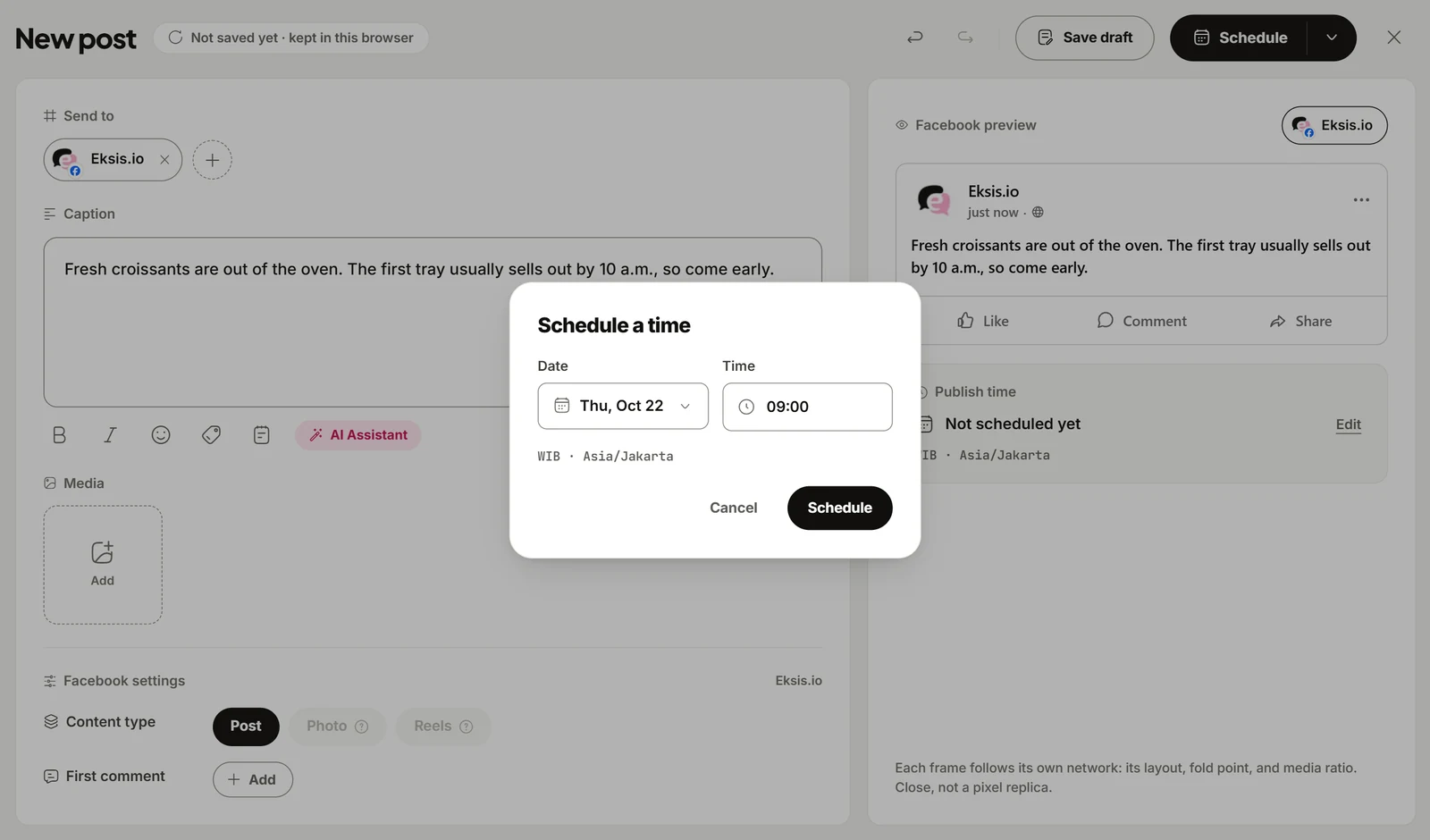
Publish times follow the workspace time zone, shown under the date and time, so check that it matches where most of your followers live.
Best hours to post is part of eksis Analytics, which is included from the Starter plan. Compare plans to see what each one includes.
Timing is one part of the post
A good slot puts a post in front of people. What they do next depends on the post.
- Put the point near the start. Facebook shows about the first 480 characters before it cuts a post off, as our caption length guide explains.
- Answer the first comments while the post is fresh. Keeping every platform's comments in one queue makes that easier.
- Skip engagement bait. Meta lists engagement bait among the types of content it demotes, so a post that begs for likes or shares can end up reaching fewer people.
If you are still building a posting rhythm to test, start with how to plan a week of posts in one sitting.
Sources
- Buffer: Best time to post on Facebook
- Sprout Social: Best times to post on Facebook in 2026
- Hootsuite: The best time to post on Facebook
All three were read on October 21, 2026. The companies update these studies, so check the source before you quote a number.
Frequently Asked Questions
What is the best time to post on Facebook?
No single time works for every Page. In three large public studies, Buffer names Thursday at 9 a.m., Sprout Social names Tuesday and Wednesday between noon and 8 p.m., and Hootsuite names Tuesday at 5 a.m. A weekday morning or midday slot is a reasonable first test, followed by a look at your own results.
What is the best day to post on Facebook?
Midweek. Buffer ranks Wednesday first, then Thursday and Tuesday. Sprout Social ranks Monday to Thursday highest. Both rank the weekend last.
What is the worst time to post on Facebook?
The studies disagree here too. Buffer reports its weakest results on Saturdays and on afternoons between noon and 5 p.m. Sprout Social reports Sunday as the weakest day. Hootsuite advises against posting after 10 p.m.
Should I post in my time zone or my audience's?
Your audience's. All three studies report local times, so a recommended 9 a.m. means 9 a.m. for the people you want to reach. In eksis, publish times follow the workspace time zone, so set it to where most of your followers live.
How long should I test a posting time?
Long enough that each slot has several posts behind it. If you post a few times a week, plan on three to four weeks per round. eksis needs at least two posts in an hour before it ranks that hour ahead of the others, and more posts make the comparison steadier.