AI images for small business posts in 2026: what is safe to use commercially, and when to label them
What the US Copyright Office says about owning AI images, what OpenAI, Adobe Firefly, Midjourney, and Canva allow in their own terms, and when Meta, YouTube, TikTok, and Pinterest want AI content labeled, checked in October 2026.
10 min read



On this page
You can use AI-generated images in your business posts, as long as the tool's own terms allow it, the image does not copy someone else's work, brand, or face, and you label it where the platform asks. What you usually cannot do is claim copyright over an image you only prompted. The US Copyright Office says prompts alone do not make you the author.
This guide covers three separate questions that often get mixed up: who owns the image, what each tool's terms let you do with it, and when Instagram, Facebook, YouTube, TikTok, and Pinterest want it labeled. Everything below comes from the Copyright Office, each tool's own terms or FAQ, and each platform's own help pages, read on October 24, 2026. It is a plain-language summary, not legal advice, so ask a lawyer for anything that matters to your business.
The short answer
- Ownership and copyright are different things. OpenAI, Midjourney, and Canva all say you own your outputs as far as the law allows, but the US Copyright Office says purely prompted output is not protected by copyright. Others may be free to reuse it.
- Commercial use is allowed by all four tools covered here, with conditions. Midjourney requires a Pro or Mega plan for companies with more than $1,000,000 a year in revenue, Adobe treats some beta features differently, and Canva excludes edits of its own library content.
- OpenAI, Adobe, and Midjourney forbid using their tools to infringe other people's rights, and Canva makes you responsible for your output. A logo, a character, or a real person in the picture is your risk, not the tool's.
- Several tools forbid passing AI output off as human-made, or removing the provenance data they attach.
- Platforms label AI content in different ways. YouTube and TikTok require disclosure of realistic AI content. Meta and Pinterest add labels when they detect AI signals in the file, and both also label content the poster discloses.
Who owns an AI image: the US Copyright Office
In Part 2 of its report on copyright and artificial intelligence, the US Copyright Office concluded that AI outputs can be protected by copyright only where a human author has determined sufficient expressive elements. That can include a human-made work that is still perceptible in the output, or creative arrangement or modification of the output by a person, "but not the mere provision of prompts." The Office also says that using AI to assist, or including AI material inside a larger human-made work, does not prevent copyright in the human parts. It reviewed more than 10,000 public comments before reaching these conclusions.
What that means for a small business:
- A product photo you took, edited with an AI tool, keeps your copyright in what you made.
- A poster you designed with an AI-generated background can be protected for your design, but not for the background on its own.
- An image you got from a prompt and posted as is may have no copyright at all. A competitor who copies it may be doing nothing unlawful under copyright, so do not build your brand identity on it.
This is the US position. Other countries decide for themselves, and Adobe's own FAQ says whether you have a copyright interest in Firefly output "depends on the laws of your local jurisdiction."
What each tool's terms allow
| Tool | Terms we read | Who owns the output | Commercial use | Conditions worth knowing |
|---|---|---|---|---|
| OpenAI (ChatGPT image generation) | Terms of Use, effective January 1, 2026 | You own the output, and OpenAI assigns you its rights in it | The terms set no separate commercial-use limit | Output may not be unique. You may not present output as human-generated or use it to infringe anyone's rights |
| Adobe Firefly | Firefly business FAQ and Generative AI User Guidelines (updated May 15, 2026) | Adobe points to local law | Yes for features without a beta label; beta features too unless the product says otherwise | No illegal or infringing use, and no use to train AI models. Do not remove Content Credentials. Contractual IP indemnity only for qualifying enterprise entitlements |
| Midjourney | Terms of Service, effective May 27, 2026 | You own your assets to the fullest extent the law allows | Yes, with the plan rule | Companies with more than $1,000,000 a year in revenue, and their employees, need a Pro or Mega plan to own their assets. Midjourney keeps a broad license to your prompts and images, which are public and remixable by default unless you use Stealth on Pro or Mega. Do not mislead people about the images' nature or source |
| Canva AI products | AI Product Terms, effective June 26, 2026 | You own your output, except output that modifies Canva library content, which stays under that content's license | Any lawful purpose, at your own risk | Output may not be unique. Do not present output as human-generated or remove provenance metadata such as C2PA |
Two practical points come out of that table. First, read the terms of the plan you are actually on, since rights can depend on the plan or on whether a feature is in beta. Second, check whether your account is personal or business, and whether separate business terms apply: OpenAI says its Business Terms cover ChatGPT Enterprise and its API, and its separate terms for the European Economic Area, Switzerland, and the UK apply to users there.
What can still go wrong
None of these tools promises the image is safe to use for every purpose. OpenAI and Midjourney disclaim warranties of non-infringement, and Canva says any use of output is at your own risk. The usual problems are not about the tool's license:
- Look-alikes. An image that closely resembles a well-known character, artwork, or product design can infringe even if a tool made it.
- Logos and trademarks. A recognizable brand in the background, on a cup or a shirt, belongs to someone else.
- Real people. A realistic image of a real person, especially one shown saying or doing something, raises consent and publicity issues, and it is exactly what platform labeling rules target.
- Misleading product images. If the picture shows a dish, a room, or a product result you do not actually deliver, customers will notice when they visit.
- Duplicates. Because OpenAI and Canva both say outputs may not be unique, another business could post something very similar.
When platforms want AI images labeled
| Platform | What it asks of you | What it does on its own |
|---|---|---|
| Facebook and Instagram (Meta) | Self-disclosure is one of the two triggers for its label | Adds an "AI info" label when it detects industry-shared signals or you self-disclose. Since September 2024, content only edited with AI shows the label in the post's menu instead |
| YouTube | Disclose realistic AI content: a real person appearing to say or do something they did not, altered footage of a real event or place, a realistic scene that did not happen, or AI music that is the focus. Use "AI use" under Attributes in YouTube Studio | May label automatically for content made with YouTube's AI tools, content with C2PA metadata, or content its systems detect. Repeated non-disclosure can lead to penalties, including removal or suspension from the YouTube Partner Program |
| TikTok | Label AI-generated content with realistic images, audio, or video, using TikTok's label, a sticker, or the caption, under its synthetic media policy | Announced testing of an automatic "AI-generated" label for content it detects was made or edited with AI |
| You can indicate that a Pin was generated or modified with AI | Adds an "AI modified" label when its systems detect AI from IPTC metadata or its own classifiers. You can appeal a label through support |
YouTube notes that disclosure alone will not limit a video's audience or its eligibility to earn money. For stylized or clearly unrealistic images, such as a cartoon mascot or an abstract background, YouTube says disclosure is not required, and Meta's approach centers on realistic content.
A checklist before you post an AI image
- Check the plan. Confirm your tool and plan allow commercial use, and that no beta or library-content exception applies.
- Look for borrowed elements. Scan for logos, text, characters, artwork that closely copies a specific artist's work, and real faces.
- Add your own work where you want protection. A photo you took, your layout, your hand-lettered type: those are the parts copyright can cover.
- Keep the provenance data. Adobe and Canva forbid removing Content Credentials or C2PA metadata, and YouTube and Pinterest read that data to label content.
- Decide on the label per platform. Realistic image of a person or event: label it. Clearly illustrated graphic: the platform rules above may not require it, but a short note does no harm.
- Keep a record. Save the prompt, the tool, the plan, and the date for images you use in ads or on packaging.
Do this in eksis
eksis schedules the image you upload; it does not decide whether an image needs a label. The network tabs in the composer have no AI-content setting at the time of writing, so plan disclosures this way:
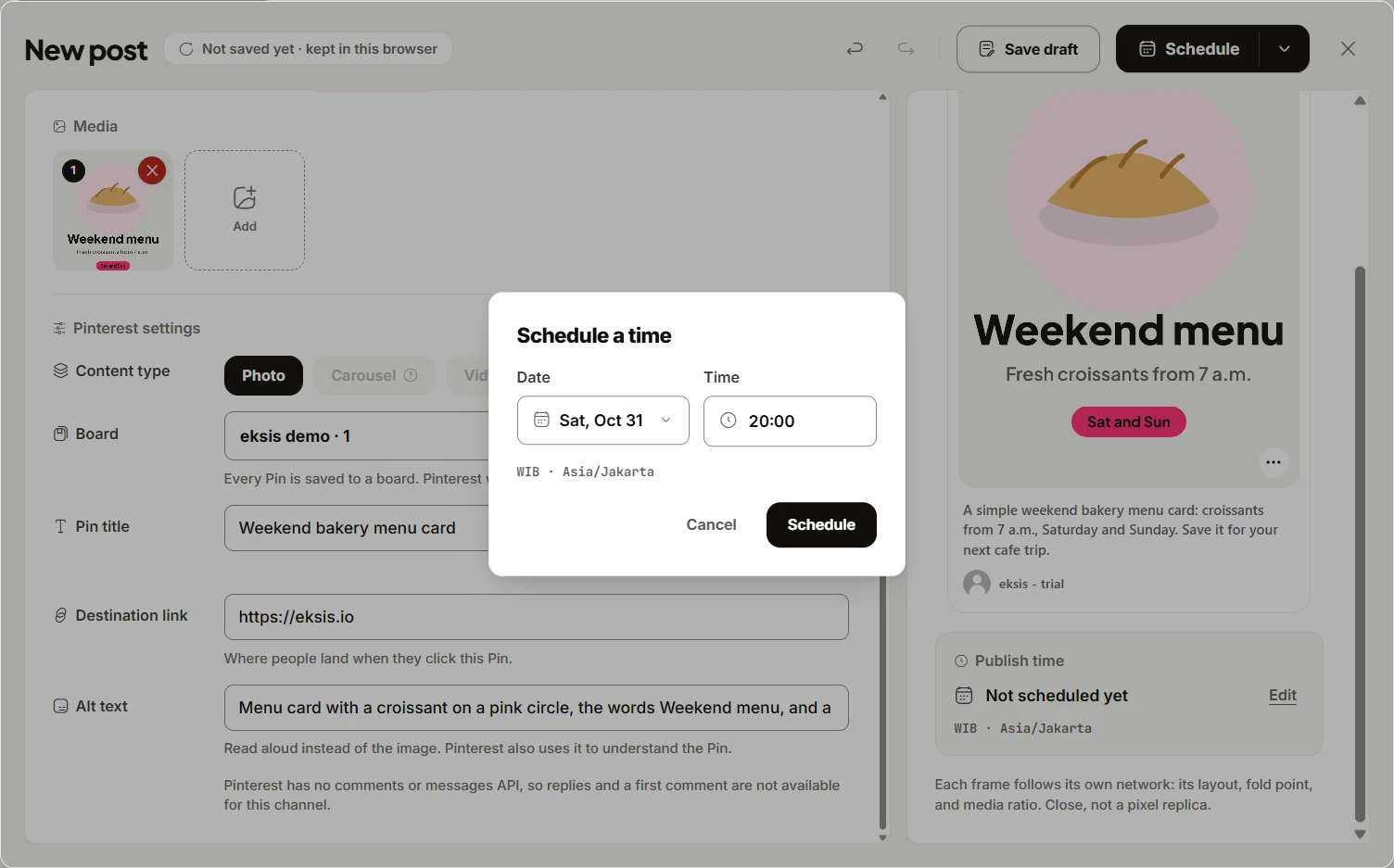
- Click Create post, add the image, and pick your channels.
- Put a plain disclosure in the caption where it is needed, such as "Image created with AI". Each channel has its own tab, so you can add it on YouTube, TikTok, and Instagram and leave it off where the image is clearly an illustration.
- On Pinterest, fill in the alt text on the Pinterest tab so the Pin describes what the picture shows.
- For a YouTube video that needs the platform's own "AI use" setting, upload it in YouTube Studio, where that setting lives under Attributes.
- If someone else on your team makes the images, give them the Contributor role under Settings > Members. Their posts wait in Awaiting approval, so an Editor can check the image and the label before it goes out. Approvals start on Starter.
For writing the caption itself, see how to use AI for social media posts without sounding like a bot, and for image dimensions, social media image sizes. Plans are on eksis pricing.
Sources
- US Copyright Office: NewsNet 1060, Part 2 of the report on copyright and AI
- OpenAI: Terms of Use
- Adobe: Firefly approach for business, FAQ
- Adobe: Generative AI User Guidelines
- Midjourney: Terms of Service
- Canva: AI Product Terms
- Meta: Our approach to labeling AI-generated content and manipulated media
- YouTube Help: Disclosing use of GenAI content
- TikTok Newsroom: New labels for disclosing AI-generated content
- Pinterest Help: Gen AI labels
All were read on October 24, 2026.
Frequently Asked Questions
Can I use AI-generated images for my business commercially?
Generally yes, if the tool's terms allow it. OpenAI, Midjourney, and Canva say you own your outputs, and Adobe allows commercial use of Firefly outputs from non-beta features. Midjourney requires a Pro or Mega plan for companies with more than $1,000,000 in yearly revenue. You remain responsible for not infringing anyone's rights.
Can I copyright an image I made with AI?
In the US, not if you only wrote the prompt. The Copyright Office says protection requires a human author to have determined sufficient expressive elements, such as your own work visible in the output or your creative arrangement or modification of it.
Do I have to label AI images on Instagram?
Meta adds an "AI info" label when it detects industry-shared AI signals in the file or when you self-disclose. Content only edited with AI shows that label in the post menu. Labeling realistic images of people or events is the safest default.
Does YouTube require me to disclose AI content?
Yes, for realistic AI content: a real person appearing to say or do something they did not, altered footage of a real event or place, a realistic scene that did not happen, or AI music as the focus. Use the "AI use" setting under Attributes in YouTube Studio. Clearly unrealistic content and minor edits do not need disclosure.
Can eksis add the AI label for me?
Not at the time of writing. The composer's network tabs have no AI-content setting, so add a disclosure in the caption, or use the platform's own app where a specific label setting matters, such as "AI use" in YouTube Studio.