The best time to post on YouTube in 2026, Shorts and long videos compared
Buffer says long videos do best on Sunday at 10 a.m. and Shorts on Friday at 4 p.m., while SocialPilot points weekday long videos to the afternoon. Here is what the two YouTube studies found, where they agree, and how to test your own channel.
11 min read




On this page
Ask when to post on YouTube and the answer now depends on what you upload. Buffer's analysis of 1.8 million videos found that long videos did best on Sunday at 10 a.m., while Shorts did best on Friday at 4 p.m. SocialPilot's study of 301,000 videos agrees that the two formats need separate schedules, but it puts weekday long videos in the afternoon, not the morning.
Only two of the large timing studies cover YouTube. Sprout Social's 2026 data covers six networks and YouTube is not one of them, and Hootsuite's YouTube page returned a not-found error when we checked on October 24, 2026. So this article puts the two studies side by side, adds what YouTube itself tells you in YouTube Studio, and ends with a way to test your own channel.
The short answer
- Schedule Shorts and long videos separately. Both studies say the two formats peak at different times.
- For Shorts, start with a Thursday, Friday, or Saturday evening. Both studies rank those days highest, and Buffer's top three Shorts slots are Friday at 4, 6, and 7 p.m.
- For long videos, start with a weekend morning, such as Sunday between 8 and 10 a.m. Buffer and SocialPilot both point there for weekends.
- On weekdays the studies split: Buffer favors mornings from 8 to 11 a.m., SocialPilot favors uploading between 2 and 5 p.m. Test one slot of each.
- Open YouTube Studio, go to Analytics, then Audience, and check When your viewers are on YouTube before you settle on anything.
What each study found
| Buffer | SocialPilot | |
|---|---|---|
| Sample | 1.8 million videos shared on YouTube, long videos and Shorts | 301,000 videos from more than 27,000 channels, published with SocialPilot |
| Data period | Not stated | Not stated, article dated May 1, 2026 |
| What it ranks | Median engagement of videos posted in each hour | Engagement rate per view |
| Best long-video time | Sunday, 10 a.m. | Weekdays, 2 to 4 p.m. upload |
| Best long-video days | Sunday, then Tuesday and Monday | Wednesday, Thursday, Friday, plus Sunday for morning content |
| Best Shorts time | Friday, 4 p.m., then 6 p.m. and 7 p.m. | 12 to 2 p.m. or 6 to 7 p.m. upload |
| Best Shorts days | Friday, then Saturday and Thursday | Friday, Saturday, Thursday |
| Weakest | Long videos: weekday early afternoons, Wednesday and Thursday. Shorts: noon to 5 p.m., Tuesday and Monday | Long videos: before 9 a.m. and after 10 p.m. Shorts: 3 to 7 a.m. and Sunday evenings |
Here is the long-video picture day by day. Buffer gives three times per day and the table shows its first. SocialPilot gives an upload window.
| Day | Buffer, long videos | SocialPilot, long videos |
|---|---|---|
| Monday | 9 a.m. | 2 to 4 p.m. |
| Tuesday | 9 a.m. | 2 to 4 p.m. |
| Wednesday | 7 a.m. | 3 to 5 p.m. |
| Thursday | 5 p.m. | 3 to 5 p.m. |
| Friday | 12 p.m. | 1 to 3 p.m. |
| Saturday | 12 p.m. | 8 to 10 a.m. |
| Sunday | 10 a.m. | 8 to 10 a.m. |
And the same for Shorts:
| Day | Buffer, Shorts | SocialPilot, Shorts |
|---|---|---|
| Monday | 8 p.m. | 7 a.m. or 12 p.m. |
| Tuesday | 8 p.m. | 7 to 11 a.m. or 5 to 7 p.m. |
| Wednesday | 7 p.m. | 12 p.m. or 3 to 6 p.m. |
| Thursday | 7 p.m. | 7 to 11 p.m. |
| Friday | 4 p.m. | 7 to 9 a.m. or 11 a.m. to 1 p.m. |
| Saturday | 7 p.m. | 9 to 10 a.m. or 3 to 6 p.m. |
| Sunday | 7 p.m. | 10 to 11 a.m. or 3 to 5 p.m. |
Both studies say their times are local to the audience. Buffer states that its recommended times apply in your own time zone, and SocialPilot says all its times reflect the target audience's local time.
Where the studies agree
- Two formats, two schedules. Buffer split long videos and Shorts for the first time in this analysis because the patterns were so different. SocialPilot calls opposite peak times for the two formats its most important 2026 finding.
- Shorts belong late in the week. Both rank Friday, Saturday, and Thursday as the strongest Shorts days, in that order.
- Weekend mornings work for long videos. Buffer's best slot of the week is Sunday at 10 a.m. and its Saturday picks include 10 a.m. and noon. SocialPilot's weekend upload window for long videos is 8 to 10 a.m. on both days.
- Upload a little early. Buffer's takeaways suggest publishing a long video one to two hours before your audience's peak, so YouTube has time to process it. SocialPilot suggests two to three hours.
- Your own data beats theirs. Both send readers to the When your viewers are on YouTube report in YouTube Studio.
Why the answers differ
They rank different things
Buffer ranks each hour by the median engagement of videos posted then. SocialPilot ranks by engagement rate per view, which it says makes the results fit a 500-subscriber channel as well as a 500,000-subscriber one. A slot can rank high on one measure and middling on the other.
Upload time is not viewing time
SocialPilot's tables have separate columns for when to upload and when viewers peak, and it recommends uploading two to three hours before the peak. Its Friday Shorts row is a good example: upload between 7 and 9 a.m. or 11 a.m. and 1 p.m., for a viewing peak between 4 and 6 p.m. Buffer's times are the hours videos went out. Read the column header before you copy a number.
One page disagrees with itself
SocialPilot's headline puts long videos at 2 to 4 p.m. on weekdays, yet its format comparison table says mornings dominate for long videos, with Sunday at 10 a.m. as the single best slot, and names Friday from 4 to 7 p.m. as the strongest Shorts window. Those last two figures are Buffer's results. Treat any single number from that page as a starting point.
Habits shift
Buffer says its previous YouTube dataset pointed to weekday afternoons from 3 to 5 p.m., with Wednesday through Friday strongest and weekends weakest. This time the pattern reversed. Neither study states its data period, so you cannot tell how recent each one is.
The samples are customers of each tool
Both studies use videos published through their own scheduling tool. A study can only describe the channels that use it.
What YouTube itself shows you
YouTube does not publish a best time to post. It gives each channel two reports that help.
In YouTube Studio, select Analytics in the left menu, then Audience at the top. YouTube's help page lists these reports there, among others:
- When your viewers are on YouTube. It shows when your viewers were online across YouTube in the last 28 days. YouTube suggests using it to build your community, schedule a Premiere, or plan a live stream.
- Formats your viewers watch on YouTube. It shows whether your viewers watched videos, Shorts, or live streams in the last 28 days, which tells you how much weight to give each schedule.
Note what the first report measures: when your viewers use YouTube, not when your own videos did well. Use it to choose candidate slots, then test them. YouTube also says an updated Studio has been rolling out gradually since July 2026, so your Analytics page may look different from older screenshots.
Find your own best time to post on YouTube
- Check When your viewers are on YouTube and Formats your viewers watch. If most of your audience watches Shorts, put your testing effort there first.
- Pick two candidate slots per format. For long videos, one weekend morning (Sunday at 9 a.m.) and one weekday afternoon (Wednesday at 3 p.m.). For Shorts, one evening late in the week (Friday at 6 p.m.) and one earlier slot from SocialPilot's list.
- Run at least six to eight uploads per format before you decide. SocialPilot suggests that range, and with fewer videos one strong topic can decide the result on its own.
- Compare videos at the same age, for example their views and likes after seven days, and look at engagement per view rather than totals.
- Keep the better slot for each format, replace the weaker one, and repeat next quarter. Your viewing heatmap covers only 28 days, so check it again before each round.
Find and schedule your YouTube hours in eksis
Read your best hours
Click your YouTube channel in the sidebar and open Insights. The Best hours to post chart groups your posts by the hour they went out, in your workspace time zone, and ranks those hours by average engagement. For YouTube that means likes plus comments. eksis reads views, likes, and comments from YouTube, and it does not count views as engagement.
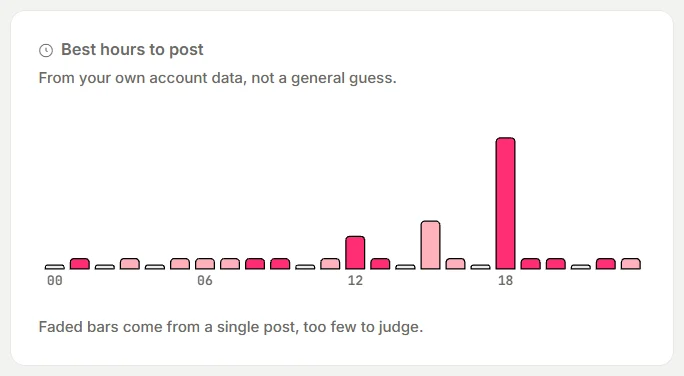
An hour needs at least two posts with numbers before it can rank ahead of the others, and an hour resting on a single post is drawn faded. Choose 90 days at the top while you test.
Two limits matter for this test:
- The chart is by hour of day only. It does not split by day of the week, so log the weekday yourself.
- It does not separate Shorts from long videos. Videos you uploaded in YouTube Studio count too, starting with up to 100 posts from the last 180 days, but eksis lists those as Video even when YouTube shows them as Shorts. Only uploads you schedule in eksis as a Short carry the Short label.
To compare the formats, use the Post performance table on the same page. The type appears under each account name, and you can sort by Reach (views, for YouTube) or Eng. rate. Export, then Posts, downloads the same list as a CSV with a Type column, so a spreadsheet can average each format by hour. eksis stops updating a video's numbers 30 days after it goes out. It does not show YouTube's When your viewers are on YouTube report, so check that in YouTube Studio.
Schedule a video for that hour
- Click Create post and pick your YouTube channel.
- Add the video. On the channel's tab, set Content type to Video or Short. A Short can be up to 3 minutes and no wider than it is tall, and eksis adds #Shorts to the description.
- Fill in the Title, which YouTube requires, answer Made for kids, and choose the privacy. For a public video you can turn on Notify subscribers when it goes live, and you can add a Thumbnail.
- Click Edit next to Publish time, pick the day and hour, and click Schedule.
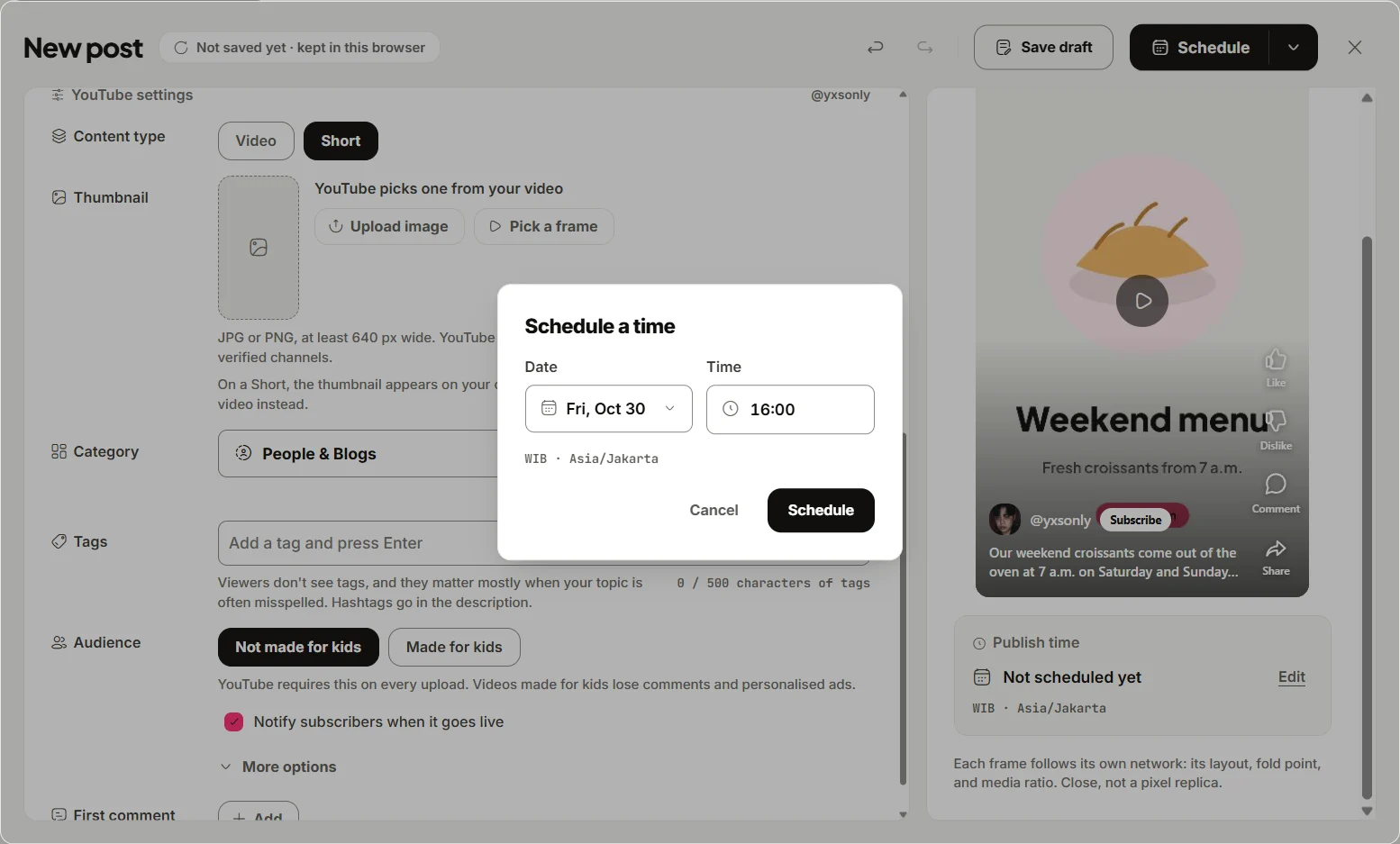
Publish times follow your workspace time zone, set under Settings, General, Time zone, so set it to where most of your viewers live. Uploads share one daily YouTube API quota across eksis, and if it runs out, an upload waits for the next day.
The Free plan connects one channel and allows 15 scheduled posts a month, but has no Analytics. Starter adds Analytics, including Best hours to post, and connects up to 20 accounts. See the YouTube integration or compare plans.
Timing is one part of the video
A good slot gets a video its first viewers. The title, thumbnail, and first seconds decide what happens next. If you cut one vertical video for several networks, our guide to posting one video to TikTok, Reels, and Shorts covers the specs. For upload frequency, see how often to post on social media, and for the same exercise on another video platform, the best time to post on TikTok.
Sources
- Buffer: Best time to post on YouTube, data from 1.8M videos
- SocialPilot: Best time to post on YouTube in 2026, videos and Shorts
- Sprout Social: Best times to post on social media in 2026
- Hootsuite: Best time to post on social media in 2025
- YouTube Help: Understand your YouTube audience
- YouTube Help: Get started with YouTube Analytics
All were read on October 24, 2026. The companies update these studies, so check the source before you quote a number.
Frequently Asked Questions
What is the best time to post on YouTube?
It depends on the format. Buffer's analysis of 1.8 million videos puts long videos at Sunday 10 a.m. and Shorts at Friday 4 p.m. SocialPilot's study of 301,000 videos suggests uploading long videos between 2 and 4 p.m. on weekdays and Shorts between 12 and 2 p.m. or 6 and 7 p.m. Start with a weekend morning for long videos and a late-week evening for Shorts, then test.
What is the best time to post YouTube Shorts?
Both studies rank Friday, Saturday, and Thursday as the strongest days for Shorts. Buffer's top three slots are Friday at 4, 6, and 7 p.m., and it finds Shorts engagement peaks between 6 and 11 p.m. in general.
Should I post YouTube Shorts and long videos at the same time?
The studies say no. Buffer found almost opposite peak times, mornings for long videos and evenings for Shorts, and SocialPilot reports the same split. Give each format its own slot and measure them separately.
Where do I see when my viewers are online?
In YouTube Studio, open Analytics, then Audience, and scroll to When your viewers are on YouTube. It covers the last 28 days and shows when your viewers use YouTube, not when your videos performed best.
Can eksis show my best time to post on YouTube?
Yes, on plans with Analytics. Best hours to post ranks the hours your channel's videos went out by average likes and comments, and needs two videos in an hour before ranking it. It does not split Shorts from long videos in the chart, so use the Post performance table or the Posts export to compare formats.