How LinkedIn ranks posts in 2026, and what that means for links
LinkedIn rebuilt its feed in 2026 around language models that match posts to interests and predict dwell, likes, comments, and shares. What LinkedIn has published about ranking, with dates, and why link posts reach fewer people even though LinkedIn says links are not penalized.
10 min read



On this page
LinkedIn ranks the posts in your feed with machine learning models that predict two kinds of behavior for each post and each person: whether they will stop and spend time on it, and whether they will like, comment on, or share it. In 2026, LinkedIn rebuilt that system around large language models that read what a post is about and match it to people interested in the topic, whether or not they follow you.
What that means for links is less settled. LinkedIn staff have said posts are not penalized for including an external link, while large independent datasets keep finding that link posts reach fewer people. This guide sets out what LinkedIn itself has published about ranking, with dates, as it read on October 24, 2026, and then what the link question looks like from there.
The short answer
- LinkedIn's feed predicts passive actions (click, skip, long dwell) and active ones (like, comment, share), according to its engineering blog on March 12, 2026.
- The 2026 rebuild uses one retrieval system built on LLM embeddings, so posts can reach people outside your network when the topic matches their interests.
- LinkedIn says its ranking never uses demographic information such as age, race, or gender.
- Its Help Center names three groups of signals: identity, content, and activity, and says the feed tapers the distribution of low-quality content.
- LinkedIn says links are not penalized. Buffer's data from 58,000 accounts says posts with link previews got 28% fewer impressions. Both statements can be true at once, and the second article in this pair goes through the numbers.
What LinkedIn has published about the feed
LinkedIn does not publish a ranking formula, but its engineering team and Help Center describe how the feed works. These are the main sources, newest first:
| Source | Date | What it covers |
|---|---|---|
| Engineering blog: "Engineering the next generation of LinkedIn's Feed" | March 12, 2026 | The rebuilt retrieval and ranking system |
| Research paper: "An Industrial-Scale Sequential Recommender for LinkedIn Feed Ranking" | February 12, 2026 (revised September 16, 2026) | The ranking model, with A/B test results |
| Engineering blog: "Putting members first" | November 20, 2025 | How LinkedIn tests that ranking treats creators fairly |
| Help Center: LinkedIn relevance | Last updated about six months before we read it | The signals in plain language |
| Help Center: Sort your feed | Last updated about eleven months before we read it | Most relevant and Most recent views |
How the 2026 feed works
Finding candidate posts
Before LinkedIn can rank posts, it has to pick which ones to consider. According to the March 2026 engineering post, the old feed pulled candidates from several separate systems: a chronological index of your network, trending content by industry and region, collaborative filtering, and several embedding-based systems. The new feed replaces them with a single system built on embeddings from a fine-tuned large language model.
In practice, LinkedIn turns each member's profile and history, and each post, into text that a language model reads. The post gives an example of what that allows: the model can connect an interest in electrical engineering with a post about small modular reactors, even if the words do not match. LinkedIn also says new posts and changes to someone's interests show up in the system "within minutes".
The same post says retrieval balances posts from your network, accounts you follow, and suggested content, and that the unified approach aims to surface posts from creators you are not connected to when they match your interests.
Ranking them
The ranking model, which LinkedIn calls a Generative Recommender, reads a member's history as a sequence of more than 1,000 past interactions instead of scoring each post on its own. It predicts two families of actions:
- Passive: click, skip, and long dwell, meaning staying on a post past a certain point.
- Active: like, comment, and share.
The research paper describes the production version, Feed SR, and reports that it served most of LinkedIn's feed traffic for over three months, with A/B test gains of 2.10% in time spent and 3.52% in likes, comments, or reshares compared with the previous model. Those are LinkedIn's gains as a platform, not figures for any one creator.
Both engineering posts say the system does not use demographic attributes. The November 2025 post puts it directly: LinkedIn's "algorithm and AI systems do not use demographic information (such as age, race, or gender) as a signal to determine the visibility of content." It adds that the feed uses "hundreds of other signals" such as position, industry, network, and activity, which is why two similar posts can reach very different numbers of people.
What the Help Center says
The Help Center article on LinkedIn relevance groups the signals into three types: identity (who you are, from your profile), content (for example, how often a post is viewed or engaged with), and activity (what you have reacted to or commented on). It says the feed draws from connections, people and companies you follow, groups, and relevant posts from outside your network, and that these systems "filter out or taper distribution of low-quality and unsafe content."
Members can also choose how their feed is sorted. The default, Most relevant, is personalized from activity and interests. Most recent shows posts from people you follow in reverse chronological order, without personalization.
What LinkedIn staff have said in interviews
Beyond the engineering material, LinkedIn's editorial and product staff have described the feed in interviews. Buffer summarized two of them in December 2025, an Entrepreneur interview with Dan Roth and Alice Xiong and a podcast with Laura Lorenzetti. The main points, as Buffer reports them:
- Posts from your connections and followers come first, and relevant posts can travel beyond them.
- Virality is no longer the goal; relevance to a specific professional audience is.
- Expertise matters: LinkedIn tries to surface knowledge and advice from people who know the subject.
- Hashtags are "a nice to have, not a need to have," in Lorenzetti's words.
These are LinkedIn's descriptions of intent. They are useful for understanding direction, but they are not measurements.
What this means for posts with links
Nothing LinkedIn has published says "links are ranked lower." In 2025, Rishi Jobanputra, who works on LinkedIn's product team (Buffer describes him as a senior director of product management), said in a LinkedIn video that posts are not penalized for external links, as reported by Buffer and by the creator newsletter Breakout Insights. Lorenzetti said in a podcast interview, as quoted by Buffer, that the algorithm focuses "on the value and content that's being shared in the post."
The ranking design suggests why link posts can still reach fewer people without any rule against links. The model predicts long dwell and engagement. A post whose main job is to send people somewhere else asks them to leave, and a post that ends after one line plus a link card gives them little to stay for. Buffer's October 2026 article on LinkedIn followers makes the same argument.
Independent data supports a reach cost. Buffer looked at a year of posts from more than 58,000 accounts posting through Buffer and compared posts with and without links from the same account in the same month. Posts with a link preview got 28% fewer impressions and 44% fewer engagements. Posts with a URL in the text and no preview card dropped about 16% on both. Link previews did get about 87% more clicks, by LinkedIn's count.
Other datasets put the reach gap anywhere from about 16% to 36%, and they disagree on whether a link in your own first comment helps or hurts. We compare them side by side in link in the post or in the first comment on LinkedIn.
The practical reading for now:
- Write the post so it is complete without the click. If the link goes to a guide with three points, put all three in the post. People who want more will click; the rest still got value, and stayed on the post.
- Lead with the point. Long dwell starts with someone deciding to read past the first two lines.
- Stay on a few topics. The 2026 retrieval system matches posts to interests. A profile that posts about the same three subjects gives it a clearer signal than one that posts about everything.
- Answer comments. Comments are one of the active actions the model predicts, and a thread under a post is more of them.
- Decide per post whether you want reach or clicks. For a sign-up or a launch, a link post that reaches fewer people may still bring more visitors.
Schedule LinkedIn posts in eksis
eksis publishes text, photo, and video posts to your personal LinkedIn profile. It does not post to Company Pages, and it cannot read LinkedIn comments or statistics: LinkedIn gives those to outside apps through its Community Management API, which it approves app by app, and eksis has not been approved yet. So eksis Analytics has no LinkedIn numbers; you read results in LinkedIn's own analytics.
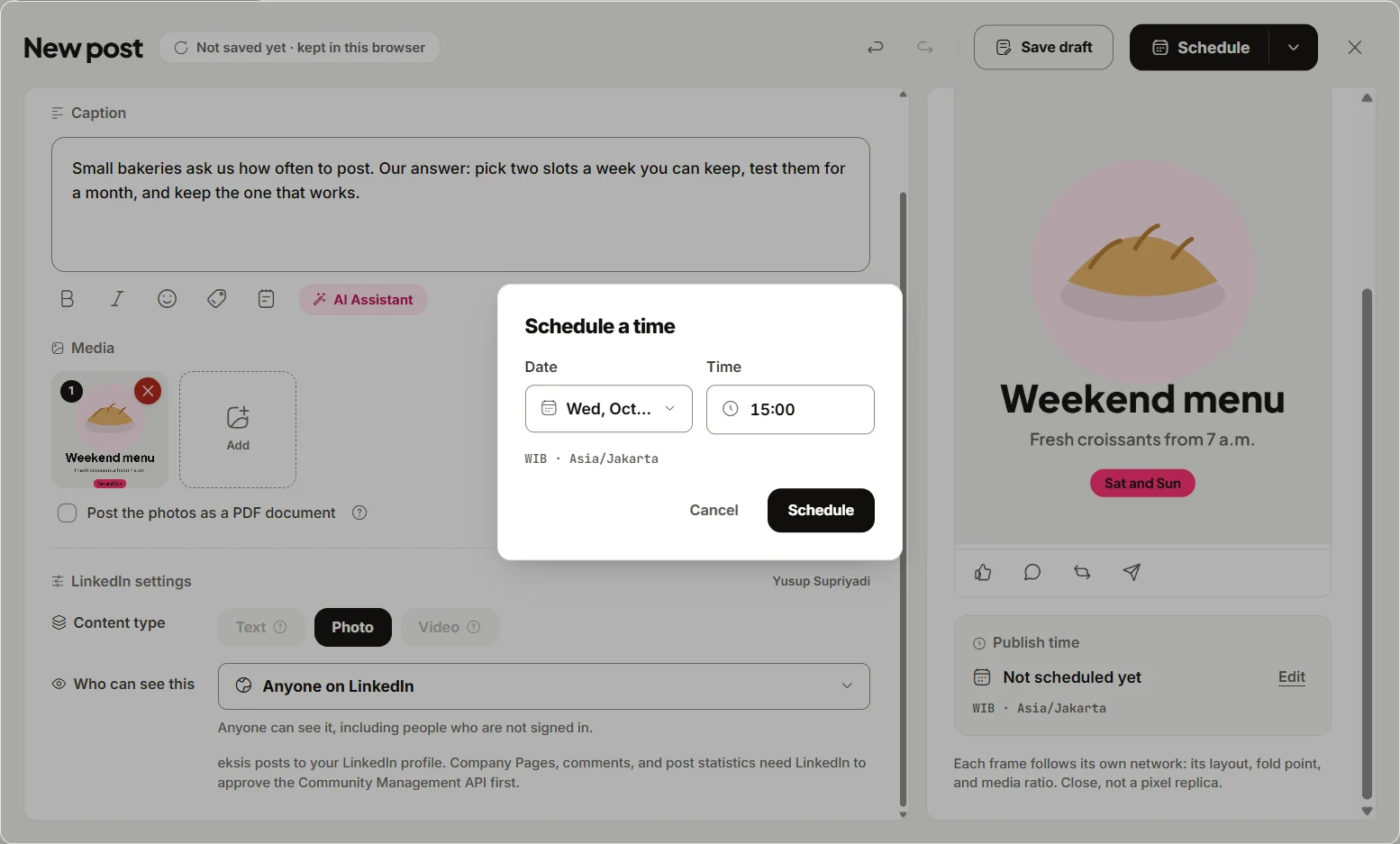
What eksis does cover:
- Click Create post and pick your LinkedIn profile. Under Who can see this, choose Anyone on LinkedIn or Your connections only.
- To keep readers on the post, attach photos and turn on Post the photos as a PDF document. LinkedIn shows the pages as a swipeable carousel, one photo per page, and you can give it a Document title.
- If the caption contains a URL and the post has no photo or video, eksis publishes it as a link card, the way LinkedIn shows a shared article. Adding a photo removes the card and leaves the URL as text. eksis does not yet have a switch to remove the card on its own.
- eksis cannot post a first comment on LinkedIn, because that also needs the Community Management API. If you want the link in a comment, add it yourself in LinkedIn after the post goes live.
- Click Schedule, pick a date and time in your workspace time zone, and check Posts afterwards for the exact time each post went out.
If you are stuck on what to write, the Assistant on Home can draft a post from a few notes about your topic, and you edit it in the composer before it goes anywhere. The Free plan includes one connected account and 15 scheduled posts a month. See the LinkedIn integration, plans, and our guide to the best time to post on LinkedIn.
Sources
- LinkedIn Engineering: Engineering the next generation of LinkedIn's Feed (March 12, 2026)
- arXiv: An Industrial-Scale Sequential Recommender for LinkedIn Feed Ranking (February 12, 2026, revised September 16, 2026)
- LinkedIn Engineering: Putting members first, testing and measuring how content appears in your Feed (November 20, 2025)
- LinkedIn Help: LinkedIn relevance (no exact date shown)
- LinkedIn Help: Sort your feed (no exact date shown)
- Buffer: How LinkedIn's Algorithm Works in 2026, According to the LinkedIn Team (December 19, 2025)
- Buffer: How to Increase Your LinkedIn Followers (October 5, 2026)
- Breakout Insights: Does LinkedIn penalize external links? (July 4, 2026)
All were read on October 24, 2026.
Frequently Asked Questions
How does the LinkedIn algorithm work in 2026?
LinkedIn uses a retrieval system built on large language model embeddings to find posts that match each member's interests, from their network and beyond, then ranks them with a model that reads their last 1,000 or more interactions. It predicts whether someone will click, skip, or stay on a post, and whether they will like, comment, or share it.
Does LinkedIn penalize posts with links?
LinkedIn staff say no. Independent data shows link posts reaching fewer people anyway: Buffer found 28% fewer impressions for posts with a link preview, across more than 58,000 accounts. The likely reason is that a post built to send people away earns less time on the post.
What is dwell time on LinkedIn?
It is how long someone stays on a post. LinkedIn's engineering blog lists "long dwell", staying on a post past a certain point, among the actions its ranking model predicts, alongside clicks, skips, likes, comments, and shares.
Does LinkedIn show posts to people who don't follow me?
Yes. LinkedIn's March 2026 engineering post says retrieval balances posts from your network, accounts people follow, and suggested content, and that it aims to surface posts from creators people are not connected to when the topic matches their interests.
Can eksis show LinkedIn analytics?
Not yet. LinkedIn only shares post statistics with apps approved for its Community Management API, and eksis is still waiting for that approval. eksis schedules posts to your personal profile; read the results in LinkedIn's own analytics.