How to add a TikTok sound when you schedule a video
Add a song to a TikTok video you schedule: pick one from music TikTok allows business accounts to use, see what a song changes about the post, and finish in the TikTok app when the song is missing.
5 min read



On this page
You have a TikTok video ready and want it to go out later with a song on it. In the TikTok app you add the sound while editing, but a video scheduled from TikTok Studio or a third-party tool needs a different route. In eksis you pick the song in the composer from music TikTok allows business accounts to use; for any other song, you finish the post in the TikTok app.
The short answer
- In the TikTok app: add the sound while you edit the video, then post or save it.
- Business accounts: TikTok gives businesses its Commercial Music Library, a separate set of songs cleared for commercial use. Many songs you hear on personal accounts are not in it.
- In eksis: in the TikTok tab of the composer, choose Add sound in the Music row, connect TikTok for Business once, then pick a song from Popular now or search.
- A song changes the post: a video with a song is always public, and hashtags and mentions in the caption show as plain text.
- Song not in the list? Set Publishing to Finish in TikTok and add the sound in the TikTok app before you post.
Why business accounts see fewer songs
TikTok separates the music people use for fun from music a business may use to promote itself. Its Business Help Center describes the Commercial Music Library as pre-cleared music that businesses can use in their TikTok content. If your account is a business account, the songs offered to you come from that library, which is why a trending song from your personal feed may be missing. Our guide to which TikTok sounds a business account can use goes deeper.
Add a song when you schedule in eksis
eksis gets its songs from TikTok for Business, which only offers music business accounts may use, so a brand account can post with them.
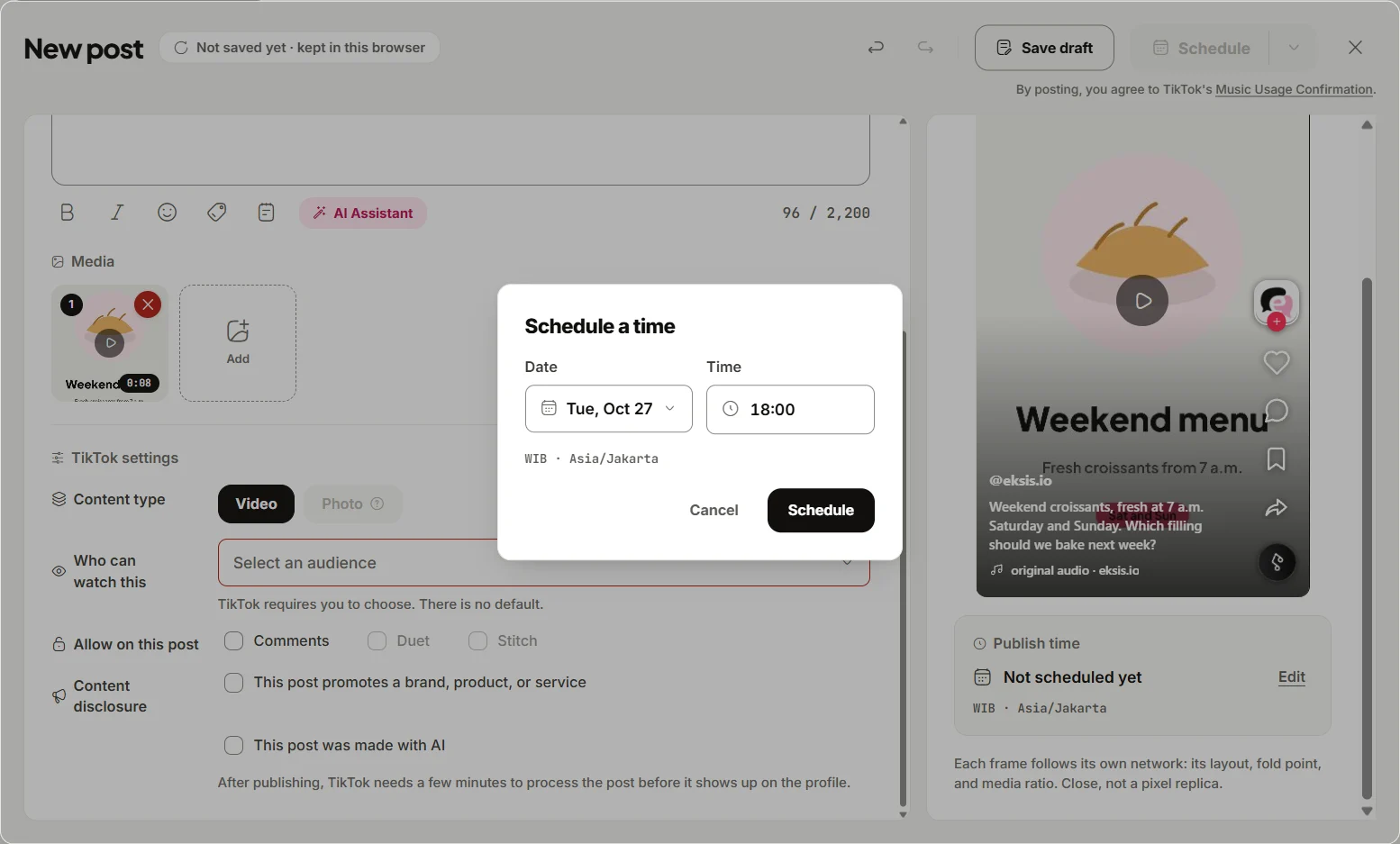
- Click Create post, pick your TikTok channel, and add a video or photos. With several channels selected, open the TikTok tab.
- In the Music row, choose Add sound. The first time, the panel offers Connect TikTok for Business. Sign in with the same TikTok account as the channel and allow access; you come back to the same post. This is a second TikTok permission, given once per account.
- Add sound opens Popular now, the songs trending on TikTok in your region. To find a particular song, type its title or artist in the search box.
- If nothing popular matches, eksis searches all of TikTok and shows From all of TikTok. If popular songs match but not the one you want, choose to search all of TikTok under the list.
- Select a song to hear it, select it again to stop, and choose Use to put it on the post.
- On a video, set Volume for Original sound and Added sound, each from 0 to 100 (both start at 50), and use Trim to pick which part of the song plays. Change picks another song; Remove drops it.
- Click Edit next to Publish time, choose the date and time, and click Schedule.
If the TikTok for Business permission expires later, the same panel asks you to connect again. The channel itself stays connected and keeps posting.
What a song changes
The eksis docs list what a song changes on a TikTok post:
- A video with a song is always public. The audience switches to everyone and stays locked until you remove the song. An account that cannot post publicly cannot put a song on a video.
- Hashtags and mentions show as plain text in the caption of a post with a song.
- On a photo post, the song plays from its start, without volume or trim controls, and the post keeps the audience you chose.
When the song you want is not there
The picker only shows songs TikTok allows on business accounts. To post with a song outside that list, set Publishing to Finish in TikTok in the composer. At the scheduled time, you finish the post in the TikTok app, where you add the sound before posting.
Developers can do the same through the eksis API and the MCP tool search_tiktok_music; the steps are in the eksis docs. For everything else about the TikTok side of scheduling, see how to schedule TikTok videos from your desktop.
Plans and limits
The music picker works on every plan. Free connects one social account and schedules up to 15 posts a month; Pro Eksis is $3 a month for up to 20 accounts with no monthly post limit. See compare plans.
Sources
- TikTok Business Help Center: About the Commercial Music Library (read November 11, 2026)
- eksis docs: Music on TikTok (read November 11, 2026)
Frequently Asked Questions
Can I add music to a scheduled TikTok?
Yes, if your scheduler has a music picker. In eksis, choose Add sound in the TikTok tab while you schedule.
Why can't I find a song for my TikTok business account?
Business accounts only get songs from TikTok's Commercial Music Library, so many songs on personal accounts are missing. In eksis, songs outside that list can be added by setting Publishing to Finish in TikTok.
Why did my TikTok become public when I added a song?
TikTok locks a video with a song to a public audience. Remove the song to choose another audience.
Does adding a song change my caption?
Hashtags and @mentions in the caption of a post with a song show as plain text rather than links.