Which TikTok sounds can a business account use?
Businesses on TikTok should use the Commercial Music Library, not the general sound library where most trending songs live. What TikTok's help pages and terms say about trending songs, other creators' original sounds, and using the same track on Reels or Shorts.
9 min read



On this page
A business on TikTok should use sounds from TikTok's Commercial Music Library, a catalog of about 1 million tracks that TikTok has cleared for commercial use and offers to businesses for free. The general sound library, where most trending songs live, is not licensed for commercial use, and TikTok's own help center says so in one line: "Businesses cannot use the general music library for commercial usage."
The rule follows what you post for, not only the type of account. This guide covers what TikTok's help pages and terms say about sounds for businesses as they read on October 24, 2026, what that means for trending songs and other creators' original sounds, and how the audio works when you schedule TikTok videos from another app.
The short answer
- Business accounts see only Commercial Sounds when they tap Add Sound. Personal accounts see every sound, and can switch to Commercial Sounds from a dropdown.
- Commercial Sounds can be used for organic posts, including duets and stitches, for ads, and for branded content.
- TikTok's Music Terms say a commercial user "should not use an Original Sound uploaded by another user."
- TikTok's EEA Business Terms say that when you use an account for a business purpose, you must use Commercial Sounds, the Commercial Music Library, or music whose rights you have cleared yourself.
- The license covers TikTok only. The same track in a Reel or a YouTube Short needs its own permission.
- If you post anyway with music you have no right to use, TikTok may mute the sound or take the video down.
Which accounts this applies to
TikTok's page "Types of TikTok accounts" (last updated May 2026) lists Personal Accounts, Business Accounts, Verified Business Accounts, Blue-V Verified Business Accounts, and Organization Accounts. A Business Account is meant for brands and comes with performance metrics, audience insights, and other commercial tools.
The sound library you see depends on that account type. According to TikTok's help article "How to use the Commercial Music Library" (last updated July 2026):
- On a Business Account, tapping Add Sound on a new video shows only sounds from the Commercial Music Library, labeled Commercial Sounds.
- On a Personal Account, Add Sound shows all sounds. To pick from the commercial library, tap Sounds and choose Commercial Sounds from the dropdown.
The account type controls what you see, but the terms are written around what you are doing. TikTok's Business Terms of Service for the EEA (last updated July 2025) apply when you use TikTok "for purposes within your trade, business, craft or profession", which includes "managing your own business through your account on the Platform." A shop posting from a personal account is still posting for its business. We could not read the non-EEA version of the Business Terms, so check the version for your country, but the help center's line about businesses and the general library has no regional condition.
What the Commercial Music Library is
TikTok's help article "About the Commercial Music Library" (last updated July 2025) describes it as a "pre-cleared global music library of 1 million songs", covering all styles, genres, and regions, from independent and emerging artists as well as large music companies, and free for businesses to use.
It lists three uses the library covers:
- Organic content, including a duet, react, or stitch with other people's videos
- Video ads
- Branded content
The "How to use" article adds a few practical details. You can filter the library by region, usable placements, themes, genre, mood, and duration, and up to 10,000 Commercial Sounds show at a time. Once you pick a Commercial Sound, you can use it in organic or paid content. Because availability can differ by region, select the region where your audience is before choosing a track.
What a business should not use
The general sound library
This is where most trending songs sit, and it is the clearest case. TikTok's Music Terms (EEA version, effective July 2025) put it plainly: "You shouldn't use a music recording from Sounds for any commercial purpose." A song can be in the general library and trending without being licensed for a business to use in marketing.
Other creators' original sounds
Original sounds are the audio people upload with their own videos: voiceovers, jokes, remixes. They are the grey area most guides skip. The Music Terms say: "If you're a Commercial User, you should not use an Original Sound uploaded by another user." TikTok's commercial library article is softer and tells businesses that use original sounds from other users to "consult your legal team to ensure you have obtained a proper license."
The cautious reading for a small business is simple: do not build a post around someone else's original sound unless that person has given you permission, in writing if the post is an ad or a paid collaboration. An original sound can also contain a copyrighted song that the uploader had no right to share, which you cannot see from the sound page.
Commercial Sounds outside TikTok
The Commercial Music Library user terms state: "Commercial Uses outside of TikTok are not permitted and no rights are granted by TikTok for such uses." If you film one video and post it to TikTok, Instagram Reels, and YouTube Shorts, a Commercial Sound added in TikTok does not come with a license for the other two. The Music Terms say the same: uses outside the platform need separate permission.
Some Commercial Sounds are marked Premium. The CML user terms say they "may be subject to an additional fee", shown when you buy ad inventory, so this mostly affects paid campaigns.
What happens if you use the wrong sound
When you post on TikTok, you agree to its Music Usage Confirmation. It asks you to confirm that there is no copyright-protected music in the video, or that you have obtained and paid for every license needed for the composition and the recording. It ends with a direct warning: if you post anyway without being able to confirm either, "the post might be taken down."
The CML user terms add that TikTok may take down videos or mute the audio when a Commercial Sound is no longer available, and that it accepts no liability for that. So even a correctly licensed post can lose its soundtrack later. Keep the visual part of your video understandable without the music, with on-screen text or a voiceover, so a muted post still works.
Safe options for business videos on TikTok
In practice, a small business has four kinds of audio it can use with confidence:
| Audio | Why it is safe | Watch out for |
|---|---|---|
| Commercial Sounds from the Commercial Music Library | Cleared by TikTok for commercial use on TikTok | Only on TikTok; Premium tracks may cost extra in ads |
| Your own voice or voiceover | You own it | Background music playing in the room is still music |
| Sounds you recorded yourself: the coffee machine, the workshop, the street | You own the recording | Music from a shop speaker or a car radio counts as music |
| Music you licensed from a library that allows social media use | Your license covers it | Read whether the license covers TikTok and ads, and keep the receipt |
Trending songs from the general library, other people's original sounds, and songs ripped from streaming services are the ones to leave out of business posts.
Schedule TikTok videos with the right audio in eksis
eksis uploads your finished video to TikTok through TikTok's official API. That has one consequence worth knowing before you plan around a sound: the audio TikTok publishes is the audio inside your video file. eksis cannot add a sound from TikTok's in-app library to a video, Commercial Sounds included.
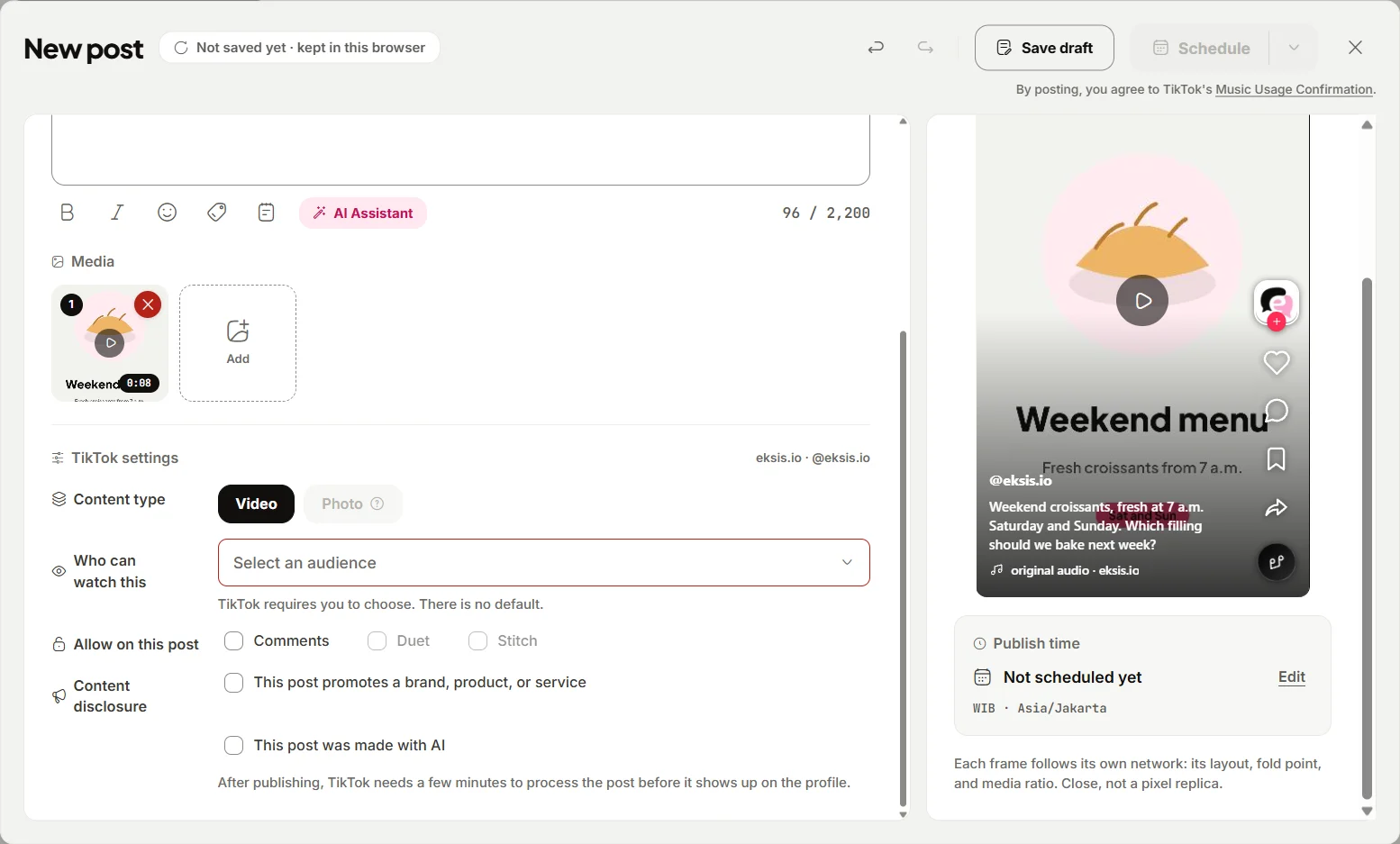
So the workflow is:
- Edit the video with audio you have the right to use: your voiceover, your own recorded sound, or music licensed for social media use. If you want a specific Commercial Sound, post that video from the TikTok app instead, since the library lives there.
- In eksis, click Create post, choose your TikTok account, and add the video. Pick Who can watch this, which TikTok requires, and set comments, Duet, and Stitch.
- If the post promotes your business, turn on This post promotes a brand, product, or service and choose Your brand, or Branded content for a paid partnership.
- Above the publish button, the composer shows TikTok's line "By posting, you agree to TikTok's Music Usage Confirmation", with a link to it, and adds the Branded Content Policy for branded posts. Read it before you schedule: it is TikTok's confirmation, and it applies to posts from eksis as much as posts from the app.
- Click Schedule and pick a date and time in your workspace time zone.
For photo posts, the TikTok tab has a Let TikTok pick a soundtrack option. TikTok chooses the track, and TikTok has not said which library it picks from for business accounts, so check the published post in the app if music rights matter for it.
If you post the same video to Instagram Reels and YouTube Shorts from the same eksis post, remember the CML license does not travel with it. Our guide to posting one vertical video to TikTok, Reels, and Shorts covers the other specs to check. eksis publishes TikTok videos and photo posts on every plan, including Free; see the TikTok integration and plans. For what affects reach once the video is live, read the TikTok algorithm for small businesses.
Sources
- TikTok Business Help Center: About the Commercial Music Library (last updated July 2025)
- TikTok Business Help Center: How to use the Commercial Music Library (last updated July 2026)
- TikTok Business Help Center: Types of TikTok accounts (last updated May 2026)
- TikTok: Commercial Music Library User Terms (no date shown)
- TikTok: Music Terms, EEA version (effective July 2025)
- TikTok: Business Terms of Service, EEA version (last updated July 2025)
- TikTok: Music Usage Confirmation (no date shown)
All were read on October 24, 2026. This guide explains TikTok's published rules and is not legal advice; for ads and paid partnerships, check the terms for your country.
Frequently Asked Questions
Can a TikTok business account use trending sounds?
Only if the trending sound is in the Commercial Music Library. TikTok says businesses cannot use the general music library for commercial purposes, and business accounts only see Commercial Sounds when they tap Add Sound.
Can I switch to a personal account to use any sound?
A personal account shows every sound, but TikTok's EEA Business Terms tie the music rule to business use, including managing your own business through your account. Posting for your business from a personal account does not make an unlicensed song licensed.
Are Commercial Music Library sounds free?
TikTok says the library is free for businesses to use. Some sounds are marked Premium, and the CML terms say those may carry an extra fee, which TikTok shows when you buy ad inventory.
Can I use a TikTok Commercial Sound on Instagram or YouTube?
No. The Commercial Music Library terms say commercial uses outside TikTok are not permitted and TikTok grants no rights for them. Use music you have licensed for those platforms, or your own audio.
Can eksis add TikTok sounds to my video?
No. eksis uploads the video file you provide, with the audio already in it. To use a sound from TikTok's library, add it and post from the TikTok app. Before you schedule, eksis shows a link to TikTok's Music Usage Confirmation, which you agree to by posting.