November 2026 trend formats small brands can use, and what to do when the sound is off-limits
Most trending video formats rely on a commercial song that business accounts cannot use. This guide covers eight formats that work without trending audio, why business accounts hit a wall with certain songs, and how to adapt the format anyway.
9 min read



On this page
Every few weeks, a new video format spreads across TikTok, Instagram, and Threads. A small business that spots the trend early can catch viewers who would not otherwise see them. The catch is that most trending formats ride on a commercial song, and business accounts often cannot use that song.
This guide covers trend formats circulating in November 2026 that small businesses can adapt, why business accounts hit a wall with trending audio, where to find sounds your account is approved to use, and how to adapt the format to work anyway.
The short answer
- Most trending video formats rely on a commercial song that business accounts cannot use.
- TikTok limits business accounts to the Commercial Music Library. Instagram also limits the music available to some business accounts.
- You have two options: use the format with different audio, or skip the trend and post something your audience actually wants to see.
- The format is what goes viral, not always the song. A transition, a caption style, or a visual gag works just as well with your own voiceover or a sound your account can use.
- If you manage multiple accounts or schedule posts in advance, use eksis to queue trend videos alongside your regular posts.
The formats going around in November 2026
Text-and-sales formats for small businesses
I Just Wanna... (TIME Marketing)
This format overlays text starting with "I just wanna..." followed by a sales goal (for example, "I just wanna sell out this collection"). The punchline lands in the caption below the video. TIME Marketing identifies this as trending on Instagram Reels in November 2026 and notes it typically uses "Housewife" by Tate McRae.
No and Yes (TIME Marketing)
Cut back and forth between a customer pain point (the "no") and the brand's solution (the "yes"), spending one second on each. The strongest "yes" lands last for emphasis. TIME Marketing reports this format uses a playful sound with "no" and "yes" vocalizations, though the specific track name is not disclosed. It works on Instagram Reels.
Visual and animation formats
Zoom In (TIME Marketing)
Place a short message on the screen, then mimic a pinch-zoom gesture to grow the text and reveal the full message using keyframe animation. TIME Marketing identifies this as trending on Instagram Reels in November 2026. No specific audio is required. The visual effect carries the message.
Moodboard Stack (TIME Marketing)
Compile 6 to 8 of your best work pieces (photos, designs, or products) into one Reel with a simple hook at the start. No sales messaging appears in the video itself. TIME Marketing recommends this format for the first or second week of November on Instagram.
Lens Wipe Transition (Later)
Wipe across the frame as if wiping a camera lens, hiding the cut between two scenes. Later's analysis of Instagram Reels trends identifies this as a popular transition format in 2026, typically paired with upbeat audio.
Practical formats for business accounts
Exact Script You Can Copy (Volume)
Give viewers the exact phrases or words to use in a situation, rather than explaining the concept. Volume's analysis of 450 trending posts found this format effective for teaching and selling. Post this as a talking-head video on Instagram and TikTok, with no specific audio required.
Every Click and Every Setting Shown (Volume)
Film your laptop or phone screen and walk through the click path, settings, or numbers step by step. Volume identifies this as an editing trick that viewers find useful and practical. Post this as a screen-recording or talking-head video on both platforms. No specific audio is required.
Process versus the Product (SocialBee)
Show behind-the-scenes footage of your work process, then reveal the finished result. SocialBee lists this as a trending format titled "Process vs. the product" across multiple months in 2026. The visual transformation is the focus; no specific audio is required.
Formats when you have limited audio
All the formats above are practical for business accounts because they work well without trending audio. Zoom In, Moodboard Stack, Exact Script, Every Click and Setting, and Process versus the Product can all be posted with voiceover, licensed audio, or silence. The format carries the video, not the soundtrack.
Can a business account use the trending sound?
When a trend blows up, the audio at the center is usually a commercial song licensed for creator use, but not for business promotion. Platforms separate creator accounts (people building an audience for themselves) from business accounts (accounts that sell products, services, or ads).
TikTok's Commercial Music Library
TikTok's Business Help Center article "About the Commercial Music Library" describes it as a library of pre-cleared music that businesses can use in their TikTok content, separate from the general music library people use on personal accounts.
TikTok gives business accounts the Commercial Music Library, a separate collection of approved songs. A trending sound from the general library will not appear in your results on a business account.
Instagram's music on business accounts
Instagram also limits the music available to some business accounts. The song list you see when you add audio to a Reel or post is what your account can use. If a trending audio is not in your list, your account does not have permission to use it.
How to adapt each format without the trending song
When you cannot use the exact audio as everyone else, you are already being forced to do something different. That difference might be your advantage.
Voiceover or dialogue format
Many trending formats feature scripted dialogue or monologue set to a trending song. The format is the words and the pacing, not the audio. To adapt: write the same script or a similar one, record yourself or a team member reading it, and add a sound from your account's approved library that matches the mood. If the original trend is funny and upbeat, pick upbeat audio. If it is serious, pick something serious. The script and the performance carry the video, not the soundtrack.
Transition or visual trick
Videos that show a visual gag (a zoom, a cut, a prop change, or a camera trick) set to trending audio are mostly about the visual. To adapt: learn the visual trick from watching the original, then recreate it with your product, your shop, or your team. Use any sound your account has access to, or post it silent. The viewers come for the visual trick, not the song.
Sequence and pacing format
Videos that show a series of still images, product photos, or clips set to a trending song are really about the rhythm and the sequence of the images. To adapt: create the same kind of sequence with your own content and photos, set it to any trending sound your account can use (or your own music, or leave it silent), and post it. The format does not depend on the audio.
When to skip the trend
Not every trend works for your shop. If the format requires a sad song and you sell party supplies, or the trend is people riffing on a joke you cannot make about your business, skip it. Post something your audience actually wants to see, and let someone else ride the trend.
Scheduling trend posts in eksis
If you are managing multiple accounts or planning your posts a week in advance, you can schedule trend videos in eksis just like any other post.
For TikTok videos
eksis has a TikTok music picker when you schedule a video to TikTok. Here is how it works:
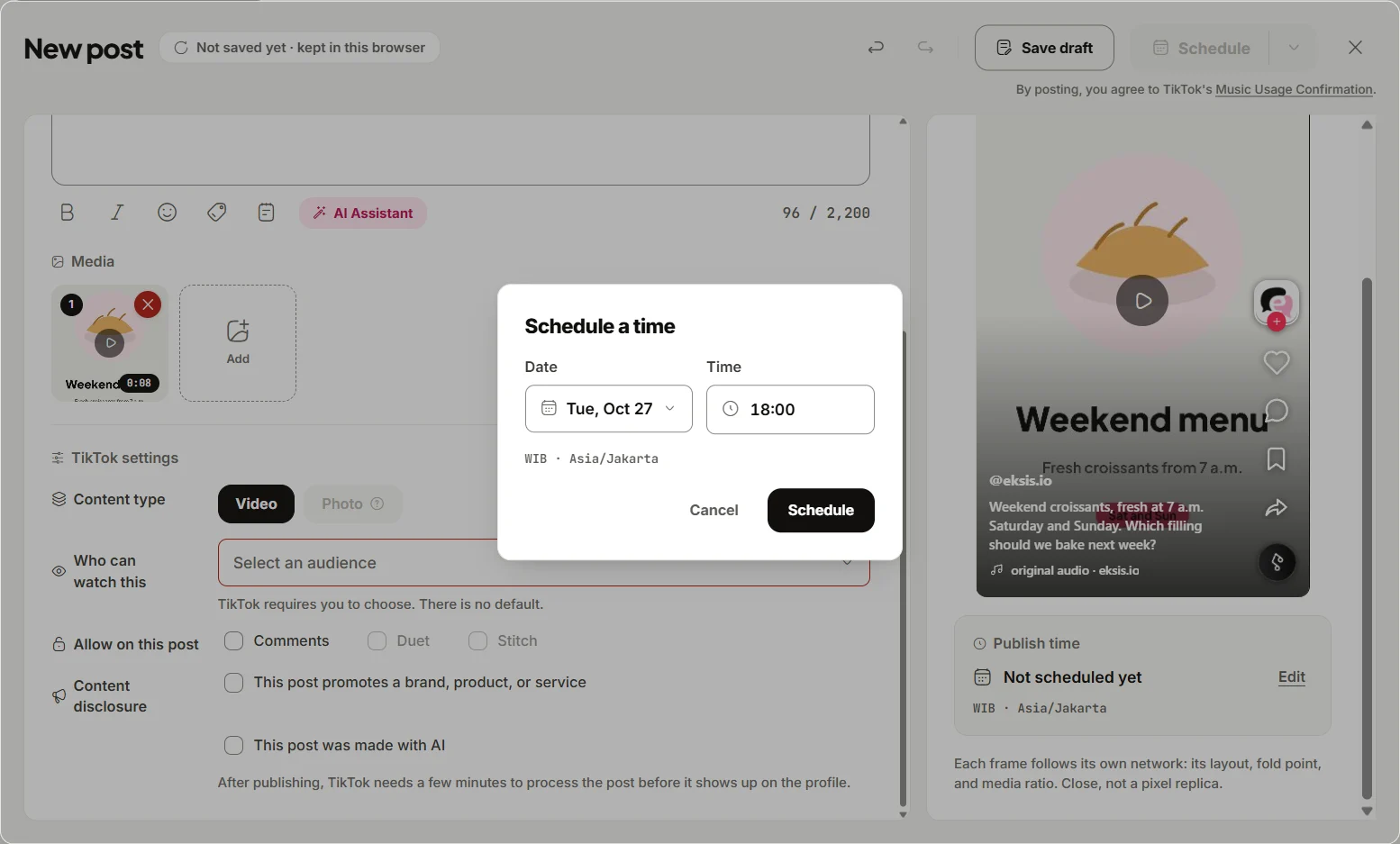
- In the composer, pick your TikTok channel and add a video.
- Open the TikTok tab and find the Music row.
- Choose Add sound. The first time you use it for this channel, eksis asks you to Connect TikTok for Business to access the Commercial Music Library.
- After you connect, the music picker shows songs from "Popular now" (trending in your region). Search by title or artist with the search box.
- Select a song to preview it, then choose Use to add it to the post.
According to eksis's tutorial on Music on TikTok, "A TikTok post from eksis can carry a song. The songs come from TikTok for Business, which only offers music that business accounts may use, so a brand account can post with them." The tutorial notes that "Only songs TikTok allows on business accounts show up, so some songs you hear in the TikTok app are missing."
If you want to use a restricted trending sound instead, the tutorial states: "To post with one of those, set Publishing to Finish in TikTok and add the sound in the TikTok app before you post." This means you schedule the video from eksis and finish it in the TikTok app at publish time.
On a video with a song, eksis gives you two tools:
- Volume: Set the original sound (your video's audio) and the added song, each from 0 to 100.
- Trim: Pick which part of the song plays during your video.
A TikTok post with a song from the music picker is always public. The audience is locked to everyone and stays locked until you remove the song.
For Instagram Reels
eksis has no built-in music picker for Instagram. To add music when you schedule a Reel, use one of these approaches:
- Put licensed audio or your own voiceover in the video file before you schedule it in eksis, then schedule the video as normal.
- Post that Reel from the Instagram app if you want a song from Instagram's library. In the Instagram app, add the music after you film the Reel.
Plans and limits
- On the Free plan, you can schedule 15 posts a month to 1 TikTok account and use the music picker.
- On Pro Eksis ($3 a month), you can schedule unlimited posts to 20 TikTok accounts and use the music picker without a monthly limit.
For more details, see the guide on how to schedule TikTok videos.
Before you jump on a trend
Check the checklist before jumping on a trend before you spend time on any trend format. Not every trend fits your business, and that is okay.
Sources
- TIME Is Now Marketing: Trends (read November 11, 2026)
- Volume: Business and Marketing (read November 11, 2026)
- Later: Instagram Reels trends (read November 11, 2026)
- SocialBee: Latest Instagram trends (read November 11, 2026)
- TikTok Business Help Center: About the Commercial Music Library (last updated July 2025)
- eksis: Music on TikTok
Frequently Asked Questions
What's the difference between a TikTok trend sound and a Commercial Sound?
A trending sound lives in TikTok's general library and is licensed for personal creators, not businesses. A Commercial Sound lives in the Commercial Music Library and is licensed for business accounts to use on TikTok. On a business account, only Commercial Sounds show in your search results.
Where do I find sounds my TikTok business account can use?
Search the TikTok sound browser on your business account. The songs that appear are the ones your account can use. If a trending sound from the general library is not in your results, your account does not have permission for it.
Why are some trending sounds unavailable on my business account?
Rights holders license music differently for personal creators and business accounts. A trending song in the general library is licensed only for personal creators. Business accounts can use only the Commercial Music Library.
What should I do if the trend format doesn't fit my business?
Skip it. Not every trend is for your shop. Your audience follows you for your products or services. Post something your audience actually wants to see instead.
Can eksis add sounds to my Instagram Reels?
eksis does not have a built-in music picker for Instagram. Either bake audio into your video file before scheduling it, or post that Reel from the Instagram app if you want a song from Instagram's library.