How to choose a social media scheduler for a small business in 2026: 8 tools compared
Eight things to check before you pick a scheduler, from networks and account types to approvals, inbox coverage, and price model, then Buffer, Hootsuite, Sprout Social, Agorapulse, Later, Metricool, Publer, and eksis compared with prices checked in October 2026.
10 min read Updated Nov 3, 2026



On this page
The best social media scheduler for a small business is the cheapest one that publishes automatically to every account you use, fits the number of people who post, and includes the one or two extras you rely on, such as a shared inbox or approvals. Most comparison lists rank tools by features. A small business usually decides on three things: networks, people, and price model.
eksis makes a scheduler, so weigh this accordingly. This guide sets out eight selection criteria, then compares eight tools against them, with prices and limits from each vendor's own pricing page or help center, read on October 24, 2026. Check the vendor's page before you buy, since prices and plans change.
The short answer
- Start with your networks. A tool that cannot publish automatically to one of your main accounts will cost you more time than it saves.
- Count the people who need a login. Per-user tools charge for each one; per-channel and per-workspace tools mostly do not.
- Check what the free plan or entry plan leaves out: approvals, the inbox, analytics history, and X are the usual gaps.
- Try two tools with your real accounts for a week before you pay for a year.
- For a quick fit: Later for Instagram-first shops, Buffer for a simple queue, Metricool for analytics across brands, Agorapulse or Sprout Social for heavy customer care, Publer for wide network coverage, and eksis for a small team on a tight budget that does not need LinkedIn Company Pages.
Eight things to check before you choose
1. Networks and account types
List every account you post to and its type. Some networks only allow automatic publishing for certain account types. Buffer's channel table, for example, shows automatic publishing for Instagram business and creator accounts but only reminders for Instagram personal profiles and Facebook groups. Later's pricing page lists eight networks, with no X or Bluesky. eksis publishes to LinkedIn personal profiles but not Company Pages. Match the list to your accounts before anything else.
2. Automatic publishing or reminders
A reminder means the tool sends a notification and you finish the post in the app. That is fine for a weekly Story, and tiring for a daily one. Check which of your post types each tool publishes on its own.
3. Post types per network
Reels, Stories, carousels, YouTube Shorts, Pinterest boards, TikTok privacy settings, LinkedIn PDF carousels, and first comments are supported unevenly. If one format drives your sales, test it in the trial.
4. People and permissions
Count who needs to log in, and whether anyone's posts need sign-off. Approvals are often one tier above the entry plan: Buffer puts them on Team, Hootsuite on Advanced, Agorapulse on Professional, Metricool on Advanced, and Later on Growth. eksis includes internal approvals from Starter.
5. Inbox coverage
If you answer comments and messages in the tool, check which networks feed the inbox. Networks decide what each outside app can read, so coverage differs by tool. Buffer and Later list replies to TikTok comments, while eksis cannot read TikTok comments. LinkedIn opens comments only to apps approved for its Community Management API, which Buffer's comment list includes and eksis does not have. Review sites are a separate question: Sprout and Agorapulse handle Google reviews, while the eksis Inbox does not.
6. Analytics you will actually read
Most small businesses need reach, engagement, follower trend, and best times to post. Check how far back the history goes on your plan (Buffer's free plan keeps 30 days, Later's Starter 3 months), whether exports are included, and whether posts published outside the tool are counted.
7. Price model and limits
Tools charge per user, per channel, per brand, or per workspace. The model decides how the bill grows when you add a person or an account. We worked through the math for a team of three in per-user or per-channel pricing.
8. Getting your data out
Before you commit, check whether you can export analytics to CSV, and whether the tool has an API. If you leave in a year, you want your history and a clean way to move.
Eight schedulers compared
Prices are in US dollars, checked on October 24, 2026 on each vendor's own page. Check the vendor's page before deciding.
| Tool | Price model | Free option | Entry paid price | Strong point |
|---|---|---|---|---|
| Buffer | Per channel | Free plan: 3 channels | Essentials: $6 per channel a month ($5 billed yearly) | Simple queue, many integrations, Mastodon and Google Business Profile |
| Hootsuite | Per user | 14-day trial | Standard: $99 per user a month, billed yearly, 10 accounts | Monitoring and listening built in |
| Sprout Social | Per seat | 30-day trial | Essentials: $79 per seat a month billed yearly ($99 monthly), 5 profiles | Customer care, reviews, CRM integrations |
| Agorapulse | Per user | 30-day trial | Standard: $79 per user a month billed yearly ($99 monthly), 10 profiles | Inbox and Google reviews on every plan |
| Later | Per Social Set | Free plan | Growth: $37.50 a month billed yearly, 2 sets and 2 users | Instagram planning, Link in Bio, Snapchat |
| Metricool | Per brand | Free plan: 1 brand | Starter: $25 a month for 5 brands ($20 billed yearly) | Analytics, competitors, reports |
| Publer | Per account and member | Free plan: 3 accounts, no X | Professional: from $5 a month ($4 billed yearly) | Wide network list, bulk scheduling |
| eksis | Per workspace | Free plan: 1 account | Starter: $4 a month, 20 accounts, 2 seats | Low flat price, comment and DM automations |
Later's Starter and Scale prices did not appear in the text of its pricing page that we read, so the table shows Growth, taken from Later's small business page.
Notes on each tool
Buffer
Buffer publishes to Bluesky, Facebook Pages, Google Business Profiles, Instagram, LinkedIn Pages and profiles, Mastodon, Pinterest, Threads, TikTok, YouTube Shorts, and X. Its free plan covers 3 channels with 10 queued posts each. Essentials has one user; Team adds unlimited members, approvals, and access levels. Good for: a business that wants a dependable queue and few channels.
Hootsuite
Standard includes 10 accounts, unlimited scheduling, one inbox, brand and competitor monitoring, and AI post and image generation, at $99 per user a month billed yearly. Unlimited accounts start on Professional ($199), approvals on Advanced ($399). Good for: a team that wants listening and monitoring without a separate tool.
Sprout Social
Sprout connects to X, Facebook, TikTok, LinkedIn Pages and profiles, Instagram business profiles, Pinterest, YouTube, Bluesky, Threads, WhatsApp, and Trustpilot, and handles reviews from Google, Yelp, Glassdoor, and the app stores. Prices run from $79 to $399 per seat a month. Good for: a team where customer care and reporting matter more than price.
Agorapulse
Every plan includes the social inbox, comment moderation, Google reviews moderation, and white-label reports. Self-serve plans include 10 profiles, and X is an add-on. Good for: an inbox-heavy team that wants Sprout-style care at a lower per-user rate.
Later
Later covers Instagram, Facebook, TikTok, Threads, YouTube, Pinterest, LinkedIn, and Snapchat, with Link in Bio and Instagram content collection on every plan. Starter allows 30 posts per profile a month, and the inbox and approvals start on Growth. Good for: Instagram and TikTok-first shops and creators.
Metricool
Metricool prices by brand, one profile per network per brand. Starter covers 5 brands with unlimited publishing and unlimited analytics history; team members and approvals start on Advanced ($67 a month). X is $10 a month per account. Good for: a business or small agency that lives in its analytics.
Publer
Publer supports Facebook Pages, Groups, and profiles, Instagram, Threads, TikTok, X, Mastodon, Bluesky, LinkedIn, Pinterest, Google Business Profiles, YouTube, WordPress, and Telegram. Paid plans start at $5 a month for one account, and the price rises per account and member. Analytics and best times to post start on Business. Good for: someone who posts to unusual destinations or in bulk.
eksis
eksis publishes to Instagram (feed, carousel, Reels, Stories), Facebook, Threads, TikTok, YouTube, X, Bluesky, Pinterest, LinkedIn personal profiles, and DEV Community (Threads was added on November 3, 2026). Starter at $4 a month includes 20 accounts, 2 seats, unlimited scheduled posts, Analytics with Best hours to post, internal approvals, and comment and DM automations on Instagram and Facebook. What it does not do: publish to LinkedIn Company Pages, show LinkedIn statistics, handle Google reviews, or offer a link-in-bio page. Posting to X uses monthly X credits (15 on Starter). Good for: a small business or creator team with many accounts and a small budget.
A simple way to decide
- Write down your accounts, their types, and the people who post. Cross out any tool that cannot publish automatically to your main accounts.
- Mark the one or two extras you cannot do without: inbox, approvals, reviews, listening, link in bio.
- Find the cheapest plan on each remaining tool that includes those extras, and price it for your team and account count.
- Trial the two cheapest for a week with real posts. Check the format you post most, and how the analytics read.
- Pay monthly for the first month or two, then switch to yearly if it sticks.
If you are moving from a specific tool, our guides to Later alternatives and Sprout Social alternatives go into what you would gain and give up.
Try the checklist in eksis
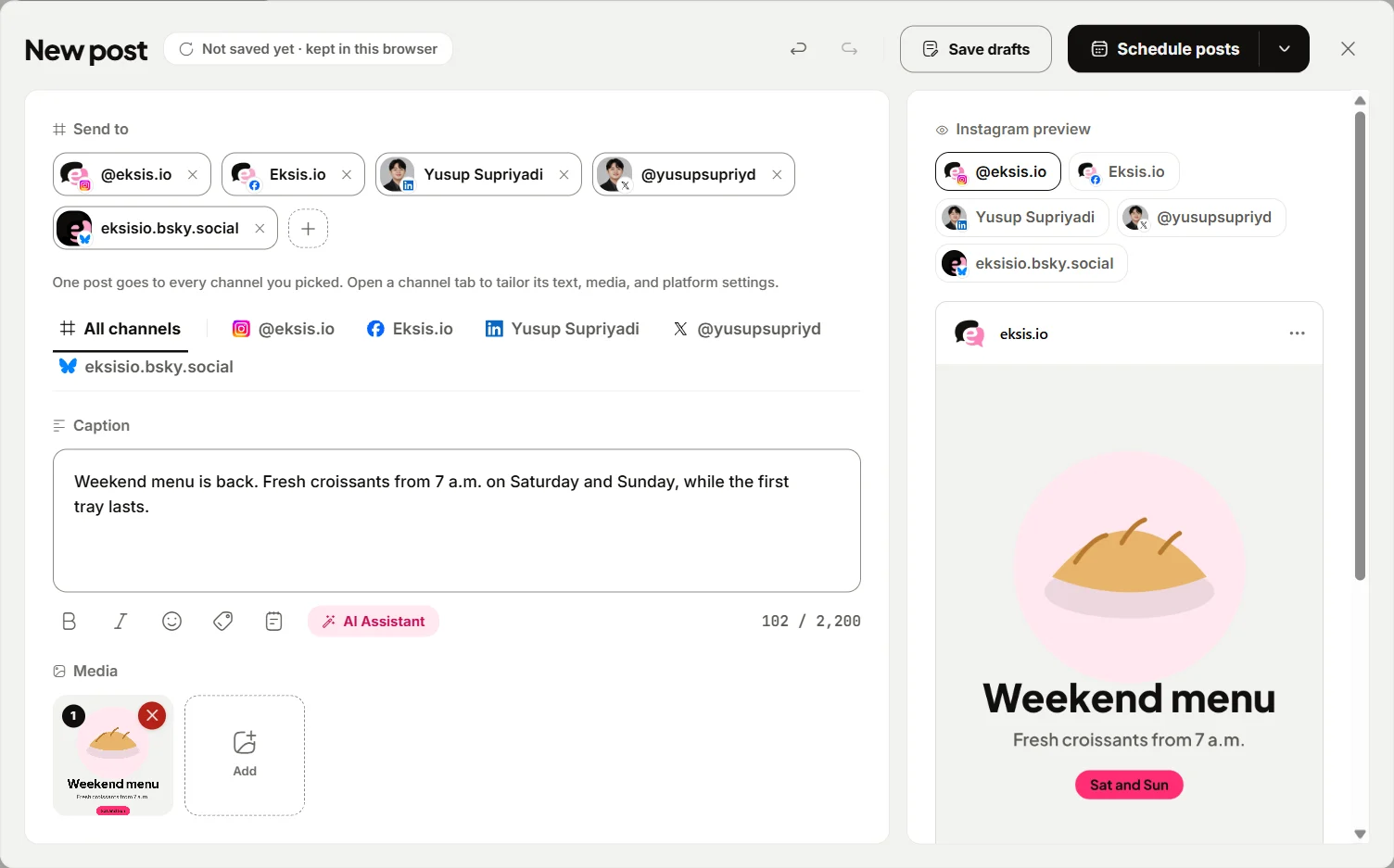
- Create a free workspace and connect one account. The composer checks each post against the network as you type and flags what is missing, which is a quick way to see whether your usual formats are supported.
- Set your time zone under Settings > General > Time zone.
- Click Create post, pick channels, adjust each channel's tab, and Schedule. Open Posts for the Week, Month, or List view.
- Check the Inbox for comments on the networks you use, and try a keyword reply in Automations (Free includes one active automation).
- On Starter, open Analytics for post performance, audience, and Best hours to post, and use Export to download the data.
Compare plans on eksis pricing and see each network's limits on its integration page, such as Instagram or LinkedIn.
Sources
- Buffer: Pricing
- Hootsuite: Plans
- Sprout Social: Pricing
- Sprout Social Help Center: What social profiles can I connect to Sprout?
- Agorapulse: Pricing
- Later: Pricing
- Later: Social media management for small businesses
- Later Help Center: Choose a Later Social Plan
- Metricool: Pricing
- Publer: Pricing
- Publer Help: What are Publer's Plans and Pricing?
- eksis: Pricing
- eksis docs: Create and schedule a post
All were read on October 24, 2026.
Frequently Asked Questions
What is the best social media scheduler for a small business?
The one that publishes automatically to all your main accounts, fits your team size, and includes the extras you use, at the lowest price for your setup. For an Instagram-first shop that might be Later; for heavy customer care, Agorapulse or Sprout Social; for a small team on a low budget, Buffer, Metricool, Publer, or eksis.
Which social media schedulers have a free plan?
On October 24, 2026, Buffer (3 channels), Later, Metricool (1 brand), Publer (3 accounts, no X), and eksis (1 account, 15 scheduled posts a month) listed free plans. Hootsuite, Sprout Social, and Agorapulse offered free trials of 14, 30, and 30 days.
Do I need approvals in a scheduler?
Only if someone's posts should be checked before they go out, such as a new hire or a freelancer. Approvals usually sit above the entry plan, so check the tier. See our guide to a post approval workflow.
Can one scheduler handle comments from every network?
Not always. Networks decide what each outside app can read, so coverage differs by tool. Buffer lists comment replies for ten networks, including TikTok and LinkedIn, while eksis reads comments on Instagram, Facebook, Threads, YouTube, X, and Bluesky but not TikTok, Pinterest, or LinkedIn. Check inbox coverage for your networks during the trial.
Which scheduler publishes to LinkedIn Company Pages?
Among the pages we read, Sprout Social's help center and Buffer's pricing page list LinkedIn Pages, and Publer lists LinkedIn Profiles and Pages. eksis publishes to personal LinkedIn profiles only.