Later alternatives in 2026 for small businesses that post beyond Instagram
Later covers eight networks, and X and Bluesky are not among them. What Later does well, where small businesses outgrow it, and what Buffer, Publer, Metricool, and eksis charge, checked on each vendor's own page in October 2026.
10 min read Updated Nov 3, 2026



On this page
If you are leaving Later, the reason is usually one of three: you need to post to X or Bluesky, which Later does not publish to; you hit the 30-posts-per-profile limit on Starter; or you need a shared inbox and approvals, which Later keeps for Growth and above. The right replacement depends on which of those pushed you out.
eksis makes a social media scheduler, so weigh this accordingly. This guide lists what Later does well, what each alternative charges according to its own pricing page on October 24, 2026, and who each one suits. Where Later is still the better fit, we say so.
The short answer
- If you need X and Bluesky alongside Instagram and TikTok, look at Buffer, Publer, Metricool, or eksis. Later's pricing page lists Instagram, Facebook, TikTok, Threads, YouTube, Pinterest, LinkedIn, and Snapchat, and nothing else.
- If you run one brand with a handful of accounts and want the lowest fixed price, compare Metricool's Starter (priced per brand) with eksis Starter (priced per workspace).
- If you pay per account and want to add accounts one at a time, Buffer and Publer bill that way.
- If Link in Bio, Instagram user-generated content collection, or Snapchat are central to how you work, Later still covers them in one tool, and you may be better off staying.
- Check each vendor's pricing page before you switch. Prices change, and some pages show yearly rates by default.
What Later does well
Later started as an Instagram planner, and its plans still show it. Every plan includes a customizable Link in Bio page with shoppable feeds, email sign-up forms, and a Mailchimp form. You can collect and repost media from Instagram business and creator accounts and from hashtags, and Growth adds posts you were tagged or mentioned in. Hashtag suggestions, Instagram product tagging (Growth and up), and a visual Instagram planner are built in. It also schedules to Snapchat Spotlight and Stories, which few schedulers do.
Later's plans are built on Social Sets. One Social Set holds one profile from each supported network, so a single set covers an Instagram, a TikTok, a Facebook Page, a Pinterest, and so on. For a creator or a shop with one presence on each network, that is a tidy way to price.
Where small businesses outgrow it
These come from Later's own pricing page and help center, read on October 24, 2026.
- Later supports eight networks. X, Bluesky, Mastodon, and Google Business Profile are not among them.
- Starter allows 30 scheduled posts per profile per month. Growth raises that to 180, and only Scale is unlimited.
- Starter includes one user. The help center says additional users and Social Sets are not available on Starter, so a second person means moving to Growth.
- Replying to Instagram, Facebook, and TikTok comments and messages inside Later, and submitting posts for approval, start on Growth.
- Because a Social Set holds one profile per network, a second Instagram account needs a second Social Set, which means Growth or an add-on.
Later's plans as of October 24, 2026
| Plan | Price (checked October 24, 2026) | Social Sets | Users | Scheduled posts |
|---|---|---|---|---|
| Free | $0 | Limited | Not stated | Limited scheduling |
| Starter | Not shown in the page text we could read | 1 | 1 | 30 per profile per month |
| Growth | $37.50 a month, billed yearly | 2 | 2 | 180 per profile per month |
| Scale | Not shown in the page text we could read | 6 | 4 | Unlimited |
Later's pricing page loads its prices when you choose a billing period, and the text version we read did not include them. The Growth figure comes from Later's small business page, which shows $37.50 a month billed yearly. Later's pricing page advertises 3 months free on yearly billing, while its help center mentions 4 months free, so confirm the discount at checkout. Later offers a 14-day trial for paid plans.
The alternatives, side by side
All prices below are in US dollars, taken from each company's own pricing page or help center on October 24, 2026. Check the vendor's page before deciding.
| Tool | Free plan | Lowest paid price | How the price grows | Publishes to X and Bluesky |
|---|---|---|---|---|
| Buffer | Up to 3 channels, 10 scheduled posts per channel at a time | Essentials: $6 per channel a month, or $5 billed yearly | Per channel. Channels 11 to 25 cost $4 each | Yes, both |
| Publer | 3 social accounts (X excluded), 10 scheduled posts per account at a time | Professional: from $5 a month for 1 account, or $4 billed yearly | Per account and per extra member, with every 10th free | Yes, X on paid plans |
| Metricool | 1 brand, 20 posts a month, no LinkedIn or X | Starter: $25 a month for up to 5 brands, or $20 billed yearly | Per brand. X is an add-on at $10 a month per connected account | Yes, X through the add-on |
| eksis | 1 social account, 15 scheduled posts a month | Starter: $4 a month, or $40 a year | Per workspace. Starter covers up to 20 accounts | Yes, X through monthly credits |
A brand in Metricool is one business with one profile per network, which works much like Later's Social Set.
Buffer
Buffer bills per connected channel: $6 a month each on Essentials for the first ten, and $12 on Team, with lower rates above ten channels and about 20% off for yearly billing. It publishes to the networks Later covers except Snapchat (YouTube as Shorts), plus X, Bluesky, Mastodon, and Google Business Profiles. Its free plan is generous for testing: three channels, ten queued posts each, and community replies.
Who it suits: a business with a few channels that wants a mature queue, a browser extension, and many integrations (Canva, Google Drive, Zapier, and others are on every plan). Watch the per-channel math as you grow, and note that Essentials includes one user. Approvals and access levels need Team.
Publer
Publer's paid plans start at $5 a month for one account and one user, and the price rises with each account and each additional member you add. Its help center does not publish the per-account rate, so use the pricing selector to see the exact total for your setup. It supports a long list of networks, including Facebook Groups by reminder, Google Business Profiles, Telegram, Mastodon, and WordPress, and offers bulk scheduling and its own link-in-bio page, Linkie, on every plan.
Who it suits: someone who wants Later's link-in-bio habit plus networks Later lacks. Analytics, best times to post, and API access sit on Business, from $10 a month.
Metricool
Metricool prices by brand, not by account. Starter covers up to 5 brands for $25 a month ($20 billed yearly) with unlimited publishing, unlimited analytics history, and multiple link-in-bio pages. X costs an extra $10 a month per connected account. Team members, roles, and post approval start on Advanced, from $67 a month billed monthly.
Who it suits: a business that cares about analytics and competitor tracking as much as scheduling. A solo owner with one brand gets a lot for $25. A team of two or three needs Advanced.
eksis
eksis prices per workspace. Starter is $4 a month and covers up to 20 social accounts and 2 team seats, with no monthly cap on scheduled posts, full Analytics, and internal approvals. It publishes to Instagram (feed, carousel, Reels, and Stories), Facebook, Threads, TikTok, YouTube, X, Bluesky, Pinterest, LinkedIn, and DEV Community. Threads was added on November 3, 2026.
Limits to know before you switch:
- LinkedIn posts go to a personal profile only. eksis does not publish to LinkedIn Company Pages, and it shows no LinkedIn statistics, because LinkedIn shares those only with apps approved for its Community Management API.
- Posting to X uses X credits. Starter includes 15 a month. A plain post takes 1 credit and a post with a link takes 13, and posts with links are capped at 2 a month from plan credits. Extra credits are sold in packs.
- There is no Snapchat publishing and no link-in-bio page.
- The posting queue exists, but queue times are set through the API or an AI assistant connected over MCP for now, not in the app. Until then you pick a time for each post.
Who it suits: a small business or creator with more networks than Later covers and a budget that does not stretch to per-seat tools. See the full plan list on eksis pricing.
When to stay with Later
Switching has a cost, so stay if most of these are true:
- Instagram and TikTok are where your sales happen, and your Link in Bio page drives them.
- You repost customer photos found through hashtags or tags, and that collection step is part of your week.
- You post to Snapchat.
- You never post to X or Bluesky and have no plans to.
If you are on Starter only because of the 30-post limit, compare Later's Growth price with the alternatives above before moving everything.
How to move from Later without losing a week
- Open your Later calendar for the next 30 days and note every post, its time, and its network. Nothing migrates automatically between tools.
- Copy each Link in Bio button's URL and label. If the new tool has no link-in-bio page, set one up elsewhere before you change the link in your profile.
- Download your media and keep the originals in a folder you control, so you are not depending on either tool's library.
- Connect your accounts in the new tool first, and check that each one connects as the right type. Automatic Instagram publishing needs a Business or Creator account in every tool listed here.
- Run both for a week. Schedule new posts only in the new tool and let the posts already in Later go out. Cancel when Later's calendar is empty.
Do this in eksis
- Create a free workspace, then set the time zone under Settings > General > Time zone. Every publish time follows it.
- Connect your accounts. On Free you can connect one, and Starter takes up to 20.
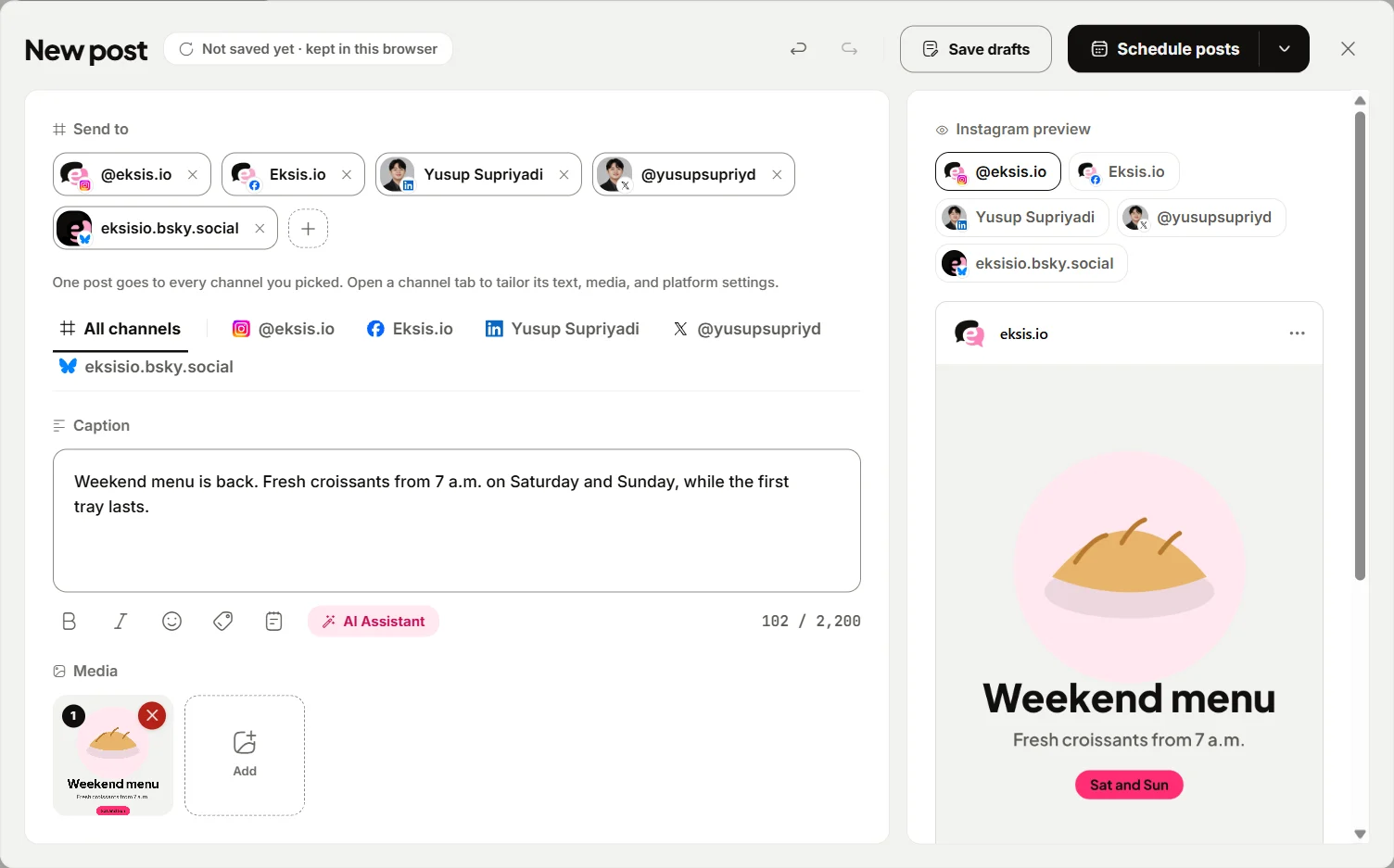
- Click Create post, pick the channels, and write the caption under All channels. Each channel gets its own tab, so you can shorten the X version or add a Pinterest board and title.
- Click Schedule and pick a date and time, or Save draft to finish later. Open Posts to see the Week, Month, or List view and drag a card to move it.
- Keep ideas on the Idea board under Create Idea, and start a post from any idea with Create post.
- On Starter, open Analytics to see post performance and Best hours to post worked out from your own posts.
Compare plans on eksis pricing, and see what each network supports on the Instagram, X, and Bluesky integration pages. If you are cross-posting text updates, read how to cross-post to Threads, Bluesky, and X.
Sources
- Later: Pricing
- Later: Social media management for small businesses
- Later Help Center: Choose a Later Social Plan
- Later Help Center: Manage Later Plan Add-ons, Users and Social Sets
- Buffer: Pricing
- Buffer: Pricing (machine-readable version)
- Publer: Pricing
- Publer Help: What are Publer's Plans and Pricing?
- Metricool: Pricing
- eksis: Pricing
All were read on October 24, 2026.
Frequently Asked Questions
Does Later support X (Twitter)?
No. Later's pricing page lists Instagram, Facebook, TikTok, Threads, YouTube, Pinterest, LinkedIn, and Snapchat as its supported networks. Buffer, Publer, Metricool, and eksis all publish to X, each with its own pricing for it.
What is a Social Set in Later?
A Social Set is a group of up to one profile from each network Later supports. Starter includes 1, Growth 2, and Scale 6. A second Instagram account needs a second Social Set.
What is the cheapest Later alternative for one small business?
On the pages we read, eksis Starter at $4 a month for up to 20 accounts and Publer Professional from $5 a month ($4 billed yearly) for one account are the lowest paid starting prices. Buffer and Metricool both have free plans that may be enough for a single owner. Compare on the networks you need, not only the price.
Which Later alternative has a link-in-bio page?
Buffer's Start Page, Publer's Linkie, and Metricool's link-in-bio pages all cover it. eksis does not offer a link-in-bio page.
Can I move my scheduled posts from Later to another tool?
Not automatically. Note what is scheduled for the next month, download your media, connect your accounts in the new tool, and run both for a week while Later's queue empties.