Black Friday social media plan for small shops: what to schedule before November 27
Black Friday is November 27, 2026, and Cyber Monday November 30. What to decide by November 15, what to schedule before the sale, how often to post during it, and how to keep up with comments and DMs while you pack orders.
7 min read



On this page
Black Friday is November 27, 2026, the day after Thanksgiving, and Cyber Monday is November 30. If you run a small shop, most of the social media work can be done this week and next, so that during the sale you are packing orders and answering customers instead of writing captions.
The short answer
- By November 15: decide the offer, the dates, and what you can ship and when. Write it down before you write any post.
- By November 20: write and schedule every post from now until December 1. Use photos and video you already have.
- During the sale: keep the posting pace you planned and spend the saved time on comments and DMs.
- Avoid: posting far more than you usually do, shipping promises you cannot keep, and closing comments on sale posts.
Decide the offer by November 15
Before any caption, settle the business details. Every post you schedule will repeat them, so changing them later means editing every post.
- The offer. A percentage off, a fixed amount off, free shipping over a threshold, or a bundle.
- The window. When the sale opens and when it closes, with the time zone.
- Shipping. How many orders you can pack in a day, the last order date for delivery before the holidays, and the shipping time you will advertise.
Then list the questions customers ask every time you run a sale: shipping time, sizes, stock, international delivery, returns. Write a short answer to each now. You will reuse these answers in captions, in a pinned post, and in saved replies.
Schedule the lead-up: November 12 to 26
Keep close to your normal pace. If you post once a day on Instagram most weeks, two weeks of sudden triple posting will look different from everything your followers know you for. Our guide to how often to post on social media has the platform-by-platform numbers from the studies if you want a reference point.
A simple shape for the two weeks before:
- The announcement. What is on sale, when it opens, and whether there is an early-access list or a waitlist.
- Product posts. One item or one bundle per post, with the photo people already respond to. A short video of the product in use works on Reels, TikTok, and Shorts.
- The answers post. Shipping times, last order dates, returns. Pin it on Instagram and TikTok so new visitors find it.
- The reminder. The day before the sale opens: the time it starts and where to buy.
If you plan in one sitting, our guide to planning a week of social media posts walks through the batching.
Schedule the sale weekend: November 27 to 30
During the sale your posts have one job: tell people the sale is on, what is in it, and when it ends. A workable plan for a small shop:
- Opening post on Friday morning: the offer, the end date and time, and where to buy.
- One product or proof post each day: a best seller, a bundle, or a short clip of orders being packed.
- A reminder on Sunday if your sale runs through the weekend.
- A last-call post on Cyber Monday, timed a few hours before the sale closes.
That is two or three posts a day at most. If you want to know which hours suit your audience, look at the platform data first; the best time to post on Instagram and on TikTok guides explain what the studies found and how to check your own numbers.
Comments and DMs during the sale
Sale posts bring questions, and a question left unanswered for a day is often a sale lost. Plan for it:
- Put the common answers where people look. Pinned post, highlights, link in bio.
- Prepare short replies to the questions you listed earlier, so you can paste rather than type.
- Check at set times. Morning, midday, and evening is enough for most small shops, plus one last check before you sleep on the busiest days.
- Do not close comments. Customers ask about sizes, stock, and shipping there, and other buyers read the answers.
What not to do
- Don't promise faster shipping than you can pack. If you usually ship in three to five business days, advertise five.
- Don't change the offer mid-sale unless you also edit every scheduled post that mentions it.
- Don't schedule more posts than you can check. Each post brings comments, and you are the one answering them.
- Don't run a giveaway on top of the sale unless you have time to run it fairly; see how to run a comment giveaway people can trust.
Schedule the sale and answer customers in eksis
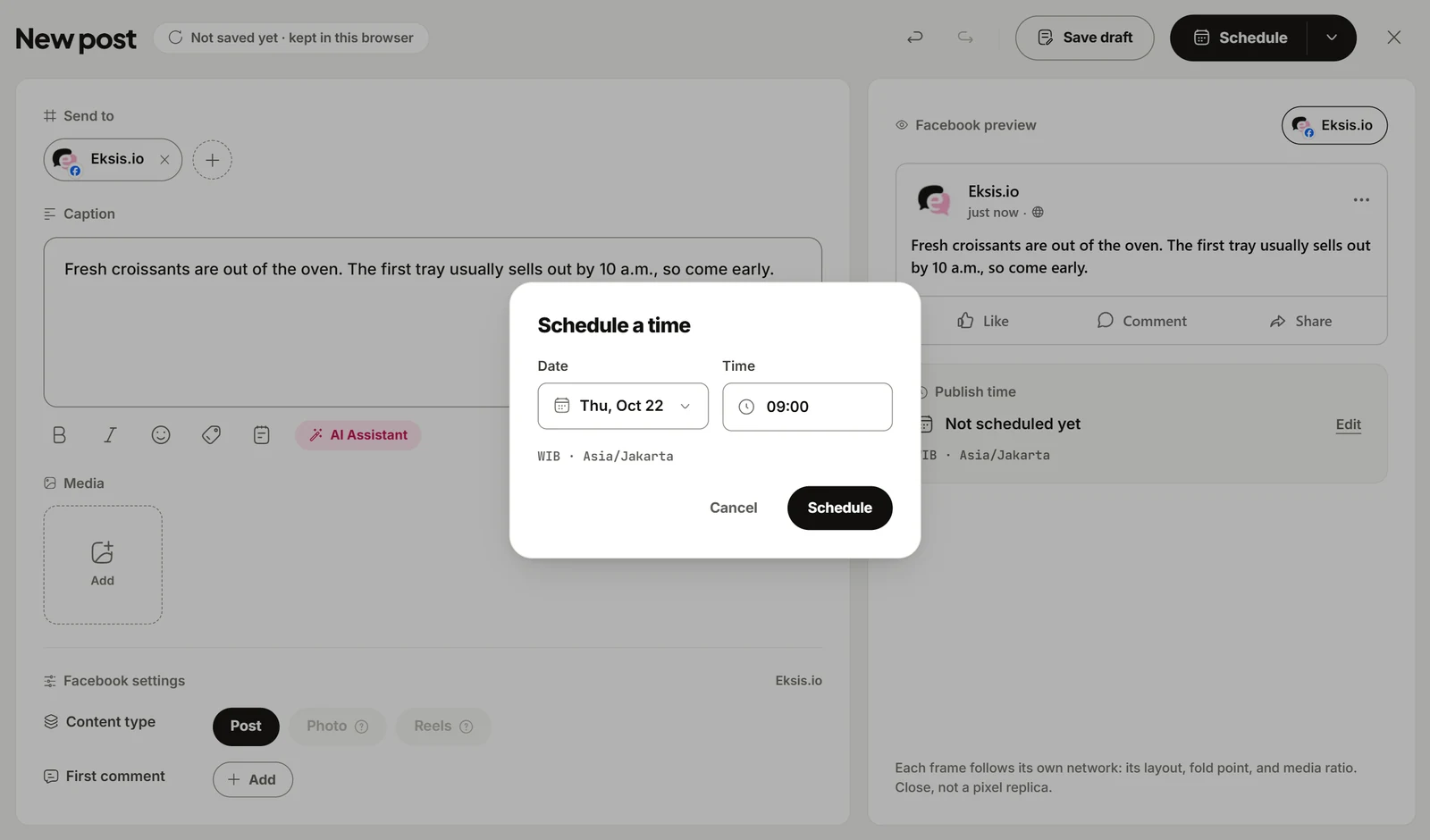
In eksis you can write the whole two weeks in one sitting and see it on one calendar. Click Create post, pick your Instagram, Facebook, TikTok, and other channels, write one caption or a different one per channel, and click Edit next to Publish time to pick the date and time. The posts appear in Posts on a Week, Month, or List view, where you can drag one to another time if the plan changes.
For questions during the sale, the eksis Inbox collects comments from Instagram, Facebook, YouTube, Threads, X, and Bluesky, grouped by post, so you can answer them without opening each app. TikTok, LinkedIn, and Pinterest do not give outside apps access to comments, so answer those in their own apps. Save your prepared answers under Settings, Saved replies and insert one by typing / in the reply box. On Pro Eksis, the Inbox also holds Instagram and Facebook DMs; those platforms only accept a reply within 24 hours of the customer's last message.
If the same question keeps coming in on Instagram or Facebook, an automation can answer it. One of the ready-made Templates answers a price question in public and sends the details by DM, and a keyword trigger works for words like "shipping" or "size". Automations have limits that are on by default: a comment triggers an automation once, one person gets at most one automated DM a day, and an automation runs at most 60 actions an hour. Before you switch one on, read comment and DM automation without getting your account restricted, and how to auto reply to Instagram comments for the setup.
Plans and limits
The Free plan connects one social account, schedules up to 15 posts a month, keeps 7 days of Inbox history, and allows one active automation. Pro Eksis is $3 a month for up to 20 accounts, no monthly post limit, two seats, Instagram and Facebook DMs, 30 days of Inbox history, and no limit on automations. See compare plans.
After the sale
On December 1, thank your customers and say when orders will ship. If you sold out of something, say whether it is coming back. Then look at what happened while it is fresh: which posts brought the most questions, which product sold, and which questions you could have answered in the caption. Our monthly social media review is a good format for that look back.
Sources
- eksis docs: The inbox (read November 11, 2026)
- eksis docs: Automations (read November 11, 2026)
- eksis pricing
Frequently Asked Questions
When is Black Friday 2026?
Black Friday is Friday, November 27, 2026, the day after Thanksgiving in the United States. Cyber Monday is November 30, 2026.
How many posts should I schedule for Black Friday?
Stay close to your normal pace. Two or three posts a day during the sale weekend is plenty for a small shop, as long as you can answer the comments they bring.
Can I schedule Black Friday posts weeks in advance?
Yes. Once the offer, dates, and shipping times are settled, you can schedule every post up to the end of the sale in one sitting and adjust the times later.
Can I auto reply to Black Friday comments?
On Instagram and Facebook, yes, with a keyword automation in eksis or a similar tool. TikTok, LinkedIn, and Pinterest do not let outside apps read or answer comments, so reply there in the app.