Stop judging posts in 48 hours: a monthly review habit for small brands
Two days of numbers from one post is a noisy sample. Here is a five-minute daily check for problems and a 45-minute monthly review for decisions, with five questions, a one-page log, and a quarterly look at the slow signals.
9 min read



On this page
It is easy to check a post an hour after it goes out, again the next morning, and decide by the second day whether it "worked". For a small brand that habit causes more harm than good. Two days of numbers from one post is a small, noisy sample, and decisions made on it tend to swing your content in a new direction every week.
A better rhythm is a quick daily check for problems and one monthly review for decisions. The daily check asks whether anything broke. The monthly review asks what to do more of, less of, and what to test next, using a full month of posts that have had time to settle. This guide gives you a 45-minute monthly review you can run alone.
The short answer
- In the first 48 hours, look for problems only: a failed post, a broken link, comments that need an answer.
- Make content decisions once a month, on posts that are at least a week old.
- Compare every post with your median post for the month, not with your best post ever.
- Answer five questions in the review and write the answers down on one page.
- Change no more than three things for next month, so you can tell what made the difference.
- Once a quarter, add the slow signals that a monthly view misses: follower trend, messages, and what customers tell you.
Why 48 hours is the wrong time to judge
In an interview in Link in Bio, Rachel Karten's newsletter, Shinola's director of marketing Dana Mosa-Basha described the habit of launching something, looking at the first 24, 48, or 72 hours, and making a big judgment call about whether it worked. Her point was that this is not how people form relationships with brands, and that brands confuse what is measurable with what is meaningful.
There are also practical reasons the first two days mislead:
- Posts keep collecting views. Instagram notes that trial reels, which go to people who do not follow you, may take longer to get views. Any post that is still being recommended is still growing.
- One post is one data point. A topic, a day of the week, or a news event can move one post's numbers more than the content itself did.
Early data does have one good use: comparing like with like. YouTube Studio's Advanced mode includes a special report for the first 24 hours of video performance, which lets you compare how different videos started under the same conditions. That is a fair comparison. Judging a post's final value from its first day is not.
What to check daily, and what to leave alone
Keep the daily check to five minutes:
- Did every scheduled post go out?
- Is the link, price, date, or tag in each new post correct?
- Are there comments or messages that need a reply today?
- Did anything unusual happen, such as a complaint, a press mention, or a sudden spike in one post?
Fix problems. Answer people. Do not delete a post because it is quiet on day one, and do not rewrite next week's plan because of it.
The monthly review in 45 minutes
Run it in the first week of each month, on the posts you published in the previous month. By then even the last posts of the month have had several days.
1. Pull the numbers (10 minutes)
For each post: date, platform, format, topic, reach, engagements, engagement rate (engagements divided by reach), and anything else you care about, such as saves, shares, link clicks, or profile visits.
Do this every month, not every quarter, because platform insights do not keep everything forever. Instagram's help center says account and content insights cover any period within the past 90 days, so a monthly habit keeps you well inside that window.
2. Find the median (5 minutes)
Sort the month's posts by reach and pick the middle one. Do the same for engagement rate. That median post is your baseline for the month. If you post on several platforms, work out a median for each, since a normal reel and a normal LinkedIn post are not comparable.
3. Answer five questions (20 minutes)
- Which three posts beat the median by the most, and what do they have in common? Be specific about topic, format, and the opening.
- Which three posts did worst, and is there a shared reason, or was it bad luck?
- Which format or topic beat the median more than once? One win is a hint. Two or three is a pattern.
- What did people say? Read the comments and messages from the month. Repeated questions are next month's posts.
- What will you change next month? Pick up to three things: something to do more of, something to stop, and one test.
4. Write it down (10 minutes)
Keep a one-page log, with one entry per month. It can be a document or a spreadsheet tab:
| Month | What worked | What did not | Questions people asked | Next month: more, stop, test |
|---|---|---|---|---|
| September | Process videos under 30 seconds, all three above median | Promo graphics, all below median | "Do you ship?" (4 times) | More process videos, stop static promos, test a shipping FAQ carousel |
The log matters more than any single review. After three or four months, you can read back and see whether last month's changes worked, which is the only way to know your reviews are leading anywhere.
Common mistakes in monthly reviews
- Comparing with your best post ever. Your best post is an outlier by definition. Compare with this month's median.
- Changing everything at once. If you change format, topic, posting time, and caption style together, you will not know which one mattered. Three changes is plenty.
- Reading percentages on tiny numbers. A post with 40 reach and 6 engagements has a high rate that tells you very little. Note it, and look for the same result on bigger posts.
- Ignoring the comments. The numbers tell you what happened. The comments often tell you why.
- Reviewing without deciding. A review that ends without a change for next month was a reading exercise.
Add the slow signals once a quarter
Mosa-Basha argued that some of the most valuable things a brand does are hard to attribute, such as someone seeing you several times over months before deciding they like what you stand for. A monthly review of post numbers will not catch that. Every third month, add a short look at:
- Follower trend across the quarter, not month to month.
- Direct messages and enquiries that came from social, and what they asked for.
- What customers say when you ask how they found you.
- Posts people still mention or send to friends weeks later.
These do not give you one tidy number. They tell you whether the account is building something that the monthly figures cannot show.
Run the monthly review in eksis
eksis Analytics covers most of the review in one screen. It starts on Starter.
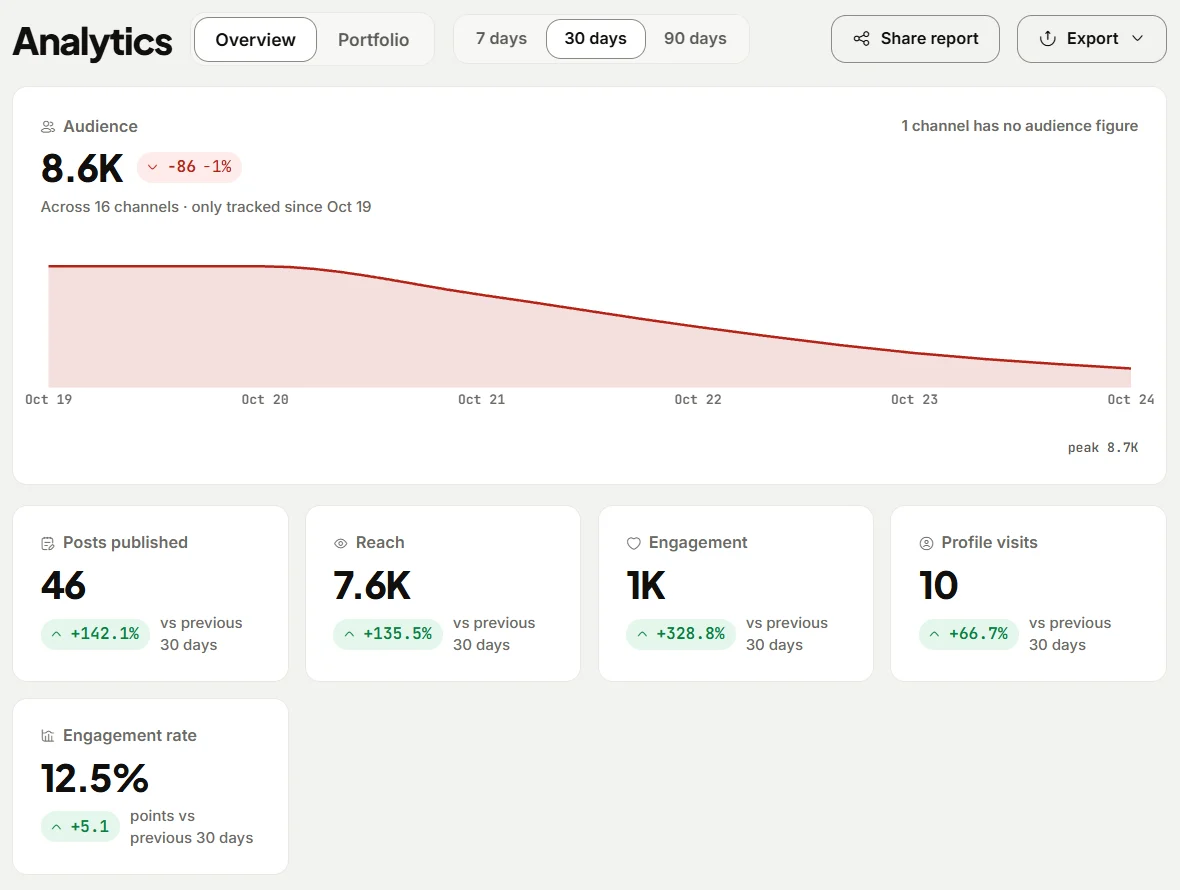
- Pull the numbers. Open Analytics and choose 30 days. Each summary number is compared with the previous 30 days. Post performance lists reach, engagement, profile visits, and engagement rate for each post, sortable by any column, including posts you published from the network's own app. Analytics offers 7, 30, and 90 days rather than calendar months, so run the review on the same day each month to keep the periods comparable.
- Export. Choose Export and pick Posts for the per-post table, or Excel workbook to get Summary, Posts, Channels, Daily followers, and Hours as separate sheets with charts, in one file that opens in Excel or Google Sheets. The post list holds the 200 most recent posts in the period.
- Know when numbers are final. Numbers usually arrive within an hour of publishing, refresh often while a post is new, and stop updating 30 days after it went out. A 30-day review in the first week of the month therefore includes some posts that are still collecting.
- Look by channel. To review one platform, select Insights under that channel in the sidebar. Best hours to post and Top posts follow the same filter.
- Ask the Assistant. On Home, the "Find what worked" suggestion looks at your best posts from the last 30 days, and "Compare your channels" shows reach and engagement by channel as a chart. Use the answers as a starting point for the five questions, not as the review itself.
- Plan next month. Put the three changes on the Idea board under Create Idea as ideas, then schedule them in Posts using the Month view.
On Agency, Share report creates a link to the current Analytics view that clients can open without an eksis account, which is useful if you run this review for someone else. The Free plan has no Analytics, so on Free, read each platform's own insights. LinkedIn statistics are not available in eksis, so review LinkedIn in LinkedIn's own analytics. See plans and our guide to the social media metrics worth tracking.
Related reading
- Is your account stalled? A two-week plan to restart your reach
- How to remix your best posts without repeating yourself
- How often to post on social media in 2026
Sources
- Link in Bio: Is your social strategy memorable?, interview with Dana Mosa-Basha of Shinola
- Instagram Help Center: View account and content insights on Instagram
- Instagram Help Center: About Trial Reels on Instagram
- YouTube Help: Learn how to use Advanced mode for analytics reports
All were read on October 24, 2026.
Frequently Asked Questions
How soon can I tell if a social media post worked?
You can tell within a day whether something went wrong, such as a failed post or a broken link. Whether the content worked is better judged once it is at least a week old and compared with your other posts from the same month.
How often should a small business review its social media analytics?
A quick daily check for problems and a full review once a month is enough for most small businesses. Add a quarterly look at slower signals such as follower trend, enquiries, and what customers say about how they found you.
What should a monthly social media report include?
The month's median reach and engagement rate, the top and bottom three posts with a reason for each, formats or topics that beat the median more than once, questions people asked, and up to three changes for next month.
How far back can I see Instagram insights?
Instagram's help center says you can view account and content insights for any period within the past 90 days. Reviewing every month keeps your data well inside that window.
Why don't my eksis Analytics numbers change after a month?
eksis stops updating a post's numbers 30 days after it went out. Until then it refreshes them often while the post is new and less often as it ages.