Is your account stalled? A two-week plan to restart your reach
Reach drops for ordinary reasons all the time. Here is how to tell a real stall from normal variation, review your last 30 posts, and test three formats in a ten-day sprint, with Instagram's Trial Reels as an optional safety net.
12 min read



On this page
Your posts used to reach a few thousand people, and for the last month they reach a few hundred. Before you change everything, check whether the account has actually stalled. Reach swings from week to week for ordinary reasons: a holiday, a weaker topic, one post that took off and made the next ones look small.
A real stall looks different. The drop shows up across several weeks, across formats, and in the reach you get from people who do not follow you yet. If that is what you see, the fix is a short, structured test, not a full rebrand. This guide gives you a two-week plan: a week-zero check that rules out the boring explanations, a review of your last 30 posts, and a sprint that tests three formats against each other, with Instagram's Trial Reels as an optional safety net.
The short answer
- Compare medians, not single posts. A stall is when your median reach per post stays down for three or more weeks across most formats.
- Rule out the account first. On Instagram, Account Status shows whether your account or content is ineligible for recommendations.
- Review your last 30 posts in one sitting. Sort them by reach and engagement rate and write down what the top and bottom groups have in common.
- Test three formats with three posts each over ten days, scheduled ahead so the sprint does not depend on free time.
- On Instagram, Trial Reels let you show a reel to non-followers first, if your account is eligible.
- Keep what beats your old median, change what is close, and drop what loses.
Stall or normal variation?
Most small accounts have a handful of posts that do far better than the rest. If last month included one of those, this month will look like a decline even if nothing changed. So before you call it a stall, look at three things.
Use the median, not the average
The average is pulled up by the one post that went wide. The median (the middle post when you sort them all) tells you what a typical post does. Work out the median reach for the last four weeks and for the four weeks before that. A drop of a few percent is noise. A drop that holds week after week is a signal.
Check whether the drop is everywhere
If your carousels are down but your short videos are steady, the problem is one format, not the account. If everything is down by a similar amount, something broader changed: the account, the audience, or how the platform treats your posts.
Look at where the reach comes from
Reach from followers and reach from non-followers tell different stories. Instagram explains that its Feed is a mix of posts from accounts you follow and recommended posts, while most of what people see in Reels and Explore comes from accounts they do not follow. If your follower reach is steady and non-follower reach collapsed, recommendations are the place to look.
Rule out a recommendation problem
Instagram says Account Status is the best way to understand whether your account and content are eligible to be recommended, and that an account that repeatedly posts content against its Recommendation Guidelines or Community Standards can lose eligibility for all of its posts for a period of time. Open Settings, then Account Status, and check for removed content or features you can no longer use.
While you are there, check the habits that quietly lower distribution. Instagram's help center lists the reels it shows less often: muted, blurry, or low-resolution reels, reels with borders, logos, or watermarks, reels mostly covered by text, and reels that are not original. Instagram's ranking explainer adds reels that have already been posted on Instagram. Followers still see those reels; what drops is reach to new people.
If Account Status is clear and your production habits are clean, you are looking at a content problem, and the next two weeks are for that.
Why accounts stall
In a piece for Link in Bio, the newsletter by Rachel Karten, strategist Matthew Stasoff groups the causes into changes on the platform, changes in the brand, and changes in the audience. That matches what small businesses usually find when they look back: a format that used to travel stopped traveling, the account drifted away from the topic people followed it for, or followers simply got tired of seeing the same kind of post.
You do not need to know which one it is before you start. The 30-post review below usually points to it.
Days 1 to 3: review your last 30 posts
Thirty posts is enough to see patterns and small enough to finish in one sitting. Stasoff suggests the same exercise in the Link in Bio piece: look back at the last 30 posts and ask what you would change, from the hook to the tone. Here is a way to make that concrete.
- Put the posts in a spreadsheet with one row each: date, format (reel, carousel, photo, text), topic, the first line or opening shot, reach, engagements, and engagement rate (engagements divided by reach).
- Sort by reach and mark the top five and the bottom five. Then sort by engagement rate and do the same. A post can reach many people and still have a low rate, which usually means the opening worked and the rest did not.
- For each group, write one sentence about what the posts share. Be specific: "all start with the finished product", "all are talking-head videos over 60 seconds", "all are promotions".
- Check the dates. If the top group is mostly older than the bottom group, note what you stopped doing.
- Write down three questions the review raises, such as "Do process videos still work?" or "Is the price post the problem, or the format we use for it?" These become your test.
Two cautions. First, compare posts of the same format with each other, so a format that usually reaches more people does not hide a weak post. Second, ignore posts from the last few days, which are still collecting views.
Days 4 to 5: choose three formats to test
Stasoff's suggestion in Link in Bio is a sprint of five new formats with five pieces each, dropping any idea that cannot stretch to five. For a business run by one or two people, 25 new posts in a short window is a lot. A smaller version keeps the same logic:
- Pick three formats. One should be a fix to something you already make (a shorter version, a new opening, a different cover). One should be something your review suggests your audience wants. One should be a genuine stretch you have not tried.
- Plan three posts per format, nine in total. Three is the minimum that tells you more than luck does, and if you cannot think of three posts in a format, it is not a format you can keep up.
- Keep everything else steady. Post at your usual times, keep the topic close to what the account is about, and do not change your bio, name, and grid at the same time as the test.
Examples for a small bakery: a 20-second reel that opens on the cut loaf instead of the dough (fix), a carousel answering the questions customers ask most in comments (audience), and a weekly "what we got wrong" post about a failed bake (stretch).
Days 6 to 12: run the sprint
Make all nine posts before day six if you can, and schedule them. A sprint that depends on finding time each day turns into four posts and a gap. Space them so each format appears early, mid, and late in the week, which stops one format from getting all the good slots.
Use Trial Reels on Instagram
For reels, Instagram offers a way to test with strangers first. Instagram introduced trial reels as "a new way to try out content and see what performs best" by sharing reels with people who do not follow you. According to Instagram's help center and creators blog:
- You need a public account. Professional (business or creator) accounts need at least 200 followers, personal accounts at least 1,000.
- If your account is ineligible to appear in recommendations, you lose access to trial reels until it is eligible again.
- Turn on Trial before you share. Followers will not see the reel in Feed or Reels, and it does not appear on your profile unless you share it to everyone. Some followers can still come across it, for example if someone sends it to them.
- Insights such as views, likes, comments, and shares appear within about 24 hours.
- You can share a trial reel to everyone at any time, or turn on Share to everyone automatically so Instagram shares it if it performs well soon after posting. Instagram's creators blog describes that decision as based on views in the first 72 hours.
- Make a new reel for each trial. Instagram warns that a trial may get limited reach if it detects you have already shared the same content.
- Trial reels are evaluated separately and do not affect how your standard reels are ranked.
Instagram also notes that trial reels may take longer to get views because they go to people who do not follow you. Give them the full window before you judge them.
Days 13 to 14: read the results and decide
Pull the same numbers you used in the review for the nine new posts. Then compare each format to the median of your last 30 posts, not to your single best post.
- Clearly above the median on reach and engagement rate: keep it and plan four more.
- Close to the median: keep the format but change one thing (the opening, the length, the cover) and run three more.
- Below the median on both: drop it for now. Note why you think it failed, because the reason often helps the next idea.
If nothing beats the median, your problem may not be format at all. Go back to your three questions from the review. A common finding for small accounts is that the topics drifted: the account started as a place to see how something is made and slowly became a place for promotions.
Then set a date four weeks out to look again. One good sprint does not undo a stall, and one bad sprint does not confirm one.
Run the two weeks in eksis
eksis covers the planning, scheduling, and reading parts of this plan. The trial step happens in the Instagram app, because eksis publishes regular reels and does not offer trial reels.
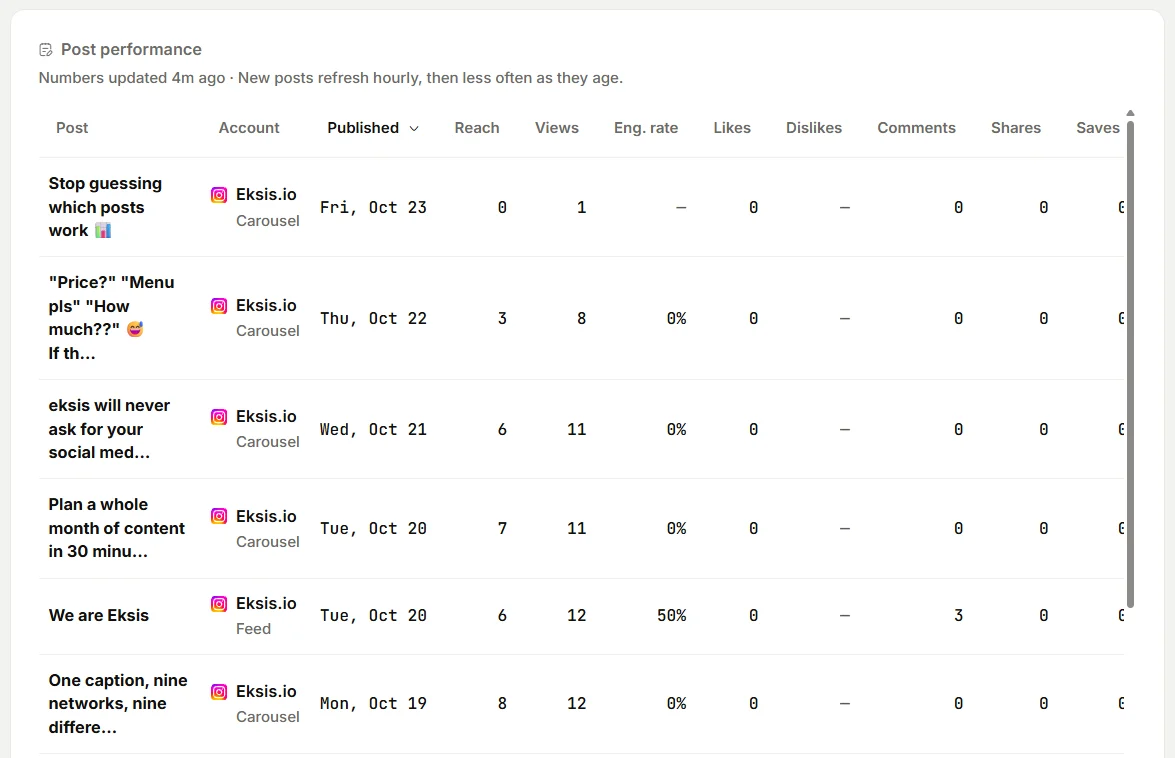
- Review. Open Analytics, choose 30 days or 90 days, and read Post performance. It lists reach, engagement, profile visits, and engagement rate for each post, and you can sort by any column. Posts you published from the network's own app count too. To work in a spreadsheet, choose Export and pick Posts. Top posts shows the most engaged posts of the period, and Best hours to post is worked out from your own posts, with faded bars where an hour rests on a single post.
- Plan. Open Create Idea in the sidebar to reach the Idea board. Add a column for the sprint, add each of the nine posts as a New idea, and tag it with its format so you can filter by tag later.
- Write and schedule. On each idea, choose Create post. Pick the channels, then choose Schedule and Schedule a time for the date and hour. Times follow your workspace time zone under Settings, General, Time zone.
- Check the week. Posts shows the calendar in Week, Month, or List view. Drag a card to move a post if two formats ended up on the same day.
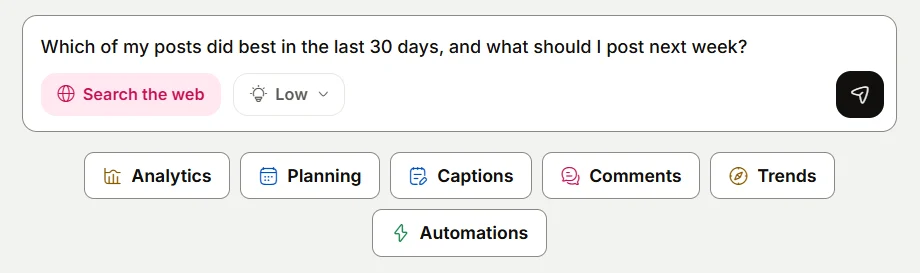
- Ask. The Assistant on Home can read your analytics: try the "Find what worked" suggestion, or ask it to compare the sprint posts with your earlier ones. It can also save drafts, which you then open in the composer to add media and schedule.
Analytics starts on Starter. The Free plan connects one account, allows 15 scheduled posts a month (enough for the nine-post sprint), and shows no Analytics, so on Free you would read the numbers in each platform's own insights. Instagram's insights cover any period within the past 90 days, which is enough for a 30-post review on most accounts. See plans and the Instagram integration.
Related reading
- The social media metrics worth tracking
- How often to post on social media in 2026
- How to plan a week of social media posts in one sitting
Sources
- Link in Bio: What to do when your social strategy stalls, by Matthew Stasoff
- Instagram Creators: Trial reels, try content with non-followers first
- Instagram Help Center: About Trial Reels on Instagram
- Instagram Help Center: Check your Account Status on Instagram
- Instagram: Instagram Ranking Explained, by Adam Mosseri
- Instagram Help Center: What kind of reels you may see on Instagram
- Instagram Help Center: View account and content insights on Instagram
All were read on October 24, 2026.
Frequently Asked Questions
How do I know if my Instagram account is really stalled?
Compare the median reach per post for the last four weeks with the four weeks before. If it stays down for three or more weeks and the drop shows up across most formats, treat it as a stall. A drop in one format, or one quiet week after a post that went wide, is normal variation.
Should I check Account Status before changing my content?
Yes. Instagram says Account Status is the best way to see whether your account and content are eligible to be recommended. If something there limits your reach, new formats will not fix it. Resolve or appeal the issue first.
Who can use Instagram Trial Reels?
Public accounts that meet a follower minimum: 200 followers for a professional (business or creator) account and 1,000 for a personal account. An account that is not eligible to appear in recommendations loses access to trial reels until it is eligible again.
How many posts do I need to test a new format?
At least three per format. One post can do well or badly for reasons that have nothing to do with the format, such as the topic or the day. Three posts give you enough to see whether a result repeats.
Can eksis post Instagram Trial Reels?
No. eksis publishes regular reels to Instagram, so share trial reels from the Instagram app. eksis can schedule the rest of the sprint and, from Starter, show the results in Analytics.