How to build a creator rate card: pricing by format, usage rights, and exclusivity
A rate card prices each format from your own time, then adds separate fees for usage rights, ads from your handle, and exclusivity. How to set each line, checked against OpenSponsorship's study of 1,527 paid deliverables and other named sources.
11 min read



On this page
A creator rate card lists a base price for each format you make, then separate prices for what a brand might add on top: running your post as an ad, reusing it on its own channels, keeping you away from competitors, extra revisions, or a rush. The base price covers the work. The add-ons cover the rights you hand over and the deals you give up.
Most rate card advice starts from follower count. A better start is your own time and your own results, checked against published pricing data so you know where you sit. This guide walks through each part, with figures from named sources and their sample sizes where they give them. eksis makes a scheduler with an Analytics screen creators use to show brands their numbers, which we cover at the end.
The short answer
- Price each format separately (a static post, a carousel, a short video, a long video, a Story), because the hours behind each one differ.
- Work out a base rate from your hours and costs, then compare it with published data. OpenSponsorship's study of 1,527 paid deliverables found a median of $134 per deliverable for creators under 10,000 followers and $150 for 10,000 to 50,000.
- Charge for usage rights separately. impact.com's creator guidance puts the usual add-on at 20 to 50% of the base rate, and Buffer's in-house creators charge about 30 to 60% for ad use.
- Price exclusivity on what it stops you from accepting, with a clear category and end date.
- Put disclosure, revision rounds, and payment terms on the card too. In the US, the FTC says disclosing a paid relationship is the creator's responsibility.
What goes on a rate card
A useful rate card fits on one page and has five parts:
- A short audience snapshot: platforms, followers, typical reach or views, engagement, and where your audience lives.
- Base rates by format and platform.
- Add-ons: usage rights, allowlisting or partnership ads, exclusivity, extra platforms, extra revisions, rush delivery.
- Bundles, if you offer them: for example three posts over six weeks.
- Terms: what one revision round means, payment timing, how you disclose, and how long the quote is valid.
Step 1: Price each format from your time
Start with the hours. List every step of one deliverable: brief and emails, scripting, setup, filming or shooting, editing, revisions, posting, and reporting back. Multiply by the hourly rate you need, and add costs such as props, travel, or software.
Buffer published the rates of three creators on its own team in October 2026. All three are mid-size creators in software and tech, mostly on LinkedIn, so their numbers describe that niche, not creators in general. One of them timed a single short video at about 11 hours, from admin and scripting to editing and revisions, and her $900 to $1,200 video rate works out to roughly $80 to $110 an hour. Timing one deal from first email to final revision is the fastest way to see whether your price covers your work.
Formats differ more than most creators expect. The same three creators charge $500 to $1,000 for a LinkedIn text or single-image post and $900 to $4,000 for a short video, with the top of that range for videos with separate animation or a complicated edit.
Step 2: Check your number against published data
Published rates disagree with each other because they measure different things: survey answers, listed asking prices, or what brands actually paid. Two sources worth knowing:
| Source | What it measures | Sample | What it found |
|---|---|---|---|
| OpenSponsorship | Cash paid per completed deliverable, medians | 1,527 deliverables, January 2025 to June 2026 | Under 10K followers: $134. 10K to 50K: $150. 50K to 250K: $417. 250K to 1M: $517. Over 1M: $2,727 |
| Buffer | Rates of three of its own creators, by interview | 3 creators, US software and tech niche | LinkedIn text or single image: $500 to $1,000. Short video: $900 to $4,000 |
The gap between the two is large, and both can be right. OpenSponsorship's medians include posts priced inside multi-post bundles, count cash only (gifted product is excluded), use current follower counts, and lean toward sports, wellness, food, and lifestyle creators, as the company says itself. Its over-1M tier rests on 53 deliverables. Buffer's figures come from three people in a niche that, in the author's words, has historically paid well.
What the OpenSponsorship data adds is a different way to argue your price. Its smaller creators had the lowest median cost per engagement: about $3.05 for 10K to 50K followers and $3.11 under 10K, against $7.07 for 50K to 250K. If your engagement is strong, quoting it next to your price is more persuasive than your follower count.
Step 3: Price usage rights separately
Your base rate covers a post on your own account. Anything beyond that is a separate right with its own price. The three common cases:
- Organic only. The post lives on your profile, and the brand can share or link to it.
- Brand reuse. The brand uses your content on its own channels: its website, emails, or ads from its own account. impact.com calls this usage rights.
- Ads from your handle. The brand pays to run your post as an ad under your name. On Meta this is a partnership ad, and on TikTok it is a Spark Ad. impact.com calls this content boosting or allowlisting.
The platforms put you in control of the third case. Meta's help center says advertisers need your permission to run partnership ads with your handle, that permission can be for one post or for your whole account, and you can revoke it at any time. TikTok's Spark Ads use an authorization code from the creator, whose duration can be customized, and a video has to be un-authorized as a Spark Ad before it can be deleted from your account. Match the length of your usage terms to the permission you grant.
What to charge, from the sources we read:
| Source | Basis | Usage rights add-on |
|---|---|---|
| impact.com creator guide | Practitioner interviews, no sample size | Most creators add 20 to 50% of the base rate. Monthly fee by tier: 0 to 50% (under 15K followers), 25 to 75% (15K to 75K), 40 to 100% (75K to 250K) |
| impact.com creator guide | Same | Boosting from your handle: 5 to 20% of the brand's ad spend |
| Buffer's in-house creators | Interviews with its own team | About 30 to 60% for letting a brand run the post as an ad; one charges +35% for 90 days and +50% for six months |
Perpetual rights, meaning the brand can use the content forever, are priced highest or not offered at all. One of Buffer's creators sold them once, for a high-production video, while the colleague with the new rate card does not offer them. Whatever you choose, write the channels, the duration, and whether the brand may edit the content into the agreement.
Step 4: Price exclusivity by what it blocks
Exclusivity means you agree not to work with a brand's competitors for a set time. impact.com's guidance puts it at 20 to 100% of the base rate, depending on the length and the brand's size. One of Buffer's creators adds about 20%, another prices it on what it would stop her from taking, and a Buffer colleague who built her first rate card for the article charges +50% for three months.
Two details change the price more than the percentage does:
- The category. "Other project management apps" blocks far less than "other software companies". Ask for a named competitor list.
- The window. A blackout of 30 days on either side of a monthly post becomes a year of exclusivity if the deal runs for a year, as one of Buffer's creators found. Count the total days, not the days per post.
Step 5: Add the terms
- Revisions. State how many rounds are included and at what stage. Two of Buffer's creators cap revisions at the script, because a change after filming usually means reshooting the whole video.
- Disclosure. The FTC's guide for influencers says to disclose any financial, employment, personal, or family relationship with a brand, in the post itself, in clear words such as "ad", "sponsored", or "Thanks to [brand] for the free product". In a video, the disclosure belongs in the video, not only the description. The FTC also says not to rely only on a platform's disclosure tool, though using it as well is fine.
- Payment. Say when you invoice (on signing, on posting, or split) and how long the brand has to pay.
- Validity. Rates change, so date the card.
An example rate card
The numbers below are made up to show the structure and the math. They are not a recommendation for your rates.
| Item | Price |
|---|---|
| Instagram Reel or TikTok video, 30 to 60 seconds | $400 |
| Instagram carousel, up to 10 slides | $300 |
| Story set, 3 frames with a link | $150 |
| Same video on a second platform | +$150 |
| Brand reuse on its own channels, 3 months | +40% of base |
| Partnership ad or Spark Ad from my handle, 30 days | +50% of base |
| Category exclusivity, 30 days, named competitors | +30% of base |
| Extra revision round after script sign-off | $75 |
| Rush delivery, under 5 working days | +25% |
A brand that wants one video with a 30-day partnership ad and 30 days of exclusivity would pay $400 + $200 + $120 = $720.
When to raise your rates
Raise them when you have proof, not on a schedule. Buffer's creators describe three kinds: a brand's own report showing your content beat other creators on its campaign, strong engagement on your first sponsored posts, and brands coming back to book you again. Keep discounts for long-term deals that save you negotiation time, rather than one-off posts you hope will lead to more work.
Show your numbers with eksis
eksis is a scheduler, not a marketplace, so it will not find you brand deals. It can help with the two practical parts: proving your numbers and getting sponsored posts out on time.
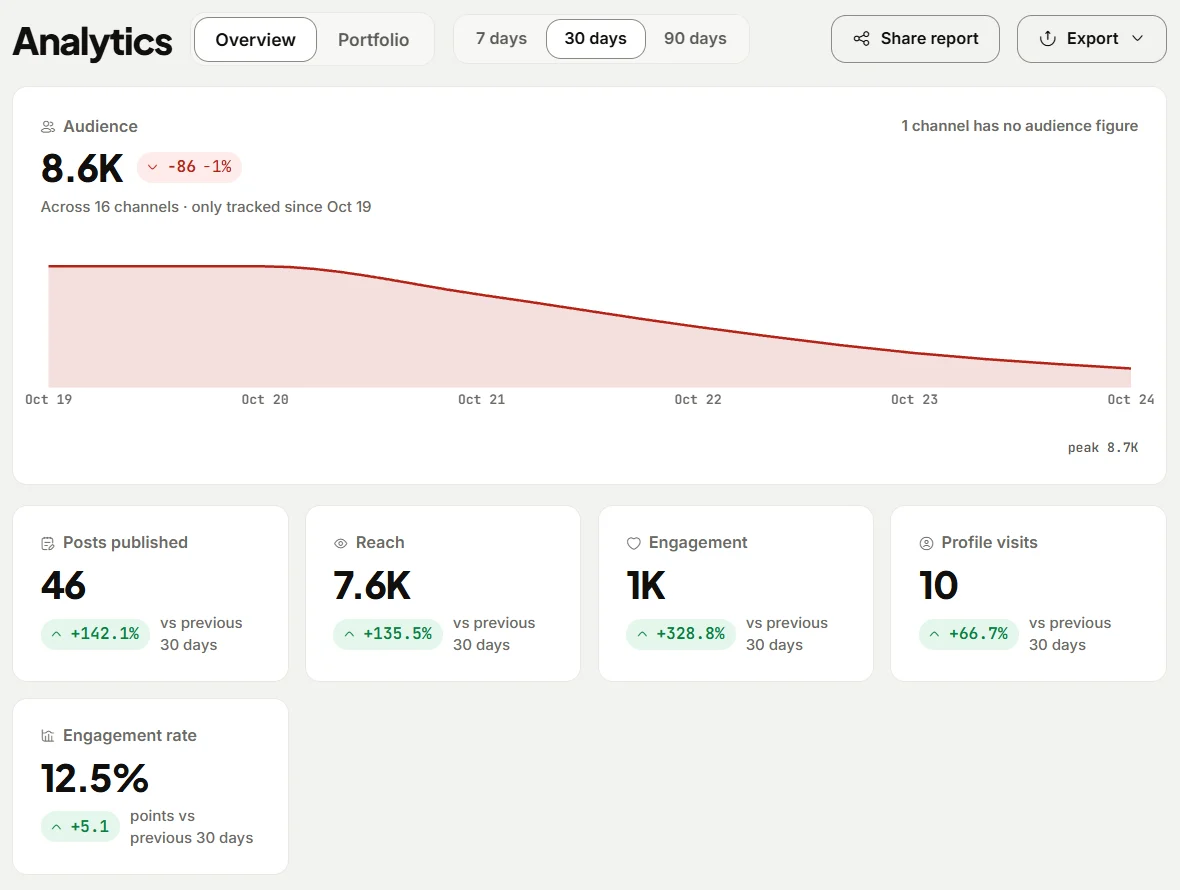
- Connect your accounts and open Analytics (Starter and above; Free has no Analytics). Pick 30 or 90 days to see reach, engagement, profile visits, and engagement rate for each post, plus follower growth per channel. Posts you published from the network's own app count too.
- Open the Portfolio view to build a public page with your channels' numbers, a name, and a bio. Switch it on, pick the channels, and copy the link to send to brands with your rate card.
- Use Export to download Posts or Summary as CSV, or the Excel workbook, when a brand asks for a performance report after a campaign.
- Check Best hours to post before you agree to a posting time in a brief.
- Schedule the sponsored post with Create post. On the TikTok tab, turn on "This post promotes a brand, product, or service" and choose Branded content, and TikTok labels it "Paid partnership". Still write your own disclosure in the caption and, for video, in the video itself.
eksis has no LinkedIn statistics, because LinkedIn shares them only with apps approved for its Community Management API, so LinkedIn creators need LinkedIn's own analytics for their card. See eksis pricing for what each plan includes, the TikTok integration, and our guide to the social media metrics worth tracking.
Sources
- Buffer: What to charge for a sponsored post, real rates from 3 creators on our team
- OpenSponsorship: Nano vs micro vs mega influencer pricing (2026 data)
- impact.com: How much to charge for usage rights as an influencer
- Meta Business Help Center: About partnership ad permissions
- TikTok Ads Manager Help: About Spark Ads
- FTC: Disclosures 101 for Social Media Influencers
- eksis docs: Analytics
- eksis docs: Connect TikTok
All were read on October 24, 2026.
Frequently Asked Questions
How much should a small creator charge per post?
There is no single figure. OpenSponsorship's study of 1,527 paid deliverables found medians of $134 for creators under 10,000 followers and $150 for 10,000 to 50,000, while three software and tech creators interviewed by Buffer charge $500 to $1,000 for a LinkedIn text post. Work out your own base from the hours a post takes, then check where it sits.
How much should I charge for usage rights?
impact.com's guidance says most creators add 20 to 50% of their base rate, more for longer terms, more channels, or perpetual use. Buffer's in-house creators charge about 30 to 60% extra for letting a brand run their post as an ad. Put the duration and channels in writing.
What is the difference between usage rights and whitelisting?
Usage rights let a brand reuse your content on its own channels. Whitelisting or allowlisting lets a brand run ads from your handle, such as Meta partnership ads or TikTok Spark Ads, which need your permission and which you can limit or revoke.
How much should exclusivity cost?
impact.com puts exclusivity at 20 to 100% of the base rate, depending on length and the brand's size. Price it on what it blocks, and insist on a named competitor list and an end date.
Do I need to disclose sponsored posts if the brand adds a label?
In the US, the FTC says the disclosure is your responsibility and that a platform's tool alone may not be enough. Put a clear word such as "ad" or "sponsored" in the post itself, and use the platform's paid partnership label as well.