Shorts, Reels, and TikTok video specs in 2026: sizes, lengths, and caption safe zones
A reference sheet for vertical video on YouTube Shorts, Instagram and Facebook Reels, and TikTok: frame sizes, length limits in the apps and the APIs, safe zones converted to pixels, and cover sizes, from each platform's own pages.
10 min read



On this page
For YouTube Shorts, Instagram and Facebook Reels, and TikTok, the safe default in 2026 is a 9:16 vertical video at 1080 x 1920 pixels. Length is where the platforms split: a Short ends at 3 minutes, a reel is only recommended to new viewers up to 3 minutes, and a Facebook reel published through Meta's API stops at 90 seconds.
Safe zones are the part most guides get vague about. The platforms publish them only for ads, and in different forms: Meta gives percentages, Google gives a pixel template, and TikTok gives downloadable files. This page collects the numbers from each platform's own pages as they read on October 24, 2026, converts them to pixels on a 1080 x 1920 frame, and combines them into one area that clears all of them. If you want the step-by-step workflow for exporting one file to all three apps, read our guide to posting one vertical video to TikTok, Reels, and Shorts; this page is the reference sheet behind it.
The short answer
- Size: 1080 x 1920 pixels, 9:16. Meta's Facebook Reels API recommends exactly that, and it clears every minimum listed below.
- Length: 3 minutes or less covers Shorts and Instagram's recommendation threshold. Facebook Reels through the API need 90 seconds or less.
- Keep text, logos, and faces inside a box 288 pixels from the top, 672 from the bottom, 65 from the left, and 192 from the right of a 1080 x 1920 frame. That is the strictest edge from Meta's and Google's published safe zones.
- Covers: Instagram crops a reel cover to the middle square on your grid, and YouTube recommends 9:16 Shorts thumbnails at 2160 x 3840.
Frame size and shape
| Platform | Recommended | Accepted shape | Minimum | Frame rate |
|---|---|---|---|---|
| Instagram Reels (app) | Not stated | 1.91:1 to 9:16 | 720 pixels | 30 fps or more |
| Instagram Reels (API) | 9:16 | 0.01:1 to 10:1 | 1,920 pixels wide at most | 23 to 60 fps |
| Instagram Reels ads | 1440 x 2560, 9:16 | 9:16 | Not stated | Not stated |
| Facebook Reels (API) | 1080 x 1920, 9:16 | 9:16 | 540 x 960 | 24 to 60 fps |
| YouTube Shorts | Not stated | Square or vertical | Not stated | Not stated |
| TikTok (desktop upload) | Not stated | Not stated | 720 x 1280 (per Hootsuite) | Not stated |
| TikTok ads (in-feed) | 9:16 | 9:16, 16:9, or 1:1 | 540 x 960 for vertical | Not stated |
Two numbers conflict with the 1080 x 1920 default. Meta's ads guide for Instagram Reels recommends 1440 x 2560, a larger 9:16 frame, while Meta's Instagram API caps width at 1,920 pixels, which 1440 x 2560 clears but a vertical 4K export (2160 x 3840) does not. If you schedule reels through any tool, stay at or below 1,920 pixels wide.
YouTube does not set a resolution for Shorts in the pages we read. What decides whether an upload becomes a Short is shape and length: square or vertical, three minutes or less.
Length limits
| Platform | In the app | Through the official API | Reach threshold |
|---|---|---|---|
| YouTube Shorts | Up to 3 minutes | Up to 3 minutes (a longer vertical video becomes a regular video) | None stated |
| Instagram Reels | Up to 20 minutes | 3 seconds to 15 minutes | Over 3 minutes is not recommended to new audiences |
| Facebook Reels | No length restriction announced (Meta, June 2025) | 3 to 90 seconds | None stated |
| TikTok | Hootsuite says 10 minutes; our earlier read of TikTok's creator tools page said 30 | Up to 10 minutes, with each account's own cap of 3, 5, or 10 | None stated |
| TikTok ads (in-feed) | Up to 10 minutes | Not applicable | Not applicable |
If one file has to fit everything, 90 seconds is the ceiling. If Facebook is not on the list, 3 minutes is.
Safe zones in pixels
Each app draws a username, caption, and buttons over the bottom and right side of a vertical video, plus a header at the top. None of the platforms we checked publishes a safe zone for regular, unpaid posts. The published numbers below are for ads, which share the same full-screen players, so they are the closest official guide.
Meta: Instagram Reels ads
Meta's ads guide for Instagram Reels asks you to leave at least 14% of the top, 35% of the bottom, and 6% of each side free of text, logos, and other key elements. On a 1080 x 1920 frame that is:
| Edge | Meta's guidance | Pixels at 1080 x 1920 |
|---|---|---|
| Top | 14% | 269 |
| Bottom | 35% | 672 |
| Left | 6% | 65 |
| Right | 6% | 65 |
That leaves a box 950 pixels wide and 979 pixels tall for anything that must stay readable.
Google: YouTube vertical video ads
Google's Ads Help page on square and vertical video includes a safe zone template for vertical video ads on YouTube, which can run in Shorts, drawn on a 1080 x 1920 frame. It marks:
| Edge | Pixels at 1080 x 1920 | Share of the frame |
|---|---|---|
| Top | 288 | 15% |
| Bottom | 672 | 35% |
| Left | 48 | 4% |
| Right | 192 | 18% |
The right margin is the wide one. Google also notes that when a viewer interacts with the YouTube app below the video, the player can shrink a vertical video to as narrow as 1:1, cropping the top and bottom.
TikTok
TikTok's help page for in-feed ads says the safe zone depends on the video's shape, the length of the ad caption, and any extra formats such as anchors, and offers it only as downloadable template files. It gives no percentages or pixel values in the text, so there is no TikTok number to put in a table. Treat the combined box below as a starting point and check a test post on a phone, especially if your captions run long.
One box that clears Meta and Google
Take the larger margin from each edge:
| Edge | Use | Source of the strictest value |
|---|---|---|
| Top | 288 px | |
| Bottom | 672 px | Both |
| Left | 65 px | Meta |
| Right | 192 px |
On a 1080 x 1920 frame, that leaves a safe box 823 pixels wide and 960 pixels tall, starting 65 pixels from the left and 288 from the top. Put captions you burn into the video, product names, prices, and faces inside it. Backgrounds and motion can run edge to edge.
Both companies agree on the bottom: 672 pixels, about a third of the frame. Burned-in subtitles placed at the very bottom of the video land inside that zone, so put them just above the line instead.
Covers and thumbnails
| Platform | What to upload | Notes from the platform |
|---|---|---|
| Instagram reel cover (app) | 420 x 654 pixels, about 1:1.55 | You can't edit the cover after uploading |
| Instagram reel cover (API) | JPEG, 9:16 recommended, up to 8 MB | When the reel appears in the feed grid, Meta crops the cover to the middle square |
| YouTube Shorts thumbnail | 9:16, 2160 x 3840 recommended, at least 640 pixels tall, JPG or PNG | Custom Shorts thumbnails are added in YouTube Studio on a computer and need a verified account |
| YouTube video thumbnail | 16:9, 3840 x 2160 recommended, at least 640 pixels wide | A vertical video with a 16:9 custom thumbnail gets an automatic 4:5 thumbnail on the home, Explore, and subscription pages |
The Instagram grid crop is the one to design for. On a 1080 x 1920 cover, the middle square runs from 420 to 1,500 pixels down. Keep the title of the cover inside that band, or it will be cut off on your profile.
YouTube's thumbnail size limit depends on where you upload: 2 MB from a phone, 50 MB from a computer.
File and encoding
| Instagram Reels (API) | Facebook Reels (API) | TikTok ads (in-feed) | |
|---|---|---|---|
| Container | MOV or MP4 | MP4 recommended | MP4, MOV, MPEG, 3GP, AVI |
| Video codec | H.264 or HEVC | H.264 or H.265 (VP9 and AV1 also supported) | Not stated |
| Audio | AAC, up to 48 kHz, 128 kbps | AAC Low Complexity, 48 kHz, stereo, 128 kbps or more | Not stated |
| File size | 300 MB at most | Not stated | 500 MB at most |
| Bitrate | 25 Mbps at most | Not stated | 516 kbps or more |
The Instagram API's 300 MB cap is the tightest file limit here. At 25 Mbps a minute of video is about 188 MB, so a two-minute reel needs a lower bitrate to fit.
Check the specs before you schedule in eksis
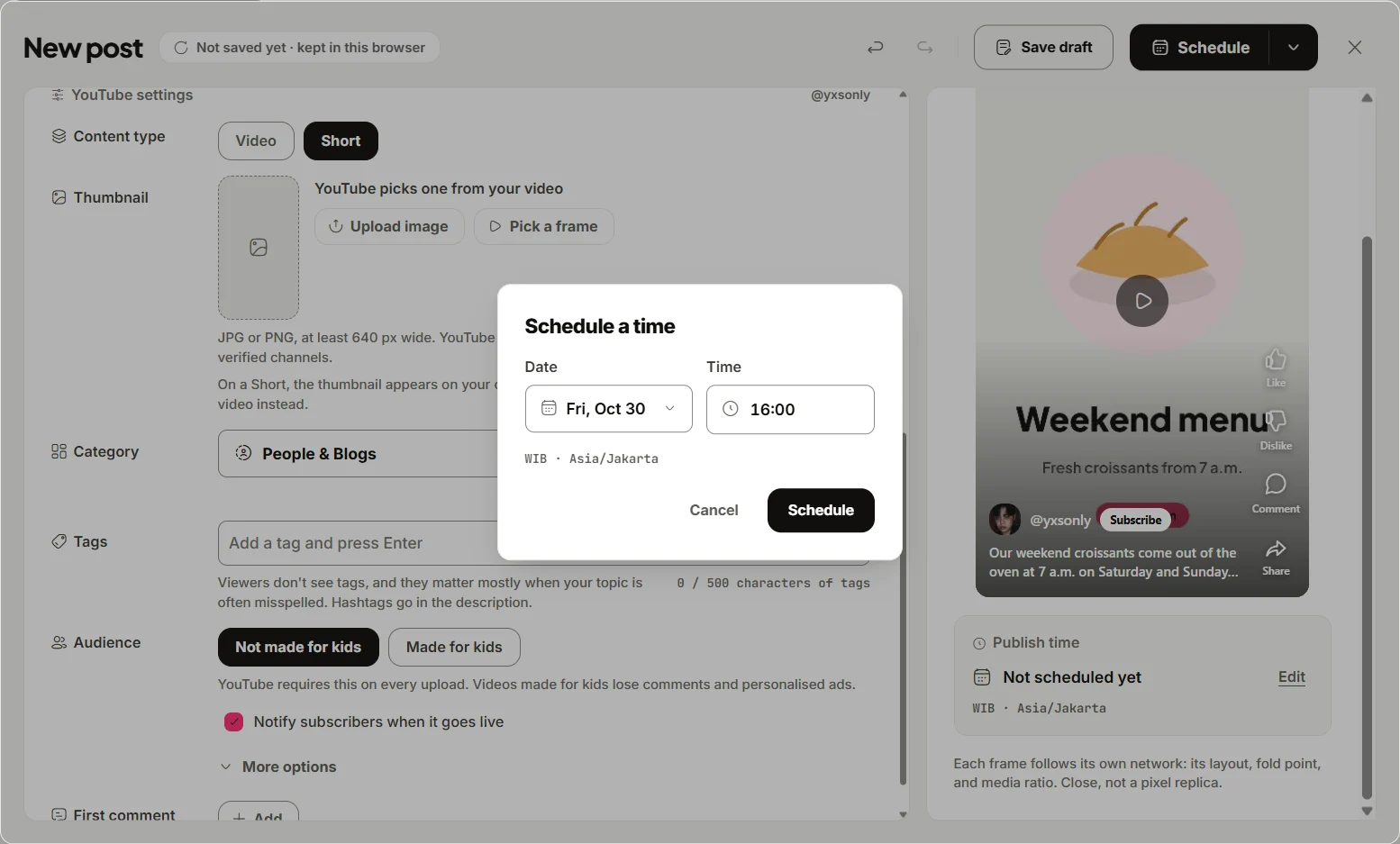
eksis publishes the file you upload as it is. It does not resize, re-encode, or crop, so the numbers above are the ones your export has to meet. What eksis does is check each destination against its own rules before it lets you schedule:
- Instagram Reels: vertical, between 1:2 and 9:16, and 3 seconds to 15 minutes.
- Facebook Reels: 3 to 90 seconds, between 1:2 and 9:16.
- YouTube Short: three minutes or less and not wider than it is tall. The Short option is greyed out otherwise, and eksis adds #Shorts to the description.
- TikTok video: up to 10 minutes, and at publish time the account's own cap.
To use it, click Create post, pick your accounts, add the video, and set Content type on each account's tab. A problem shows as an error with Fix next to it, and the post cannot be scheduled until it is solved. The preview draws each network's own layout, fold point, and media ratio. It is close rather than pixel-exact, so treat it as a check on cropping and caption length, and use the safe box above for overlay text.
For the thumbnail on YouTube, the YouTube tab offers Pick a frame from the video or an uploaded JPG or PNG at least 640 px wide. Then click Edit next to Publish time and Schedule.
Sending one video to Reels, Shorts, TikTok, and Facebook means four accounts, which needs Starter ($4 a month for up to 20 accounts); Free connects one. See plans, or the Instagram, YouTube, TikTok, and Facebook integrations. For still images, our social media image sizes guide is the companion to this page, and how long Instagram Reels can be goes deeper on reel length.
Sources
- Meta Ads Guide: Instagram Reels video ads
- Google Ads Help: Use square and vertical video to engage mobile customers
- TikTok Ads Help: TikTok Auction In-Feed Ads (updated June 2026)
- Meta for Developers: IG User Media
- Meta for Developers: Reels Publishing API
- Instagram Help Center: Record a reel on Instagram
- Instagram Help Center: Reel size and aspect ratios on Instagram
- YouTube Help: Add custom thumbnails on YouTube
- YouTube Help: Understand three-minute YouTube Shorts
- Meta: Making it easier to create videos on Facebook
- Hootsuite: How to schedule TikTok posts on mobile and desktop
- eksis docs: Platform specifications
All were read on October 24, 2026. The TikTok API limits come from our vertical video guide, which read TikTok's developer documentation on October 21, 2026.
Frequently Asked Questions
What size should a Reel, Short, or TikTok be?
1080 x 1920 pixels at 9:16. Meta recommends that size for Facebook Reels, it clears the minimums Instagram and TikTok list, and it stays under the 1,920-pixel width limit of Instagram's API.
What is the safe zone for Instagram Reels?
Meta's ads guide says to keep at least 14% of the top, 35% of the bottom, and 6% of each side free of text and logos. On a 1080 x 1920 frame that is 269 pixels at the top, 672 at the bottom, and 65 on each side.
What is the safe zone for YouTube Shorts?
Google's template for vertical video ads on YouTube, drawn at 1080 x 1920, keeps 288 pixels clear at the top, 672 at the bottom, 48 on the left, and 192 on the right. Google publishes it for ads; we found no separate figure for regular Shorts.
Does TikTok publish safe zone dimensions?
Only as downloadable template files for ads. TikTok says the safe zone depends on the video's shape, the caption length, and any extra formats, and its help page gives no pixel values in text.
What is the longest video that works on all of them?
Ninety seconds if Facebook Reels is included, because Meta's Reels publishing API stops there. Without Facebook, three minutes covers YouTube Shorts and stays within Instagram's recommendation threshold.