How long can Instagram Reels be, and what changes when you schedule them
Instagram reels can run 20 minutes in the app, but only reels of 3 minutes or less are recommended to new audiences, and scheduling tools are held to 15 minutes and 300 MB by Meta's API. Here are both sets of limits and how to schedule a reel.
9 min read



On this page
An Instagram reel can be up to 20 minutes long when you record or upload it in the Instagram app. That is the ceiling in Instagram's Help Center as of October 24, 2026. The same page adds the number that matters more for growth: reels over 3 minutes won't be recommended to new audiences, so they mostly reach people who already follow you.
Scheduling changes the ceiling. Instagram's own scheduler in the app follows the app's rules, but every scheduling tool publishes through Meta's Instagram API, which takes reels from 3 seconds to 15 minutes and files up to 300 MB. This guide puts the app limits and the API limits side by side, explains what each one means when you plan reels ahead, and shows how to schedule a reel in eksis.
The short answer
- In the Instagram app, a reel can run up to 20 minutes, made of one clip or several.
- Reels longer than 3 minutes are not recommended to people who do not follow you. For reach, stay at 3 minutes or less.
- Through Meta's API, which scheduling tools use, a reel must be 3 seconds to 15 minutes long, at most 300 MB, and at most 1,920 pixels wide.
- Instagram's in-app scheduler books reels and posts up to 30 days ahead, 25 a day.
- eksis schedules reels from 3 seconds to 15 minutes, checks the length and shape before it lets you schedule, and publishes the file as you upload it.
How long an Instagram reel can be
Instagram's Help Center article "Record a reel on Instagram" says you can record and edit reels up to 20 minutes, from one clip or several that add up to that length. A progress bar at the top of the camera shows how much you have used.
The same article carries a note that changes how most businesses should use that limit: "Reels over 3 minutes won't be recommended to new audiences." Recommendations are how a reel reaches people who do not follow you, through the Reels tab and Explore. A 12-minute reel can still be watched by your followers and anyone who finds it on your profile, but Instagram will not push it to strangers.
| Reel length | What Instagram's help pages say |
|---|---|
| Up to 3 minutes | Can be recommended to new audiences |
| Over 3 minutes, up to 20 | Can be posted from the app, but won't be recommended to new audiences |
| Over 20 minutes | Not accepted as a reel |
Instagram's page on reel size adds the shape and quality rules for uploads: an aspect ratio between 1.91:1 and 9:16, at least 30 frames per second, and at least 720 pixels of resolution. The recommended cover photo size is 420 x 654 pixels, and Instagram says you can't change the cover after uploading.
What changes when you schedule a reel
There are two ways to schedule a reel, and they run on different rules.
Scheduling in the Instagram app
Meta's help article "How to create and manage scheduled posts and Reels on Instagram" covers the in-app scheduler for public accounts:
- Tap Create (or swipe right in Feed), then Reel.
- Select the video and tap Next. Add a caption, effects, or filters.
- Tap More options and turn on Schedule this reel. Choose the date and time and tap Done.
- Tap Back, then Schedule.
The limits: up to 25 scheduled posts a day, up to 30 days ahead. The scheduled reel keeps the privacy and audience settings you had when you scheduled it. Product tagging, collaborative posts, sponsored posts, and fundraisers can't be scheduled. To change a scheduled reel, go to your profile, tap Menu, then Scheduled content under Your insights and tools, and tap Options to delete, edit, reschedule, or share it now.
Since this is the app, the 20-minute length and Instagram's own music library and editing tools are available. Meta's help page does not list a shorter length for scheduled reels.
Scheduling through a tool
Every third-party scheduler publishes reels through Meta's Instagram API, and Meta's developer reference "IG User Media" sets tighter limits than the app:
| Instagram app | Meta's Instagram API | |
|---|---|---|
| Length | Up to 20 minutes | 3 seconds to 15 minutes |
| File size | Not stated | 300 MB at most |
| Shape | 1.91:1 to 9:16 | 0.01:1 to 10:1 accepted, 9:16 recommended |
| Width | At least 720 pixels | At most 1,920 pixels |
| Frame rate | At least 30 fps | 23 to 60 fps |
| File type | Not stated | MOV or MP4, H.264 or HEVC video, AAC audio |
| Video bitrate | Not stated | 25 Mbps at most |
Two numbers in that table catch people out. The 300 MB cap means a long reel needs a lower bitrate than many editors use by default; a 10-minute export at the full 25 Mbps would be far over it. And the 1,920-pixel width limit rules out a vertical 4K export, which is 2,160 pixels wide. Export at 1080 x 1920 and both problems go away.
A few other API rules from the same reference:
- Reels cannot go inside a carousel.
- Music tagging through the API is only available for original audio, so a reel with a track from Instagram's library has to be finished in the app.
- The account's own settings apply when the reel publishes. If Allow remixing is on in the account, the published reel allows remixing, and you can turn it off afterwards in the app.
- For the cover, Meta recommends a 9:16 image. When the reel also appears in the feed grid, Meta crops the cover to the middle square.
Stories through the API have their own limit: video stories run 3 to 60 seconds and up to 100 MB.
Which limit should you plan around?
If you schedule in the app, plan around 3 minutes for reach and 20 minutes as the hard stop. If you schedule through any tool, plan around 3 minutes for reach and 15 minutes and 300 MB as the hard stop. In both cases, three minutes is the number that decides whether strangers see the reel, so it is the one to edit to.
Schedule an Instagram reel in eksis
eksis publishes reels, feed posts, carousels, and stories to Instagram through Meta's official API. The Instagram account has to be a Business or Creator account; personal accounts can't be connected. Click the + next to Channels in the sidebar, choose Instagram, and pick Instagram login or Through a Facebook Page (the second also adds location tags).
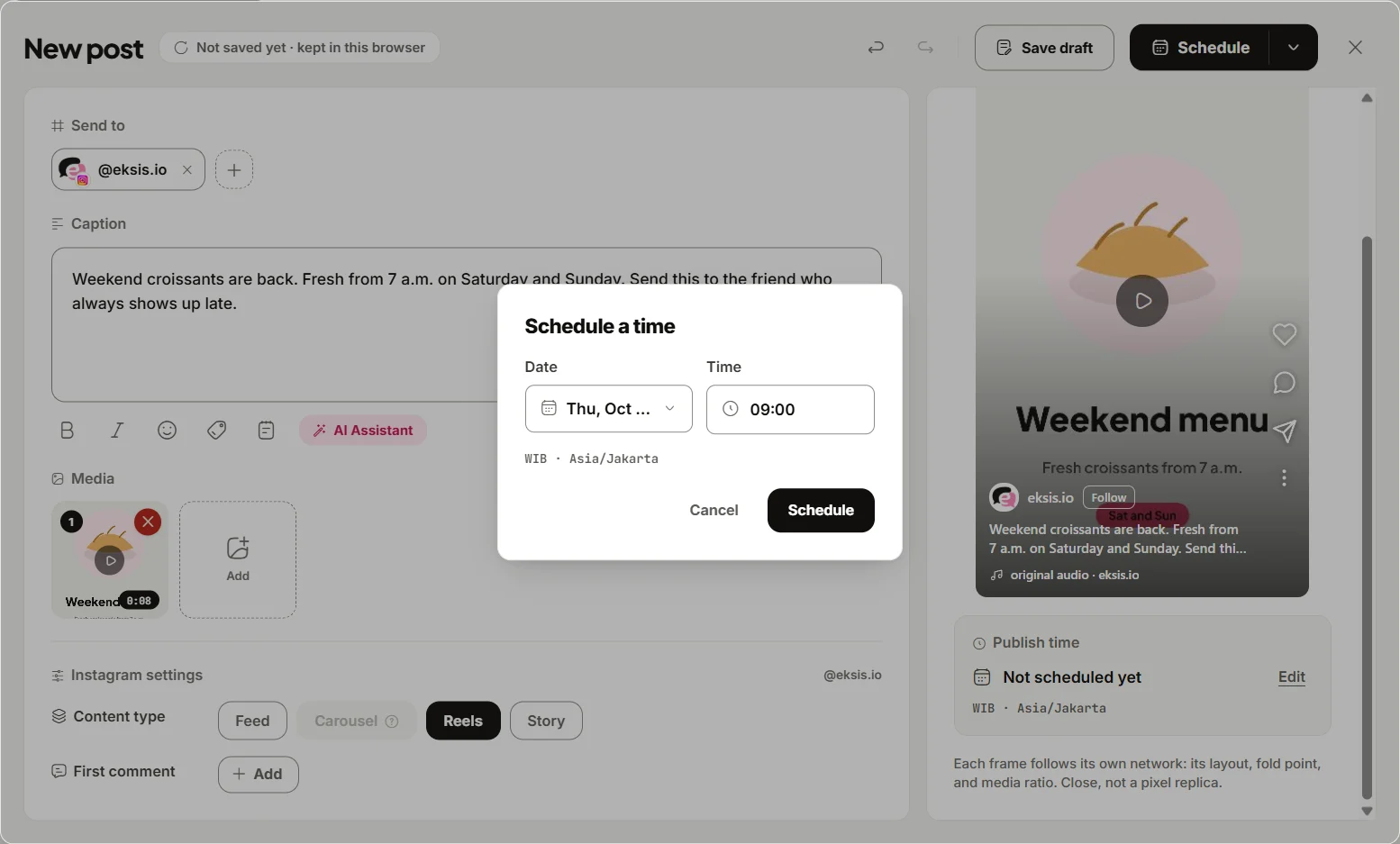
To schedule a reel:
- Click Create post and pick your Instagram account. Add TikTok, YouTube, or Facebook too if the same video goes there.
- Add the video and write the caption. On the Instagram tab, set Content type to Reels.
- eksis checks the video before it lets you schedule: a reel has to be vertical, between 1:2 and 9:16, and 3 seconds to 15 minutes long. A video outside those limits is flagged with Fix next to the problem.
- Add a First comment if you want one. Many accounts put hashtags or a link there.
- Click Edit next to Publish time. In the Schedule a time dialog, pick the Date and Time, then click Schedule.
The reel appears in Posts, where you can drag it to another time or open Post details to edit or delete it before it publishes. Unlike Instagram's in-app scheduler, eksis does not stop at 30 days ahead; it only refuses a time that has already passed.
What eksis does not change
eksis publishes your file as it is. It does not trim, re-encode, add music, or fix the cover, so export within Meta's limits before you upload: under 300 MB, no wider than 1,920 pixels, 23 to 60 fps. Instagram processes the video after upload, and a post that is still processing after 5 minutes fails, which is one more reason to keep files lean. A feed post with a video is published as a reel too.
Comments on the reel arrive in the eksis Inbox, where you can reply, hide, or delete them, and send one private reply by DM within 7 days of a comment. Liking a comment is not possible through Instagram's API, so that stays in the app. Our guide to auto replies on Instagram comments shows the comment-to-DM setup.
Plans and limits
The Free plan connects one social account and schedules 15 posts a month, and eksis publishes up to 25 posts per Instagram account in any 24 hours on it. On paid plans, Instagram's own limit of 100 posts a day applies. Starter is $4 a month for up to 20 accounts and adds Analytics for your Instagram posts and reels. See the Instagram integration or compare plans.
If the same reel goes to TikTok and YouTube Shorts, read how to post one vertical video to all three first, and see the best time to post on Instagram for when to schedule it.
Sources
- Instagram Help Center: Record a reel on Instagram
- Instagram Help Center: Reel size and aspect ratios on Instagram
- Meta Business Help Center: How to create and manage scheduled posts and Reels on Instagram
- Meta for Developers: IG User Media (updated September 28, 2026)
- eksis docs: Connect Instagram
- eksis docs: Instagram platform specifications
- eksis pricing
All were read on October 24, 2026.
Frequently Asked Questions
How long can an Instagram reel be?
Up to 20 minutes when you record or upload it in the Instagram app, from one clip or several. Reels over 3 minutes won't be recommended to people who don't follow you, according to Instagram's Help Center.
How long can a reel be if I schedule it with a tool?
Meta's Instagram API, which scheduling tools use, accepts reels from 3 seconds to 15 minutes, up to 300 MB and 1,920 pixels wide. Instagram's own in-app scheduler follows the app's 20-minute limit.
How far ahead can I schedule a reel on Instagram?
In the Instagram app, up to 30 days ahead and up to 25 scheduled posts a day, according to Meta's help page. Scheduling tools set their own range; eksis has no 30-day limit and only refuses times in the past.
Why didn't my long reel show up in the Reels tab?
If it is longer than 3 minutes, Instagram won't recommend it to new audiences, so it is shown mainly to your followers. Meta's API also notes that sharing a reel to the Reels tab does not guarantee it appears there, because it may not meet eligibility requirements or be picked by the algorithm.
Can I add Instagram music to a scheduled reel?
Not through a scheduling tool. Meta's API only supports tagging original audio, so a reel that uses a track from Instagram's music library has to be finished and scheduled in the Instagram app.