Give a content series eight episodes before you judge it
Many small accounts drop a series after two quiet posts. Here is how to plan a recurring series, schedule all eight episodes ahead, connect them on YouTube and Instagram, and decide at the end whether to renew, retool, or stop.
9 min read



On this page
A recurring series is one of the few content ideas that gets easier the longer you run it. The format is decided, the audience knows what to expect, and each episode needs a new subject rather than a new concept. The catch is the start. Early episodes go out to people who do not know the series exists yet, and many small accounts drop a series after two quiet posts, before anyone had a chance to come back for the third.
So decide before you launch how long you will give it. Eight episodes is a good length for a pilot: long enough for returning viewers to show up and for one lucky or unlucky post to stop dominating the numbers, short enough that stopping is not a big loss. This guide covers how to plan a series, how to schedule all eight episodes ahead, and what to look at when the pilot ends.
The short answer
- Write the series down in one sentence: name, promise, format, length, and posting day.
- List eight episode topics before you publish the first. If you cannot reach eight, the idea is too thin.
- Make at least three episodes before launch so a busy week does not break the schedule.
- Post on a fixed day and time, and schedule the whole run ahead.
- Look at the trend across episodes, not at any single one. Make one change at the midpoint, then decide at episode eight.
- Use each platform's series tools: playlists on YouTube and linked reels on Instagram.
Why give a series eight episodes
The number comes from a digital media company. Rachel Karten's newsletter Link in Bio described how NowThis gives itself eight episodes to pilot a social series. The full method is behind the newsletter's paywall, so what follows is our own version for a business run by one or two people.
Eight episodes works for a small account for three reasons:
- At one episode a week, it is two months. That is long enough for some people to see episode two, remember episode one, and look for episode three.
- With eight data points, one post that went wide or one that flopped no longer decides the verdict. You can see a direction.
- The cost of ending is small. If the series does not work, you have spent eight posts learning that, not a year.
There is also a reason inside the platforms. Instagram explains that its Feed ranking looks at how often people have interacted with an account in the past few weeks and at your own history of interacting with it. A series gives people a reason to interact with you repeatedly, and that history builds over episodes, not in one post.
Plan the series in one page
Before filming anything, write these five lines:
- Name. Short and plain enough to say out loud: "Fix It Friday", "One Ingredient", "Ask the Florist".
- Promise. What a viewer gets from every episode, in one sentence: "Every Friday we fix one common bike problem in under a minute."
- Format. Video, carousel, or photo with a long caption. Pick one and keep it for all eight.
- Fixed elements. The parts that repeat: the opening line, the title card, the closing question, the length, the music. These make episodes recognizable in a feed.
- Cadence. The day and time each episode goes out. Weekly suits most small businesses. Twice a week gets you to eight faster but doubles the work.
Then list eight episode topics. This is the real test of the idea. A series about "fixing common bike problems" might list a slipping chain, squeaky brakes, a flat tire on the road, gears that skip, a wobbly wheel, a loose headset, saddle height, and tire pressure. If you run out at four, the series is really a single post or a short carousel.
Look for topics in your comments and messages. The questions customers ask most are episodes waiting to be made.
Make a buffer before launch
A weekly series breaks the first time you are busy. Make at least three episodes before episode one goes live, and keep that buffer as you go: when you publish one, make the next. If production falls behind, you have three weeks of warning instead of none.
Batch the parts that repeat. Film all the openings in one session, design the title card once, and write the closing questions together. The fixed elements are what keep a series cheap to make.
Schedule the whole run
Pick a day and a time and keep them for all eight episodes. Use the hour your account usually does best, if you know it, or a slot your audience is likely to be scrolling. Our guide to how often to post covers frequency on each platform.
Schedule every episode you have ready, and add the rest as they are finished. A schedule that is already full is the simplest protection against skipping a week.
Keep the title format the same on every episode so people can find the rest: "Fix It Friday, episode 3: gears that skip". On YouTube, where a title is required, this also helps viewers who arrive from search.
Connect the episodes on each platform
Each platform has its own way to tie episodes together. Use them, because a viewer who liked episode five should be able to find episode one in a tap.
- YouTube: put every episode in a playlist. YouTube's help center explains how to create a playlist from a video or a Short through Save, then Create new playlist. One detail matters for Shorts series: YouTube says reordering is not available for playlists that only contain Shorts, so add episodes in order.
- YouTube Shorts: you can add a related video to a Short, which shows as a clickable link below your channel handle. YouTube says this needs advanced feature access, and the linked video has to be public or unlisted. Link each new episode back to episode one or to the playlist's first video.
- Instagram: Instagram's help center has a page for Link a reel, which connects multiple reels. It is available in the mobile app and not on computers. Link each new episode to the one before it.
- Everywhere: say the episode number in the first seconds or the first line, and end each episode by naming the next topic. A viewer who knows what is coming next has a reason to come back.
Judge it at episode eight, not episode one
Many series start slowly, because nobody is looking for episode one yet. Resist the urge to call it after two.
At episode four: one change
At the midpoint, look at the four episodes together. If they are all below your usual posts, change one thing: the opening, the length, or the posting time. Do not change the promise or the format, or you are starting a new series.
At episode eight: decide
Put the eight episodes side by side and look at:
- The direction. Are episodes five to eight doing better than one to four? A series that grows is working even if it started low.
- Engagement rate against your median post, not total reach. A series can reach fewer people and still hold them better.
- Signs of return viewing: comments that mention an earlier episode, people asking for a topic, saves, and new follows around episode days.
- The cost. How many hours did each episode take? Can you keep that up?
Then make one of three calls:
- Renew: plan the next eight topics and keep going.
- Retool: keep the audience, change the format or the promise, and run a new eight-episode pilot.
- End: post a short closing note if regulars followed it, and move the best topics into your regular posts.
Schedule a series in eksis
eksis handles the planning board, the schedule, and the comparison at the end.
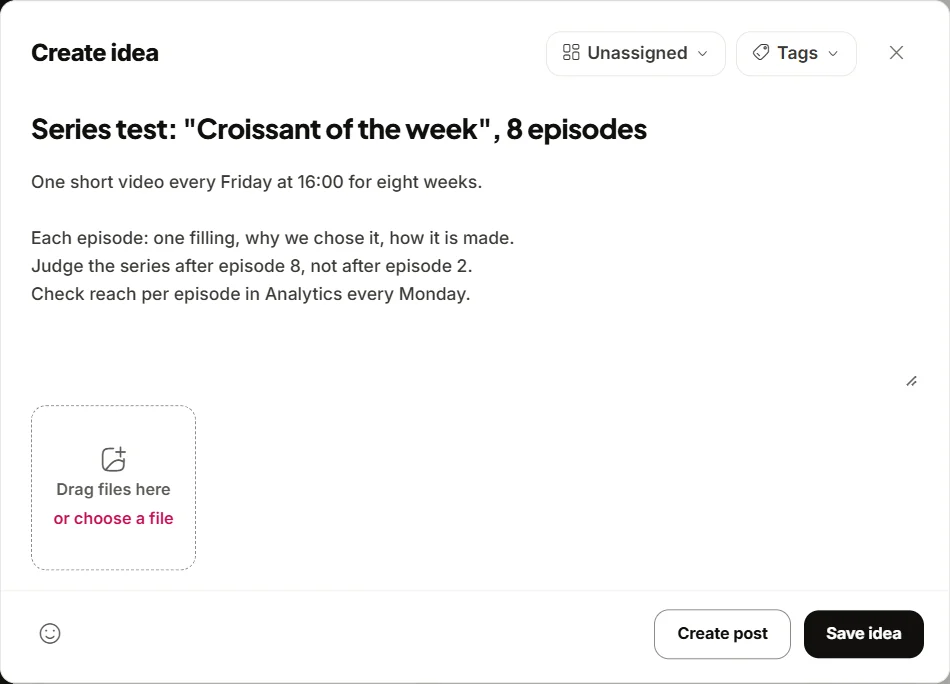
- Plan. Open Create Idea in the sidebar to reach the Idea board and add a column named after the series. Add one New idea per episode, with the topic as the title, notes for the script, and a tag with the series name. Move ideas across columns you name, such as Planned, Filmed, and Scheduled, as they progress.
- Write the first episode. On the idea, choose Create post, pick the channels, and write the caption with the fixed elements. On a YouTube channel's tab, fill in the title.
- Reuse the template. Once episode one is scheduled, open it from Posts and choose Duplicate post in Post details. Change the topic, the media, and the episode number, and keep the rest.
- Schedule. Choose Schedule, then Schedule a time, and set the same day and hour for each episode. Times follow your workspace time zone under Settings, General, Time zone. The Month view in Posts shows the whole run at a glance.
- Draft with the Assistant. On Home, the "Plan next week" suggestion makes a dated plan you can turn into drafts, and you can ask the Assistant for an eight-week plan instead. It saves drafts only. You still add media and schedule each one in the composer.
- Compare. After episode eight, open Analytics and read Post performance, or choose Export and pick Posts to put the episodes side by side in a spreadsheet. To look at one channel, select Insights under it in the sidebar.
eksis has a queue for weekly posting slots, but queue times are set up through the API or an AI assistant connected over MCP, not in the app yet. Scheduling each episode with Schedule a time works on every plan. The Free plan allows 15 scheduled posts a month on one account, enough for a weekly series. Analytics starts on Starter. See plans and the YouTube integration.
Related reading
- How to plan a week of social media posts in one sitting
- How to remix your best posts without repeating yourself
- The social media metrics worth tracking
Sources
- Link in Bio: How to pilot a social series
- Instagram: Instagram Ranking Explained, by Adam Mosseri
- YouTube Help: Create and manage playlists
- YouTube Help: Add a related video to your YouTube Shorts
- Instagram Help Center: Link a reel on Instagram
All were read on October 24, 2026.
Frequently Asked Questions
How many episodes should a social media series have before I judge it?
Plan for eight. At one a week that is two months, which gives returning viewers time to appear and keeps one unusual post from deciding the result. Make one change at episode four and decide at episode eight.
How often should I post a content series?
Weekly works for most small businesses, on the same day and at the same time. Twice a week reaches eight episodes faster, but only if you can keep a buffer of finished episodes.
How do I link episodes of a series together?
On YouTube, add every episode to a playlist and use the related video link on Shorts. On Instagram, use Link a reel in the mobile app. On every platform, say the episode number early and name the next topic at the end.
What should I measure at the end of a series pilot?
Look at the direction across all eight episodes, engagement rate compared with your median post, signs of return viewing such as comments about earlier episodes, and how many hours each episode took to make.
Can eksis post a series automatically every week?
eksis schedules each episode at the date and time you choose. Its weekly queue slots are currently set up through the API or an AI assistant over MCP, so in the app you schedule each episode with Schedule a time.